Busy applications can exhaust PostgreSQL memory and connection slots when every short request opens its own database backend. A pooler such as PgBouncer keeps client-facing connections separate from the smaller set of server connections that actually reach PostgreSQL, which reduces login overhead and protects the database from avoidable idle sessions.
PgBouncer listens on a separate port, accepts PostgreSQL wire-protocol clients, and maps each requested database to an upstream PostgreSQL database. In transaction mode, a client receives a server connection only while a transaction is active, so many clients can share a smaller warm pool when the application does not depend on session-local state.
Pooling changes both capacity math and application behavior. Size limits apply per pool, and each database/user pair can create its own server-side pool. Current Debian and Ubuntu packages run the pgbouncer service as the postgres operating-system user, so protect /etc/pgbouncer/userlist.txt with that service account unless your packaged unit shows a different User value.
Steps to configure connection pooling for PostgreSQL:
- Install PgBouncer and the PostgreSQL client tools if they are not already present.
$ sudo apt install pgbouncer postgresql-client
- Confirm the operating-system user that runs the packaged pgbouncer service.
$ systemctl show -p User --value pgbouncer
postgres
Use the returned service user for /etc/pgbouncer/userlist.txt ownership. Debian and Ubuntu 26.04 packages use postgres.
- Choose a pool_mode that matches application session behavior.
session keeps a server connection for the client session, transaction assigns one for each transaction, and statement releases it after each statement.
Transaction and statement pooling can break temporary tables, advisory locks held across transactions, long-lived LISTEN/NOTIFY usage, per-session SET state, and SQL-level PREPARE/EXECUTE assumptions. Recent PgBouncer builds can track protocol-level named prepared statements, but that does not make all session features safe.
- Edit /etc/pgbouncer/pgbouncer.ini to define the database mapping, listener, authentication file, and pool limits.
[databases]
appdb = host=127.0.0.1 port=5432 dbname=appdb

[pgbouncer]
listen_addr = 127.0.0.1
listen_port = 6432
auth_type = scram-sha-256
auth_file = /etc/pgbouncer/userlist.txt
admin_users = pgbouncer_admin
stats_users = pgbouncer_admin
pool_mode = transaction
default_pool_size = 20
reserve_pool_size = 5
max_client_conn = 200
log_connections = 1
log_disconnections = 1
default_pool_size limits server connections per pool, while max_client_conn limits client connections accepted by PgBouncer.
Binding listen_addr to 0.0.0.0 exposes the pooler on every interface. Use a private address, host firewall rules, and TLS when application hosts connect across a network.
- Generate /etc/pgbouncer/userlist.txt from the PostgreSQL roles that should authenticate through the pooler.
$ sudo -u postgres psql -Atc \
"SELECT format('\"%s\" \"%s\"', rolname, rolpassword)
 FROM pg_authid
 WHERE rolname IN ('appuser','pgbouncer_admin')
 ORDER BY rolname;" | sudo sh -c 'umask 027; cat > /etc/pgbouncer/userlist.txt'
The command streams encrypted PostgreSQL role password entries into the PgBouncer user list without printing hashes to the terminal.
/etc/pgbouncer/userlist.txt contains password verifiers. Do not publish it, copy it into tickets, or leave temporary readable copies behind.
- Restrict /etc/pgbouncer/userlist.txt to the packaged service user.
$ sudo chown postgres:postgres /etc/pgbouncer/userlist.txt
$ sudo chmod 640 /etc/pgbouncer/userlist.txt
- Restart PgBouncer to load the new configuration and authentication file.
$ sudo systemctl restart pgbouncer
- Confirm the pgbouncer service is active.
$ systemctl is-active pgbouncer
active
- Confirm PgBouncer is listening on the configured port.
$ sudo ss -lntp 'sport = :6432' State Recv-Q Send-Q Local Address:Port Peer Address:PortProcess LISTEN 0 128 127.0.0.1:6432 0.0.0.0:* users:(("pgbouncer",pid=5419,fd=7)) - Test a normal PostgreSQL query through the pooler port.
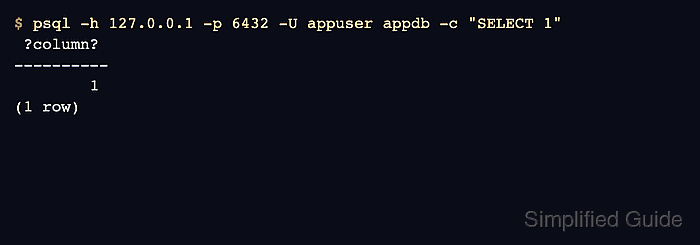
$ psql -h 127.0.0.1 -p 6432 -U appuser appdb -c "SELECT 1"
 ?column?
----------
        1
(1 row)
Application connection strings should use the pooler host and port, 6432 in this example, instead of the PostgreSQL server port 5432.
- Check pool utilization from the PgBouncer admin database.
$ psql -h 127.0.0.1 -p 6432 -U pgbouncer_admin pgbouncer -c "SHOW POOLS"
 database  |   user    | cl_active | cl_waiting | cl_active_cancel_req | cl_waiting_cancel_req | sv_active | sv_active_cancel | sv_being_canceled | sv_idle | sv_used | sv_tested | sv_login | maxwait | maxwait_us |  pool_mode  | load_balance_hosts
-----------+-----------+-----------+------------+----------------------+-----------------------+-----------+------------------+-------------------+---------+---------+-----------+----------+---------+------------+-------------+--------------------
 appdb     | appuser   |         0 |          0 |                    0 |                     0 |         0 |                0 |                 0 |       1 |       0 |         0 |        0 |       0 |          0 | transaction |
 pgbouncer | pgbouncer |         1 |          0 |                    0 |                     0 |         0 |                0 |                 0 |       0 |       0 |         0 |        0 |       0 |          0 | statement   |
(2 rows)
- Adjust pool sizes to stay below PostgreSQL connection limits while leaving administrative headroom.
Each unique database/user pool can use up to default_pool_size server connections, plus any reserve_pool_size burst allowance after waiting clients exceed the reserve timeout.

Mohd Shakir Zakaria is a cloud architect with deep roots in software development and open-source advocacy. Certified in AWS, Red Hat, VMware, ITIL, and Linux, he specializes in designing and managing robust cloud and on-premises infrastructures.


