Installing packaged PHP on SUSE gives cron jobs, Composer runs, deployment hooks, and maintenance scripts a supported command-line interpreter without forcing Apache or PHP-FPM into the first install. That keeps the first runtime small while leaving updates, security fixes, and later module changes on the normal zypper path.
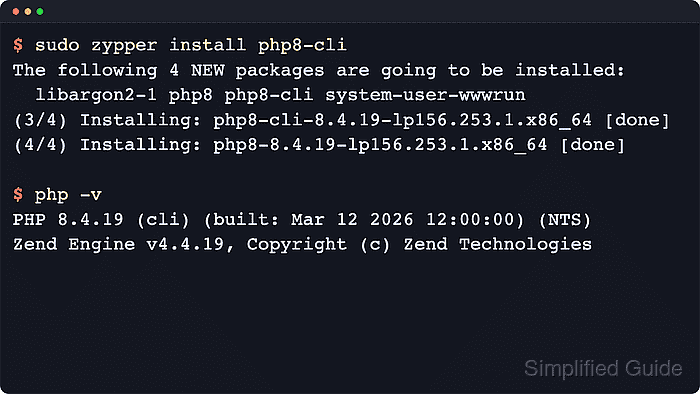
The current PHP 8 packages used here come from the official openSUSE Build Service devel:languages:php project. The shared php8 package underpins the runtime, php8-cli adds the shell interpreter, and web-facing SAPIs or extensions stay split into separate RPMs such as php8-fpm, apache2-mod_php8, php8-mysql, and php8-zip.
The repository label is branch-specific, so the add-repo step must use the exact string published for the host. Current official repo labels include openSUSE_Leap_15.6, 15.7, 16.0, openSUSE_Tumbleweed, and SLE_15_SP6. Package availability also depends on CPU architecture; a fresh Leap 15.6 aarch64 check did not return an installable php8-cli package from this repository, while the same check on x86_64 did.
Related: Find PHP configuration files
Related: Manage PHP-FPM service
Steps to install PHP on SUSE:
- Check the installed SUSE release and CPU architecture before selecting the PHP repository label.
$ cat /etc/os-release
NAME="openSUSE Leap"
VERSION="15.6"
ID="opensuse-leap"
ID_LIKE="suse opensuse"
VERSION_ID="15.6"
PRETTY_NAME="openSUSE Leap 15.6"
##### snipped #####

$ uname -m
x86_64
Leap 15.6 uses openSUSE_Leap_15.6, Leap 15.7 uses 15.7, Tumbleweed uses openSUSE_Tumbleweed, and SLE 15 SP6 uses SLE_15_SP6.
- Set a shell variable to the exact repository label published for the host.
$ repo_label='openSUSE_Leap_15.6'
Use the package's Expert Download page when the host runs another supported branch because the label format is not identical across every SUSE release.
- Add the official PHP repository definition for that label.
$ sudo zypper addrepo "https://download.opensuse.org/repositories/devel:/languages:/php/${repo_label}/devel:languages:php.repo"Importing the published .repo file creates the devel_languages_php alias automatically, which is used in the later search and install commands.
- Refresh the new repository metadata and import its signing key.
$ sudo zypper --gpg-auto-import-keys refresh devel_languages_php
The first refresh imports the current OBS signing key and builds the local metadata cache for the selected branch.
- Confirm that the selected branch publishes the PHP CLI package for the current architecture.
$ zypper search -s -r devel_languages_php --match-exact php8-cli
Loading repository data...
Reading installed packages...

S  | Name     | Type    | Version           | Arch   | Repository
---+----------+---------+-------------------+--------+-----------------------------------------
   | php8-cli | package | 8.5.7-lp156.269.3 | x86_64 | devel:languages:php (openSUSE_Leap_15.6)
If the search returns no package rows, the selected branch and architecture do not currently publish an installable php8-cli package through this repository.
- Install the packaged PHP CLI runtime from the selected repository.
$ sudo zypper install --from devel_languages_php php8-cli
Installing php8-cli also pulls in the shared php8 package. The --from option keeps the install tied to the selected OBS repository when another enabled repository also offers PHP.
- Verify that the interpreter is installed and reporting the expected CLI runtime.
$ rpm -q php8 php8-cli
php8-8.5.7-lp156.269.3.x86_64
php8-cli-8.5.7-lp156.269.3.x86_64

$ php -v
PHP 8.5.7 (cli) (built: Jun  4 2026 12:00:00) (NTS)
Copyright (c) The PHP Group
Zend Engine v4.5.7, Copyright (c) Zend Technologies
    with Zend OPcache v8.5.7, Copyright (c), by Zend Technologies
The package release string varies by branch, but the installed php8 and php8-cli packages should resolve to the same build.
Related: Check PHP version
- Search the repository for any SAPI or extension package required by the application.
$ zypper search -s -r devel_languages_php --match-exact php8-mysql php8-zip
Loading repository data...
Reading installed packages...

S  | Name       | Type    | Version           | Arch   | Repository
---+------------+---------+-------------------+--------+-----------------------------------------
   | php8-mysql | package | 8.5.7-lp156.269.3 | x86_64 | devel:languages:php (openSUSE_Leap_15.6)
   | php8-zip   | package | 8.5.7-lp156.269.3 | x86_64 | devel:languages:php (openSUSE_Leap_15.6)
Use php8-fpm for FastCGI workloads or apache2-mod_php8 when Apache should load PHP directly. XML support is split across packages such as php8-dom, php8-xmlreader, and php8-xmlwriter instead of one generic php8-xml RPM.
- Install only the extra modules required by the application.
$ sudo zypper install --from devel_languages_php php8-mysql php8-zip
Add php8-fpm or apache2-mod_php8 only when the host also needs a web-facing PHP SAPI.
- Confirm that the requested modules are loaded by the active CLI interpreter.
$ php -m
[PHP Modules]
Core
date
filter
hash
json
##### snipped #####
mysqli
mysqlnd
PDO
pdo_mysql
##### snipped #####
Zend OPcache
zip

[Zend Modules]
Zend OPcache
The php8-mysql package loads mysqli, mysqlnd, and pdo_mysql. Seeing those names with zip confirms the extension packages are visible to the active CLI interpreter.
Related: Show loaded PHP extensions

Mohd Shakir Zakaria is a cloud architect with deep roots in software development and open-source advocacy. Certified in AWS, Red Hat, VMware, ITIL, and Linux, he specializes in designing and managing robust cloud and on-premises infrastructures.


