A JSON POST request with PHP cURL needs the request body encoded as a JSON string before the transfer starts. Passing a PHP array to CURLOPT_POSTFIELDS sends form-style data instead, so an API that expects application/json can reject the request or receive a body that does not match the endpoint contract.
The request needs two checks after the transfer: whether cURL completed the network operation and whether the server returned a successful HTTP status. With CURLOPT_RETURNTRANSFER enabled, curl_exec() returns boolean false only for cURL-level failures, while HTTP responses such as 400 or 500 still need to be read with curl_getinfo().
Use json_encode() with JSON_THROW_ON_ERROR to build the body, set Content-Type: application/json for the request payload, and send Accept: application/json when the response should be JSON too. A local PHP endpoint can echo the method, content type, and decoded fields before the same client script is pointed at the real API.
Related: How to send a GET request with PHP cURL
Related: How to decode a JSON response with PHP cURL
Related: How to handle HTTP errors with PHP cURL
Related: How to set a timeout in PHP cURL
Steps to send a JSON POST request with PHP cURL:
- Confirm that the PHP cURL extension is loaded in the runtime that will run the script.
$ php -r 'var_export(extension_loaded("curl")); echo PHP_EOL;'
true
Install or enable the platform cURL extension package, such as php-curl on Debian or Ubuntu systems, when this command prints false.
- Create a local endpoint that reads the raw request body and decodes it as JSON.
- json-post-api.php
<?php
$method = $_SERVER['REQUEST_METHOD'];
$contentType = $_SERVER['CONTENT_TYPE'] ?? '';
$body = file_get_contents('php://input');

header('Content-Type: application/json');

try {
    $payload = json_decode($body, true, 512, JSON_THROW_ON_ERROR);
} catch (JsonException $e) {
    http_response_code(400);
    echo json_encode([
        'error' => 'invalid json',
        'message' => $e->getMessage(),
    ], JSON_PRETTY_PRINT | JSON_UNESCAPED_SLASHES) . PHP_EOL;
    return;
}

echo json_encode([
    'method' => $method,
    'content_type' => $contentType,
    'name' => $payload['name'] ?? null,
    'quantity' => $payload['quantity'] ?? null,
], JSON_PRETTY_PRINT | JSON_UNESCAPED_SLASHES) . PHP_EOL;
php://input reads the raw request body. JSON POST data does not populate $_POST the way form-encoded data does.
- Start the local endpoint in a second terminal while testing the client script.
$ php -S 127.0.0.1:8080 json-post-api.php
Stop the built-in server with Ctrl+C after the request test is complete.
- Create the PHP cURL client script that sends a JSON string and checks the HTTP status.
- post-json.php
<?php
$url = $argv[1] ?? 'http://127.0.0.1:8080/orders';

$payload = [
    'name' => 'monitor stand',
    'quantity' => 2,
];

try {
    $json = json_encode($payload, JSON_THROW_ON_ERROR | JSON_UNESCAPED_SLASHES);
} catch (JsonException $e) {
    fwrite(STDERR, 'JSON encode error: ' . $e->getMessage() . PHP_EOL);
    exit(1);
}

$ch = curl_init($url);
if ($ch === false) {
    fwrite(STDERR, 'Could not initialize cURL' . PHP_EOL);
    exit(1);
}

curl_setopt_array($ch, [
    CURLOPT_RETURNTRANSFER => true,
    CURLOPT_POST => true,
    CURLOPT_POSTFIELDS => $json,
    CURLOPT_HTTPHEADER => [
        'Content-Type: application/json',
        'Accept: application/json',
    ],
    CURLOPT_TIMEOUT => 10,
]);

$response = curl_exec($ch);

if ($response === false) {
    fwrite(STDERR, 'cURL error: ' . curl_error($ch) . PHP_EOL);
    curl_close($ch);
    exit(1);
}

$status = curl_getinfo($ch, CURLINFO_HTTP_CODE);
curl_close($ch);

echo "HTTP status: {$status}" . PHP_EOL;
echo $response;

if ($status < 200 || $status >= 300) {
    exit(1);
}
The body passed to CURLOPT_POSTFIELDS is the JSON string from json_encode(). Do not pass the original PHP array when the endpoint expects an application/json body.
Tool: JSON Validator can inspect a captured request body when the payload is built from templates, files, or user input instead of a fixed PHP array.
- Run the client script and confirm that the endpoint received a POST request with an application/json body.
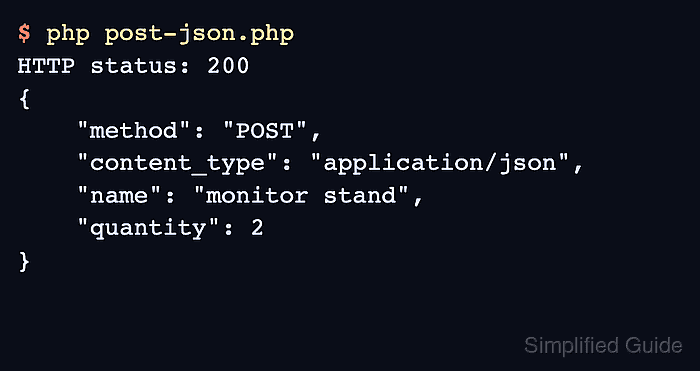
$ php post-json.php
HTTP status: 200
{
    "method": "POST",
    "content_type": "application/json",
    "name": "monitor stand",
    "quantity": 2
}
The 200 status, POST method, application/json content type, and echoed field values prove that PHP sent the JSON body and captured the response for the status check.
- Replace the local URL with the target API endpoint after the local request works.
$ php post-json.php https://api.example.com/orders
Use https:// API URLs for real requests, keep certificate verification enabled, and keep bearer tokens, Basic auth passwords, API keys, and production hostnames out of saved transcripts and screenshots.

Mohd Shakir Zakaria is a cloud architect with deep roots in software development and open-source advocacy. Certified in AWS, Red Hat, VMware, ITIL, and Linux, he specializes in designing and managing robust cloud and on-premises infrastructures.


