Multipart upload APIs reject or misread requests when PHP cURL sends the file as a plain text field, uses the wrong form key, or overrides the boundary that cURL needs to generate. A PHP client should wrap the local path in CURLFile, pass the form fields as an array, and verify that the server received the expected file part.
The upload endpoint controls the field names. The example request uses avatar for the file part and sends user_id and description as normal form fields, matching a browser-style multipart/form-data request that carries a file plus metadata.
When CURLOPT_POSTFIELDS receives an array containing a CURLFile object, PHP builds a multipart request for cURL to send. Do not set a manual Content-Type: multipart/form-data header for this request because cURL must add the boundary parameter itself.
Related: Upload files with cURL
Related: Upload file and JSON metadata with cURL
Related: How to handle HTTP errors with PHP cURL
Related: How to set a timeout in PHP cURL
Steps to upload a file with PHP cURL multipart form data:
- Confirm that the PHP cURL extension is loaded in the runtime that will run the upload script.
$ php -r 'var_export(extension_loaded("curl")); echo PHP_EOL;'
true
Install or enable the platform cURL extension package, such as php-curl on Debian or Ubuntu systems, when this command prints false.
- Create a directory for the local file used in the upload test.
$ mkdir -p files
- Create the sample file that will be sent as the multipart file part.
- files/avatar.txt
profile upload fixture
status=ready
- Create a local upload endpoint that reports the received file field and form fields as JSON.
- upload-endpoint.php
<?php
header('Content-Type: application/json');

if ($_SERVER['REQUEST_METHOD'] !== 'POST') {
    http_response_code(405);
    echo json_encode(['error' => 'POST required'], JSON_PRETTY_PRINT) . PHP_EOL;
    exit;
}

if (!isset($_FILES['avatar'])) {
    http_response_code(400);
    echo json_encode(['error' => 'avatar file field missing'], JSON_PRETTY_PRINT) . PHP_EOL;
    exit;
}

$file = $_FILES['avatar'];

if ($file['error'] !== UPLOAD_ERR_OK) {
    http_response_code(400);
    echo json_encode(['error' => 'upload failed', 'code' => $file['error']], JSON_PRETTY_PRINT) . PHP_EOL;
    exit;
}

$content = file_get_contents($file['tmp_name']);
if ($content === false) {
    http_response_code(500);
    echo json_encode(['error' => 'could not read upload'], JSON_PRETTY_PRINT) . PHP_EOL;
    exit;
}

http_response_code(201);
echo json_encode([
    'received' => [
        'field' => 'avatar',
        'name' => $file['name'],
        'type' => $file['type'],
        'size' => $file['size'],
    ],
    'form' => [
        'user_id' => $_POST['user_id'] ?? null,
        'description' => $_POST['description'] ?? null,
    ],
], JSON_PRETTY_PRINT | JSON_UNESCAPED_SLASHES) . PHP_EOL;
The endpoint is only a disposable local receiver for the smoke test. A production API will usually store the file, authenticate the request, and validate allowed MIME types and sizes before accepting the upload.
- Start the local upload endpoint in a second terminal.
$ php -S 127.0.0.1:8080 upload-endpoint.php
Keep this terminal open while testing the client script, then stop it with Ctrl+C after verification.
- Create the PHP cURL upload client script.
- upload-avatar.php
<?php
if ($argc !== 3) {
    fwrite(STDERR, "Usage: php upload-avatar.php <upload-url> <file-path>\n");
    exit(64);
}

$url = $argv[1];
$filePath = $argv[2];

if (!is_file($filePath) || !is_readable($filePath)) {
    fwrite(STDERR, "File is not readable: {$filePath}\n");
    exit(66);
}

$upload = new CURLFile($filePath, 'text/plain', basename($filePath));

$fields = [
    'user_id' => '42',
    'description' => 'Profile fixture',
    'avatar' => $upload,
];

$curl = curl_init($url);
if ($curl === false) {
    fwrite(STDERR, "Could not initialize cURL.\n");
    exit(1);
}

curl_setopt_array($curl, [
    CURLOPT_POST => true,
    CURLOPT_POSTFIELDS => $fields,
    CURLOPT_RETURNTRANSFER => true,
    CURLOPT_HTTPHEADER => [
        'Accept: application/json',
    ],
    CURLOPT_TIMEOUT => 15,
]);

$response = curl_exec($curl);

if ($response === false) {
    fwrite(STDERR, 'cURL error: ' . curl_error($curl) . PHP_EOL);
    curl_close($curl);
    exit(1);
}

$status = curl_getinfo($curl, CURLINFO_HTTP_CODE);
curl_close($curl);

echo "HTTP status: {$status}" . PHP_EOL;
echo $response;

if ($status < 200 || $status >= 300) {
    exit(1);
}
The avatar array key is the multipart file field name. Replace it, the text fields, and the MIME type with the names and values required by the target API.
- Run the upload client and confirm that the endpoint received the file part and metadata fields.
$ php upload-avatar.php http://127.0.0.1:8080/upload-endpoint.php files/avatar.txt
HTTP status: 201
{
    "received": {
        "field": "avatar",
        "name": "avatar.txt",
        "type": "text/plain",
        "size": 36
    },
    "form": {
        "user_id": "42",
        "description": "Profile fixture"
    }
}
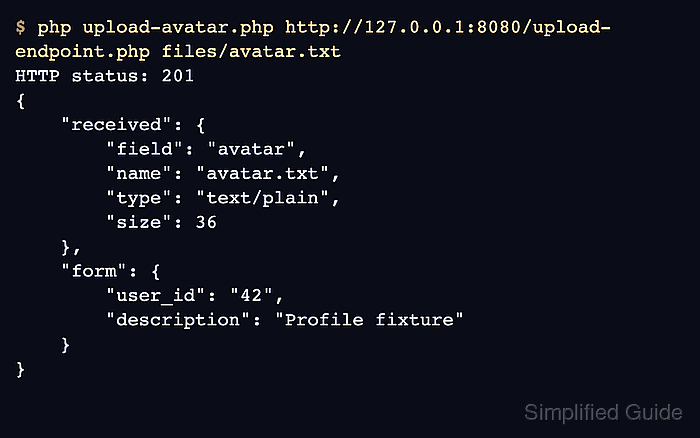
A 2xx status plus the expected file name, field name, MIME type, and size shows that PHP sent the file as a multipart upload instead of a plain form value.
- Replace the local upload URL with the target HTTPS API endpoint after the local upload works.
Keep certificate verification enabled and load real API tokens from the application's secret path instead of hardcoding them into the upload script.
- Stop the local server with Ctrl+C and remove the disposable test files when the client script has been adapted.
$ rm -rf files upload-endpoint.php upload-avatar.php

Mohd Shakir Zakaria is a cloud architect with deep roots in software development and open-source advocacy. Certified in AWS, Red Hat, VMware, ITIL, and Linux, he specializes in designing and managing robust cloud and on-premises infrastructures.


