Downloading remote files from PHP needs more than writing the response stream to a path. A missing object, timeout, redirect loop, or partial transfer can leave a local file that looks available unless the script checks the transfer before replacing the destination.
PHP passes a writable file handle to libcurl through CURLOPT_FILE. curl_exec() reports transport failures, while HTTP responses such as 404 still need a status check with curl_getinfo() before the file is trusted.
Write each response to a temporary .part file first, verify the final HTTP status and optional byte count, then rename it into place. Keep private downloads outside the public web root, and use an expected size or checksum when the provider publishes one for the file.
Related: Save cURL output to a file
Related: Fail on HTTP errors in cURL
Related: Set timeouts for PHP cURL
Tool: HTTP Header Checker
Steps to download a file with PHP cURL:
- Create local directories for the repeatable test target and the downloaded file.
$ mkdir -p webroot downloads
Use a private application directory instead of a public web directory when the downloaded file contains exports, reports, invoices, or other restricted data.
- Create the sample file that the local test server will publish.
- webroot/release.txt
release=2026.06
status=ready
- Start PHP's built-in server for the sample file in a second terminal.
$ php -S 127.0.0.1:8080 -t webroot
Keep this terminal open while testing the downloader, then stop it with Ctrl+C after verification.
- Create the PHP cURL downloader script.
- download-file.php
<?php
if ($argc < 3 || $argc > 4) {
    fwrite(STDERR, "Usage: php download-file.php <url> <destination> [expected-bytes]\n");
    exit(64);
}

$url = $argv[1];
$destination = $argv[2];
$expectedBytes = null;

if (isset($argv[3])) {
    if (!ctype_digit($argv[3])) {
        fwrite(STDERR, "Expected bytes must be a whole number.\n");
        exit(64);
    }
    $expectedBytes = (int) $argv[3];
}

$scheme = strtolower((string) parse_url($url, PHP_URL_SCHEME));
if (!in_array($scheme, ['http', 'https'], true)) {
    fwrite(STDERR, "URL must use http or https.\n");
    exit(64);
}

$directory = dirname($destination);
if (!is_dir($directory) && !mkdir($directory, 0700, true)) {
    fwrite(STDERR, "Could not create destination directory: {$directory}\n");
    exit(1);
}

$temporary = $destination . '.part';
$file = fopen($temporary, 'wb');
if ($file === false) {
    fwrite(STDERR, "Could not open temporary file: {$temporary}\n");
    exit(1);
}

$curl = curl_init($url);
if ($curl === false) {
    fclose($file);
    @unlink($temporary);
    fwrite(STDERR, "Could not initialize cURL.\n");
    exit(1);
}

curl_setopt_array($curl, [
    CURLOPT_FILE => $file,
    CURLOPT_FOLLOWLOCATION => true,
    CURLOPT_MAXREDIRS => 5,
    CURLOPT_CONNECTTIMEOUT => 10,
    CURLOPT_TIMEOUT => 60,
    CURLOPT_USERAGENT => 'ExampleDownloader/1.0',
]);

$success = curl_exec($curl);
$status = curl_getinfo($curl, CURLINFO_HTTP_CODE);
$error = curl_error($curl);
curl_close($curl);
fclose($file);

if ($success === false) {
    @unlink($temporary);
    fwrite(STDERR, "cURL error: {$error}\n");
    exit(1);
}

if ($status < 200 || $status >= 300) {
    @unlink($temporary);
    fwrite(STDERR, "HTTP status: {$status}\n");
    fwrite(STDERR, "Download failed; temporary file removed.\n");
    exit(1);
}

$bytes = filesize($temporary);
if ($bytes === false) {
    @unlink($temporary);
    fwrite(STDERR, "Could not read downloaded file size.\n");
    exit(1);
}

if ($expectedBytes !== null && $bytes !== $expectedBytes) {
    @unlink($temporary);
    fwrite(STDERR, "Size mismatch: expected {$expectedBytes} bytes, got {$bytes} bytes.\n");
    exit(1);
}

if (!rename($temporary, $destination)) {
    @unlink($temporary);
    fwrite(STDERR, "Could not move temporary file into place.\n");
    exit(1);
}

echo "HTTP status: {$status}\n";
echo "Saved: {$destination}\n";
echo "Bytes: {$bytes}\n";
The script writes to downloads/release.txt.part during the transfer and renames it only after the status and byte-count checks pass.
- Download the sample file and check the expected byte count.
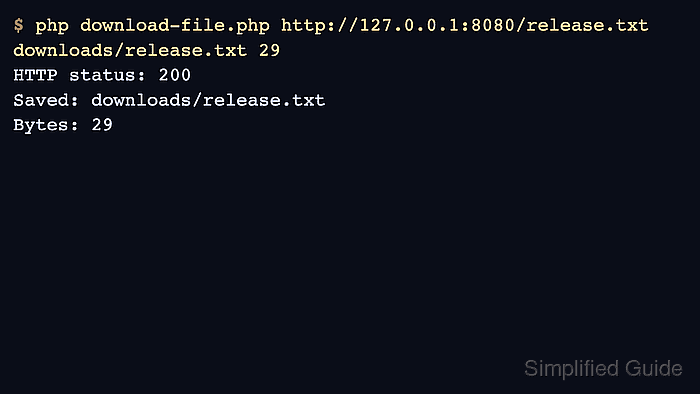
$ php download-file.php http://127.0.0.1:8080/release.txt downloads/release.txt 29
HTTP status: 200
Saved: downloads/release.txt
Bytes: 29
Replace the local http://127.0.0.1:8080/release.txt URL with the real https:// file URL when using the script outside the local test.
- Confirm that the saved file has the expected size before another process consumes it.
$ wc -c downloads/release.txt
29 downloads/release.txt
- Verify that a missing remote file is rejected instead of being saved as a successful download.
$ php download-file.php http://127.0.0.1:8080/missing.txt downloads/missing.txt
HTTP status: 404
Download failed; temporary file removed.
HTTP errors are checked separately because receiving an HTTP error response is not the same thing as a cURL transport failure.
- Remove the local test webroot after the downloader is adapted to the real endpoint.
$ rm -rf webroot

Mohd Shakir Zakaria is a cloud architect with deep roots in software development and open-source advocacy. Certified in AWS, Red Hat, VMware, ITIL, and Linux, he specializes in designing and managing robust cloud and on-premises infrastructures.


