A CSV export can outgrow available memory long before its row-level calculation becomes complicated. pandas can keep the job bounded by yielding a sequence of DataFrame objects, so only one portion of the file is resident while totals accumulate.
The chunksize argument changes pandas.read_csv() from returning one DataFrame to returning an iterable TextFileReader. Limiting columns with usecols and declaring known types with dtype reduces each batch further and avoids mixed-type inference.
Chunking suits reductions, filtered exports, and validations that need little coordination between batches. A whole-table sort, arbitrary join, or exact global deduplication usually needs an out-of-core engine or database instead.
Related: How to read CSV files with pandas
Related: How to reduce pandas DataFrame memory usage
Steps to read a large CSV in pandas chunks:
- Save the representative order data as orders.csv.
- orders.csv
order_id,region,amount
1001,North,120
1002,South,95
1003,North,80
1004,West,130
1005,South,110
1006,North,75
1007,West,60
- Create read_orders_in_chunks.py with the imports, input settings, and accumulators.
- read_orders_in_chunks.py
from collections import defaultdict

import pandas as pd

INPUT_CSV = "orders.csv"
CHUNK_SIZE = 3

rows_processed = 0
amount_total = 0
region_totals = defaultdict(int)
The sample uses three rows per chunk so iteration is visible. Production chunks can be larger as long as one chunk and its intermediate objects fit in memory.
- Append the chunk-processing loop to read_orders_in_chunks.py.
with pd.read_csv(
    INPUT_CSV,
    usecols=["region", "amount"],
    dtype={"region": "string", "amount": "int64"},
    chunksize=CHUNK_SIZE,
) as reader:
    for chunk_number, chunk in enumerate(reader, start=1):
        chunk_amount = int(chunk["amount"].sum())
        rows_processed += len(chunk)
        amount_total += chunk_amount

        for region, subtotal in chunk.groupby("region")["amount"].sum().items():
            region_totals[region] += int(subtotal)

        print(
            f"chunk {chunk_number}: "
            f"rows={len(chunk)} amount={chunk_amount}"
        )
usecols limits the loaded columns, while dtype avoids guessing known data types. The dictionary retains one subtotal per region instead of retaining each DataFrame chunk.
- Append the final summary to read_orders_in_chunks.py.
print(f"rows processed={rows_processed}")
print(f"amount total={amount_total}")
print("region totals:")
for region in sorted(region_totals):
    print(f"{region}: {region_totals[region]}")
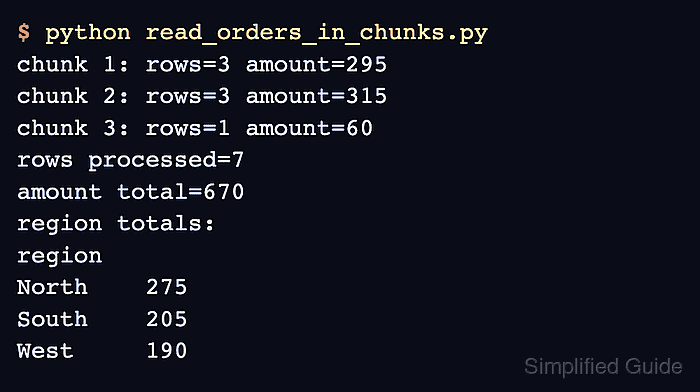
- Run the finished chunk reader from the directory containing both files to confirm bounded batch sizes against the final totals.
$ python3 read_orders_in_chunks.py
chunk 1: rows=3 amount=295
chunk 2: rows=3 amount=315
chunk 3: rows=1 amount=60
rows processed=7
amount total=670
region totals:
North: 275
South: 205
West: 190
The three chunk lines show that no batch exceeded CHUNK_SIZE. The seven-row summary and region totals prove that every sample row contributed to the reduction.

Mohd Shakir Zakaria is a cloud architect with deep roots in software development and open-source advocacy. Certified in AWS, Red Hat, VMware, ITIL, and Linux, he specializes in designing and managing robust cloud and on-premises infrastructures.


