Text timestamps cannot drive date filtering, time arithmetic, or resampling until their meaning is represented by a datetime dtype. pandas can convert fixed local timestamps and offset-aware machine timestamps while keeping rejected source values visible for correction.
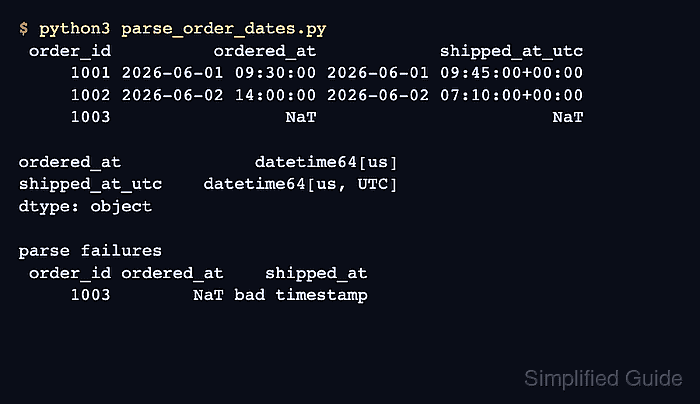
The pd.to_datetime() function accepts a Series and returns datetime-like values. An explicit format makes one known source pattern unambiguous, while errors=“coerce” turns invalid values into NaT instead of leaving a mixed text column.
Timezone offsets need a separate decision from text format. Use utc=True when timestamps with different offsets represent one timeline, and preserve the raw columns until every NaT row and timezone assumption has been reviewed.
Related: How to read CSV files with pandas
Related: How to convert data types in pandas
Steps to parse pandas datetime columns:
- Start parse_order_dates.py with the timestamp strings and raw audit columns.
- parse_order_dates.py
import pandas as pd


orders = pd.DataFrame(
    {
        "order_id": [1001, 1002, 1003, 1004],
        "ordered_at": [
            "2026-06-01 09:30",
            "2026-06-02 14:00",
            "not recorded",
            "2026-06-04 08:15",
        ],
        "shipped_at": [
            "2026-06-01T17:45:00+08:00",
            "2026-06-02T07:10:00Z",
            "bad timestamp",
            "2026-06-04T12:00:00+08:00",
        ],
    }
)

orders["ordered_at_raw"] = orders["ordered_at"]
orders["shipped_at_raw"] = orders["shipped_at"]
The sample DataFrame stands in for data already loaded by the project. The raw columns retain the exact source text when parsing produces NaT.
- Add fixed-format parsing after the raw column copies.
orders["ordered_at"] = pd.to_datetime(
    orders["ordered_at_raw"],
    format="%Y-%m-%d %H:%M",
    errors="coerce",
)
An explicit format fits a source where every valid value follows one known pattern. Invalid or out-of-range values become NaT because errors=“coerce” is set.
- Add UTC parsing after the fixed-format conversion.
orders["shipped_at_utc"] = pd.to_datetime(
    orders["shipped_at_raw"],
    format="ISO8601",
    errors="coerce",
    utc=True,
)
Parsing mixed timezone offsets without utc=True raises an error in current pandas. UTC conversion preserves each instant while placing every valid value on one comparable timeline.
- Append dtype and rejected-row checks after both parsed columns.
failed = orders[
    orders["ordered_at"].isna() | orders["shipped_at_utc"].isna()
]

assert pd.api.types.is_datetime64_dtype(orders["ordered_at"])
assert isinstance(orders["shipped_at_utc"].dtype, pd.DatetimeTZDtype)
assert str(orders["shipped_at_utc"].dt.tz) == "UTC"
assert failed["order_id"].to_list() == [1003]

print(
    orders.filter(["order_id", "ordered_at", "shipped_at_utc"])
    .to_string(index=False)
)
print()
print(orders.filter(["ordered_at", "shipped_at_utc"]).dtypes)
print()
print("rows requiring source review")
print(
    failed.filter(["order_id", "ordered_at_raw", "shipped_at_raw"])
    .to_string(index=False)
)
The assertions fail when either parsed column loses its datetime dtype, the timezone is not UTC, or the rejected-row boundary changes.
- Run parse_order_dates.py to verify the parsed values, dtypes, and rejected source row.
$ python3 parse_order_dates.py
 order_id          ordered_at            shipped_at_utc
     1001 2026-06-01 09:30:00 2026-06-01 09:45:00+00:00
     1002 2026-06-02 14:00:00 2026-06-02 07:10:00+00:00
     1003                 NaT                       NaT
     1004 2026-06-04 08:15:00 2026-06-04 04:00:00+00:00

ordered_at             datetime64[us]
shipped_at_utc    datetime64[us, UTC]
dtype: object

rows requiring source review
 order_id ordered_at_raw shipped_at_raw
     1003   not recorded  bad timestamp

Mohd Shakir Zakaria is a cloud architect with deep roots in software development and open-source advocacy. Certified in AWS, Red Hat, VMware, ITIL, and Linux, he specializes in designing and managing robust cloud and on-premises infrastructures.


