Collecting file logs with the OpenTelemetry Collector lets existing applications keep writing plain text while the Collector emits those lines as OpenTelemetry log records. It is useful when an application is not sending OTLP logs yet, but its file output still needs to flow through the same telemetry pipeline as traces and metrics.
The file_log receiver belongs to the contrib Collector distribution and tails matching files on disk. The receiver becomes active only when it appears in a logs pipeline, and the debug exporter gives a local proof path before a backend exporter is added.
A temporary log file under /tmp/checkout-api keeps the smoke test separate from production logs. After the receiver emits the sample lines, replace the path with the application log glob and run the Collector under a user or service account that can read the selected files.
Steps to collect file logs with the OpenTelemetry Collector:
- Confirm the local Collector distribution includes the file_log receiver and debug exporter.
$ otelcol-contrib components
buildinfo:
    command: otelcol-contrib
    description: OpenTelemetry Collector Contrib
    version: 0.154.0
receivers:
##### snipped #####
    - name: file_log
      module: github.com/open-telemetry/opentelemetry-collector-contrib/receiver/filelogreceiver v0.154.0
      stability:
        logs: Beta
##### snipped #####
exporters:
##### snipped #####
    - name: debug
      module: go.opentelemetry.io/collector/exporter/debugexporter v0.154.0
      stability:
        logs: Development
        metrics: Development
        traces: Development
The core Collector build may not include file_log. Use the contrib or Kubernetes Collector distribution for this receiver.
- Create a temporary application log directory.
$ mkdir -p /tmp/checkout-api
- Write the first test log line.
$ printf '2026-06-18T10:15:01Z INFO order accepted id=1001\n' > /tmp/checkout-api/app.log
- Create the Collector configuration file.
$ vi otelcol-filelog.yaml
- Add a file_log receiver, batch processor, and debug exporter.
receivers:
  file_log:
    include:
      - /tmp/checkout-api/app.log
    start_at: beginning
    include_file_path: true
    resource:
      service.name: checkout-api

processors:
  batch:
    timeout: 1s

exporters:
  debug:
    verbosity: detailed

service:
  pipelines:
    logs:
      receivers: [file_log]
      processors: [batch]
      exporters: [debug]
start_at: beginning makes the smoke test read the line already present in the file. For a production handoff, use the default end behavior when old log files should not be backfilled. Plain text lines remain in the log record body until parser operators extract timestamps, severity, or structured attributes.
- Validate the Collector configuration.
$ otelcol-contrib validate --config=otelcol-filelog.yaml
No output and exit status 0 means the configuration parsed successfully.
- Start the Collector with the test configuration.
$ otelcol-contrib --config=otelcol-filelog.yaml
2026-06-18T06:17:46.353Z    info    service@v0.154.0/service.go:264    Everything is ready. Begin running and processing data.
2026-06-18T06:17:46.558Z    info    fileconsumer/file.go:423    Started watching file    {"otelcol.component.id": "file_log", "path": "/tmp/checkout-api/app.log"}
2026-06-18T06:17:47.595Z    info    Logs    {"otelcol.component.id": "debug", "otelcol.signal": "logs", "log records": 1}
Resource attributes:
     -> service.name: Str(checkout-api)
LogRecord #0
Body: Str(2026-06-18T10:15:01Z INFO order accepted id=1001)
Attributes:
     -> log.file.name: Str(app.log)
     -> log.file.path: Str(/tmp/checkout-api/app.log)
Leave this terminal running so the receiver can continue polling the file.
- Append a new log line from another terminal.
$ printf '2026-06-18T10:15:05Z ERROR payment timeout id=1002\n' >> /tmp/checkout-api/app.log
- Confirm the appended line appears in the Collector output.
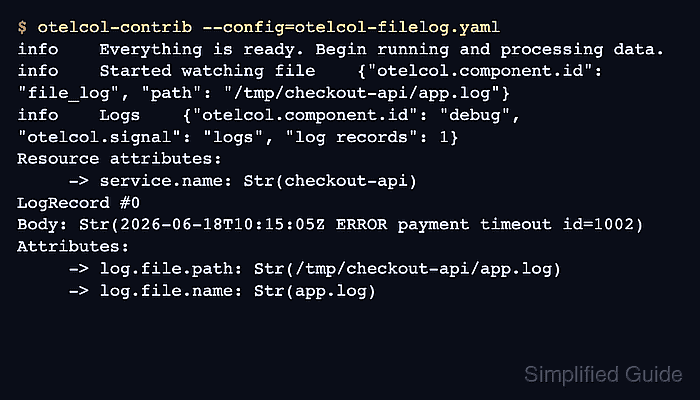
2026-06-18T06:17:57.606Z    info    Logs    {"otelcol.component.id": "debug", "otelcol.signal": "logs", "log records": 1}
Resource attributes:
     -> service.name: Str(checkout-api)
LogRecord #0
Body: Str(2026-06-18T10:15:05Z ERROR payment timeout id=1002)
Attributes:
     -> log.file.path: Str(/tmp/checkout-api/app.log)
     -> log.file.name: Str(app.log)
The Body field proves the appended file line became an OpenTelemetry log record. The log.file.path attribute proves the record came from the expected file.
- Stop the foreground Collector process with Ctrl+C after the test record appears.
- Remove the temporary test files after moving the receiver block into the active Collector configuration.
$ rm -r /tmp/checkout-api otelcol-filelog.yaml

Mohd Shakir Zakaria is a cloud architect with deep roots in software development and open-source advocacy. Certified in AWS, Red Hat, VMware, ITIL, and Linux, he specializes in designing and managing robust cloud and on-premises infrastructures.


