Installing the OpenTelemetry Collector on a Linux host creates a local telemetry service before receivers, processors, and exporters are configured. A package-based install fits servers that should run the Collector under systemd instead of a container runtime.
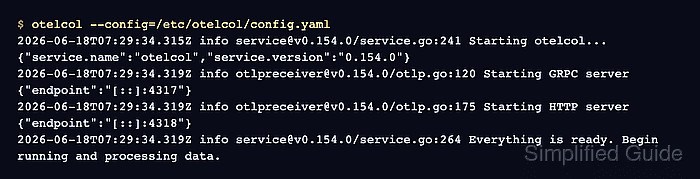
The official release packages provide the otelcol binary, the otel service account, /etc/otelcol/config.yaml, /etc/otelcol/otelcol.conf, and the otelcol.service unit. The package version and CPU architecture must match the release asset that is downloaded.
Use the DEB package on Ubuntu or Debian when the host uses APT. Red Hat family hosts use the matching RPM asset from the same release, while container-first deployments belong in the Docker Collector workflow.
Steps to install the OpenTelemetry Collector on Linux:
- Open a terminal with sudo privileges.
- Refresh the package index.
$ sudo apt update
- Install the download prerequisites.
$ sudo apt install --yes ca-certificates wget
ca-certificates lets wget validate the GitHub release download over HTTPS on minimal server images.
- Check the host CPU architecture.
$ uname -m
x86_64
Use amd64 in the package filename when this returns x86_64. Use arm64 when it returns aarch64, and use 386 for older 32-bit x86 hosts.
- Download the OpenTelemetry Collector DEB package.
$ wget https://github.com/open-telemetry/opentelemetry-collector-releases/releases/download/v0.154.0/otelcol_0.154.0_linux_amd64.deb
Replace both 0.154.0 and amd64 when installing a different official release or CPU architecture. For aarch64 hosts, use otelcol_0.154.0_linux_arm64.deb.
- Install the downloaded package.
$ sudo dpkg --install otelcol_0.154.0_linux_amd64.deb
Selecting previously unselected package otelcol.
Preparing to unpack otelcol_0.154.0_linux_amd64.deb ...
Unpacking otelcol (0.154.0) ...
Setting up otelcol (0.154.0) ...
On Red Hat family hosts, download the matching RPM asset and install it with sudo rpm -ivh otelcol_0.154.0_linux_amd64.rpm. The installed service is still otelcol.service.
- Confirm that the shell resolves the packaged binary.
$ command -v otelcol
/usr/bin/otelcol
- Confirm the installed Collector version.
$ otelcol --version
otelcol version 0.154.0
- Confirm the service configuration file points to the packaged Collector config.
$ cat /etc/otelcol/otelcol.conf
# Systemd environment file for the otelcol service

# Command-line options for the otelcol service.
# Run `/usr/bin/otelcol --help` to see all available options.
OTELCOL_OPTIONS="--config=/etc/otelcol/config.yaml"
The package-managed service reads /etc/otelcol/config.yaml by default. Change OTELCOL_OPTIONS only when the service should start with another config file or extra Collector flags.
- Validate the packaged Collector configuration.
$ sudo otelcol validate --config=/etc/otelcol/config.yaml
No output with a zero exit status means the default configuration parsed successfully.
- Restart the otelcol service.
$ sudo systemctl restart otelcol
The package enables otelcol.service during installation. Restarting makes the service state explicit and applies /etc/otelcol/config.yaml if the host did not start it during package installation.
- Confirm the Collector service is active.
$ sudo systemctl status otelcol --no-pager
● otelcol.service - OpenTelemetry Collector
     Loaded: loaded (/usr/lib/systemd/system/otelcol.service; enabled; preset: enabled)
     Active: active (running) since Thu 2026-06-18 07:35:12 UTC; 6s ago
   Main PID: 1842 (otelcol)
      Tasks: 8
     Memory: 92.4M
##### snipped #####
Jun 18 07:35:13 web-01 otelcol[1842]: Starting GRPC server endpoint=[::]:4317
Jun 18 07:35:13 web-01 otelcol[1842]: Starting HTTP server endpoint=[::]:4318
Jun 18 07:35:13 web-01 otelcol[1842]: Everything is ready. Begin running and processing data.
The ready line confirms the packaged config started and the default OTLP listeners came up. Replace the default config before accepting application telemetry on a shared network.
Related: How to configure an OTLP receiver in the OpenTelemetry Collector - Remove the downloaded package file.
$ rm otelcol_0.154.0_linux_amd64.deb

Mohd Shakir Zakaria is a cloud architect with deep roots in software development and open-source advocacy. Certified in AWS, Red Hat, VMware, ITIL, and Linux, he specializes in designing and managing robust cloud and on-premises infrastructures.


