TLS certificate failures can appear only after a client reaches the right host and port. A server may answer TCP connections while presenting the wrong virtual-host certificate, an incomplete issuer chain, or a certificate that does not cover the requested DNS name. OpenSSL can test that live handshake from the same side of the connection as a browser, API client, mail client, or monitoring probe.
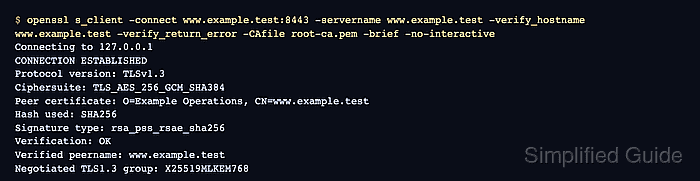
The openssl s_client command opens a TLS client session and prints the peer certificate result. Supplying the same service name to -servername and -verify_hostname keeps Server Name Indication, or SNI, aligned with hostname verification. -verify_return_error makes name or trust failures stop the check instead of hiding behind a completed handshake.
Use the DNS name clients request as the certificate name, even when -connect points at a load balancer, alternate port, or direct address. Public endpoints usually use the operating system trust store, while private PKI endpoints need -CAfile, -CApath, or another trust source that matches the affected client. Repeat the check from the network path that matters because CDN edges, split DNS answers, and proxy tiers can serve different certificates.
Steps to test a TLS certificate using OpenSSL:
- Identify the endpoint socket, expected service name, and trust source.
Use the DNS name clients request for both -servername and -verify_hostname. Add the correct -starttls protocol option only for services such as SMTP, IMAP, POP3, or LDAP that upgrade to TLS after an initial clear-text greeting.
- Run openssl s_client with SNI, hostname verification, and hard verification errors.
$ openssl s_client -connect server.example.com:8443 -servername server.example.com -verify_hostname server.example.com -verify_return_error -CAfile ca.crt -brief -no-interactive
CONNECTION ESTABLISHED
Protocol version: TLSv1.3
Ciphersuite: TLS_AES_256_GCM_SHA384
Peer certificate: CN=server.example.com
Hash used: SHA256
Signature type: rsa_pss_rsae_sha256
Verification: OK
Verified peername: server.example.com
Negotiated TLS1.3 group: X25519MLKEM768
Verification: OK means the chain built to the trust source used by the command. Verified peername means the served certificate covered the requested host name.
- Omit -CAfile when the endpoint chains to the client system trust store.
$ openssl s_client -connect server.example.com:443 -servername server.example.com -verify_hostname server.example.com -verify_return_error -brief -no-interactive
Add -CAfile, -CApath, or -CAstore only when the endpoint depends on a private root, lab CA, or custom trust bundle that the client would also use.
- Treat hostname mismatch output as a failed certificate test.
$ openssl s_client -connect server.example.com:8443 -servername server.example.com -verify_hostname api.example.com -verify_return_error -CAfile ca.crt -brief -no-interactive
depth=0 CN=server.example.com
verify error:num=62:hostname mismatch
##### snipped #####
Do not approve the endpoint from CONNECTION ESTABLISHED alone. A completed handshake can still serve a certificate that is expired, untrusted, incomplete, or valid for a different name.

Mohd Shakir Zakaria is a cloud architect with deep roots in software development and open-source advocacy. Certified in AWS, Red Hat, VMware, ITIL, and Linux, he specializes in designing and managing robust cloud and on-premises infrastructures.


