Straight-line detection sits between edge detection and geometric measurement in OpenCV. A Hough transform fits cases where lane markings, form borders, grid lines, or document edges need to become line segment coordinates instead of only bright edge pixels.
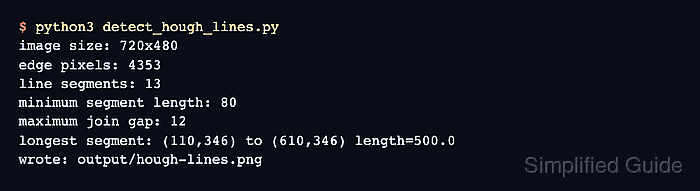
The Python code reads an image, softens noise with a Gaussian blur, builds a Canny edge map, and passes that binary edge image to cv.HoughLinesP(). The probabilistic Hough transform returns segment endpoints directly, which makes it easier to draw an overlay and filter short breaks than the standard cv.HoughLines() rho-theta output.
Thresholds matter more than the function call. Use a clean edge map and choose minimum segment length and maximum join gap for the scale of the lines that matter; too-low thresholds can turn text, texture, or noise into extra segments.
Related: How to detect edges in an image with OpenCV
Related: How to find contours with OpenCV
Related: How to install OpenCV on Ubuntu
Steps to detect lines with the Hough transform in OpenCV:
- Create an input directory for the image.
$ mkdir -p input
- Copy the source image into the expected path.
$ cp scene.png input/scene.png
Replace scene.png with the image that contains the straight structures to detect. Update input_path in the script when the project uses a different layout.
- Create the Hough line detection script.
- detect_hough_lines.py
from argparse import ArgumentParser
from pathlib import Path

import cv2 as cv
import numpy as np


parser = ArgumentParser()
parser.add_argument("--input", default="input/scene.png", help="Image to scan")
parser.add_argument("--output", default="output/hough-lines.png", help="Annotated output image")
parser.add_argument("--canny-low", type=int, default=50, help="Lower Canny threshold")
parser.add_argument("--canny-high", type=int, default=150, help="Upper Canny threshold")
parser.add_argument("--votes", type=int, default=60, help="Minimum Hough accumulator votes")
parser.add_argument("--min-length", type=int, default=80, help="Minimum line segment length")
parser.add_argument("--max-gap", type=int, default=12, help="Maximum gap joined into one segment")
args = parser.parse_args()

input_path = Path(args.input)
output_path = Path(args.output)

gray = cv.imread(str(input_path), cv.IMREAD_GRAYSCALE)
color = cv.imread(str(input_path), cv.IMREAD_COLOR)
if gray is None or color is None:
    raise SystemExit(f"could not read input image: {input_path}")

blurred = cv.GaussianBlur(gray, (5, 5), 0)
edges = cv.Canny(blurred, args.canny_low, args.canny_high, apertureSize=3)

lines = cv.HoughLinesP(
    edges,
    rho=1,
    theta=np.pi / 180,
    threshold=args.votes,
    minLineLength=args.min_length,
    maxLineGap=args.max_gap,
)

segments = [] if lines is None else [line[0] for line in lines]
annotated = color.copy()

for x1, y1, x2, y2 in segments:
    cv.line(annotated, (x1, y1), (x2, y2), (0, 180, 0), 3, cv.LINE_AA)

output_path.parent.mkdir(parents=True, exist_ok=True)
if not cv.imwrite(str(output_path), annotated):
    raise SystemExit(f"could not write output image: {output_path}")

edge_pixels = int(cv.countNonZero(edges))
print(f"image size: {gray.shape[1]}x{gray.shape[0]}")
print(f"edge pixels: {edge_pixels}")
print(f"line segments: {len(segments)}")
print(f"minimum segment length: {args.min_length}")
print(f"maximum join gap: {args.max_gap}")

if segments:
    longest = max(
        segments,
        key=lambda segment: np.hypot(segment[2] - segment[0], segment[3] - segment[1]),
    )
    x1, y1, x2, y2 = longest
    length = np.hypot(x2 - x1, y2 - y1)
    print(f"longest segment: ({x1},{y1}) to ({x2},{y2}) length={length:.1f}")

print(f"wrote: {output_path}")
- Run the script and confirm the detected segment count.
$ python3 detect_hough_lines.py
image size: 720x480
edge pixels: 4353
line segments: 13
minimum segment length: 80
maximum join gap: 12
longest segment: (110,346) to (610,346) length=500.0
wrote: output/hough-lines.png
Increase --votes or --min-length when short texture marks are being counted as lines. Increase --max-gap when a real line is broken by small gaps in the edge map.
- Keep the Hough input as a binary edge image.
blurred = cv.GaussianBlur(gray, (5, 5), 0)
edges = cv.Canny(blurred, args.canny_low, args.canny_high, apertureSize=3)
cv.HoughLinesP() votes from nonzero edge pixels. Blurring before cv.Canny() reduces isolated noise that can create extra short segments.
- Tune the probabilistic Hough parameters for the target image scale.
lines = cv.HoughLinesP(
    edges,
    rho=1,
    theta=np.pi / 180,
    threshold=args.votes,
    minLineLength=args.min_length,
    maxLineGap=args.max_gap,
)
threshold is the minimum vote count. minLineLength rejects short segments, and maxLineGap joins nearby edge runs into one returned segment.
- Review the saved line overlay.
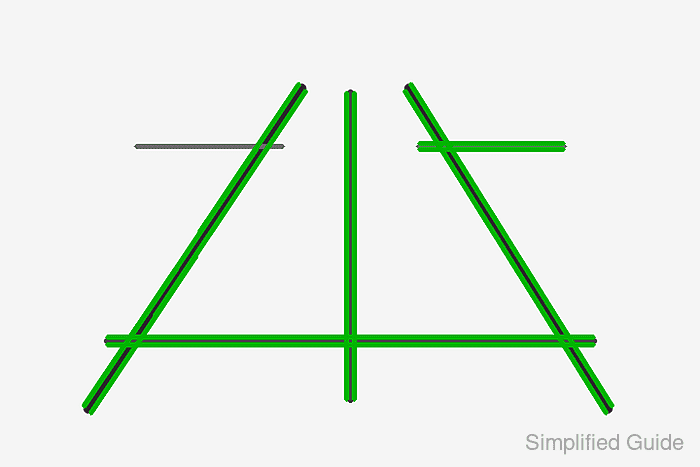
The green segments should trace the long straight strokes. Missing lines usually mean the edge thresholds or vote count are too high; extra fragments usually mean the thresholds, minimum length, or gap limit are too loose.
- Verify that OpenCV can reopen the annotated output.
$ python3 - <<'PY' import cv2 as cv image = cv.imread("output/hough-lines.png") print(f"output readable: {image.shape[1]}x{image.shape[0]}") PY output readable: 720x480 - Remove the sample script after moving the detection logic into the project.
$ rm detect_hough_lines.py

Mohd Shakir Zakaria is a cloud architect with deep roots in software development and open-source advocacy. Certified in AWS, Red Hat, VMware, ITIL, and Linux, he specializes in designing and managing robust cloud and on-premises infrastructures.


