Corner detectors mark image locations where intensity changes in two directions, such as checkerboard intersections, document corners, and structured scene points. OpenCV exposes the Harris detector through cv.cornerHarris() when a script needs repeatable point candidates before matching, tracking, or geometric checks.
The detector returns a response map rather than a ready-made list of points. Thresholding that map against the strongest response isolates high-response pixels, while connected-component counts make the output easier to compare between tuning runs.
The Python script keeps the run file-based for terminal validation. It loads input/checkerboard.png, converts the image to grayscale float32 data, marks thresholded Harris responses, draws component centers, and writes output/harris-corners.png for visual review.
Related: How to read and write an image with OpenCV
Related: How to match features with ORB in OpenCV
Related: How to install OpenCV on Ubuntu
Steps to detect Harris corners with OpenCV:
- Create an input directory for the source image.
$ mkdir -p input
- Copy the image into the expected path.
$ cp checkerboard.png input/checkerboard.png
Replace checkerboard.png with the image that contains the corners to mark. Keep the input/checkerboard.png path or update the script command to match the project layout.
- Create the Harris corner detection script.
- detect_harris_corners.py
from argparse import ArgumentParser
from pathlib import Path

import cv2 as cv
import numpy as np


parser = ArgumentParser()
parser.add_argument("--input", required=True, help="Source image")
parser.add_argument("--output", required=True, help="Annotated output image")
parser.add_argument("--threshold", type=float, default=0.01)
parser.add_argument("--block-size", type=int, default=2)
parser.add_argument("--aperture-size", type=int, default=3)
parser.add_argument("--k", type=float, default=0.04)
args = parser.parse_args()

image = cv.imread(args.input)
if image is None:
    raise SystemExit(f"could not read input image: {args.input}")

gray = cv.cvtColor(image, cv.COLOR_BGR2GRAY)
response = cv.cornerHarris(
    np.float32(gray),
    args.block_size,
    args.aperture_size,
    args.k,
)
response = cv.dilate(response, None)

max_response = float(response.max())
threshold_value = args.threshold * max_response
corner_mask = response > threshold_value
corner_pixels = int(np.count_nonzero(corner_mask))

components, labels, stats, centroids = cv.connectedComponentsWithStats(
    corner_mask.astype("uint8"),
    connectivity=8,
)
corner_groups = components - 1

annotated = image.copy()
annotated[corner_mask] = (0, 0, 255)
for centroid in centroids[1:]:
    x, y = centroid
    cv.circle(annotated, (int(round(x)), int(round(y))), 4, (0, 255, 0), 1)

output_path = Path(args.output)
output_path.parent.mkdir(parents=True, exist_ok=True)
if not cv.imwrite(str(output_path), annotated):
    raise SystemExit(f"could not write output image: {output_path}")

height, width = gray.shape
print(f"image: {width}x{height}")
print(f"block size: {args.block_size}")
print(f"aperture size: {args.aperture_size}")
print(f"k: {args.k:.2f}")
print(f"threshold: {args.threshold:.3f} of max response")
print(f"corner pixels: {corner_pixels}")
print(f"corner groups: {corner_groups}")
print(f"wrote: {output_path}")
cv.cornerHarris() works on a single-channel image for this response calculation. The script converts the source image to grayscale and np.float32 before detection.
- Run the script and confirm the Harris response counts.
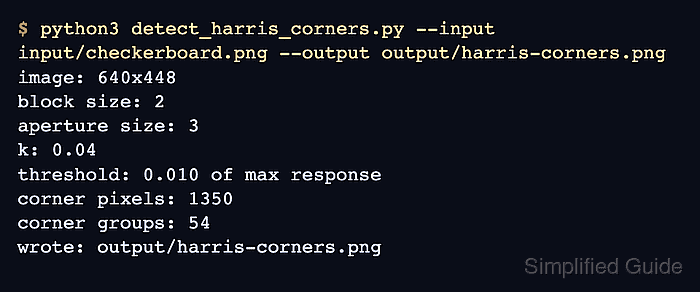
$ python3 detect_harris_corners.py --input input/checkerboard.png --output output/harris-corners.png
image: 640x448
block size: 2
aperture size: 3
k: 0.04
threshold: 0.010 of max response
corner pixels: 1350
corner groups: 54
wrote: output/harris-corners.png
--threshold is the fraction of the strongest response kept for marking. Increase it to keep only stronger corners, or decrease it when faint intersections matter.
- Review the annotated output image.
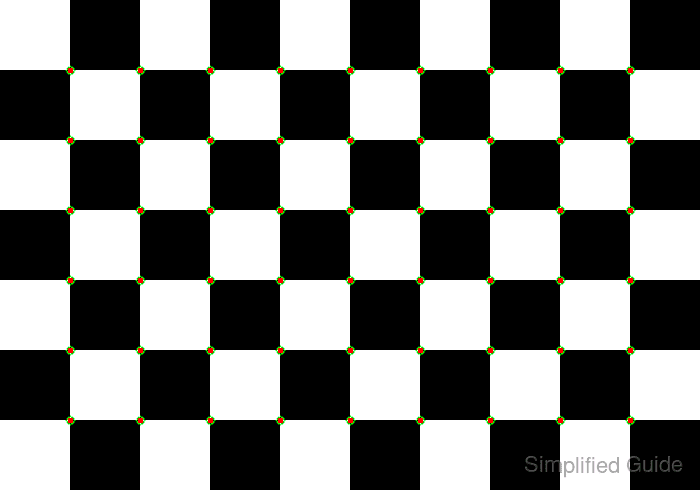
Red pixels show thresholded Harris responses, and green circles show connected-component centers. A checkerboard should mark the grid intersections, not the flat square centers.
- Confirm that OpenCV can reopen the annotated image.
$ python3 - <<'PY' import cv2 as cv image = cv.imread("output/harris-corners.png") print(f"output readable: {image.shape[1]}x{image.shape[0]}") PY output readable: 640x448 - Remove the sample script after adapting the pattern.
$ rm detect_harris_corners.py

Mohd Shakir Zakaria is a cloud architect with deep roots in software development and open-source advocacy. Certified in AWS, Red Hat, VMware, ITIL, and Linux, he specializes in designing and managing robust cloud and on-premises infrastructures.


