SCIM provisioning lets an identity provider create, update, deactivate, and group Open WebUI accounts as people join or leave a team. It belongs in deployments where sign-in already comes from OIDC or another central identity system and account lifecycle should not depend on manual admin cleanup.
Open WebUI enables SCIM from deployment environment variables, not from an admin-panel settings screen. The identity provider sends requests to the /api/v1/scim/v2/ endpoint and authenticates each request with a static bearer token.
Treat the SCIM_TOKEN value as an admin-grade secret because it can create users, change active state, and manage groups. Set SCIM_AUTH_PROVIDER to the same provider name used by the SSO setup so externalId values are stored under the right identity-provider key and can be matched during federated sign-in.
Related: How to enable SSO in Open WebUI
Related: How to create an RBAC group in Open WebUI
Steps to enable SCIM provisioning in Open WebUI:
- Choose the public Open WebUI URL and provider name for the SCIM connector.
Open WebUI URL: https://openwebui.example.com
SCIM base URL: https://openwebui.example.com/api/v1/scim/v2/
SCIM auth provider: oidc
SCIM_AUTH_PROVIDER should match the provider key used for OAuth or OIDC sign-in, such as oidc, microsoft, or the custom provider name configured for your deployment. Create the first Open WebUI admin account before testing group provisioning on a fresh instance.
- Append a generated SCIM token to the env file used by the Open WebUI container.
$ printf 'OPEN_WEBUI_SCIM_TOKEN=%s\n' "$(openssl rand -base64 32)" >> open-webui.env
The command writes the generated token to open-webui.env without printing it in the terminal. Store the same value in the identity provider's SCIM connector.
- Add the SCIM variables to the Open WebUI service configuration.
- compose.yaml
services:
  open-webui:
    image: ghcr.io/open-webui/open-webui:main
    env_file:
      - open-webui.env
    environment:
      SCIM_ENABLED: "true"
      SCIM_TOKEN: "${OPEN_WEBUI_SCIM_TOKEN:?set OPEN_WEBUI_SCIM_TOKEN in open-webui.env}"
      SCIM_AUTH_PROVIDER: "oidc"
Do not leave SCIM_AUTH_PROVIDER empty when SCIM is enabled. externalId create, lookup, and update operations can fail with server errors when no provider key is available.
- Recreate the Open WebUI container so it receives the new environment.
$ docker compose up -d open-webui
[+] Running 1/1
 ✔ Container open-webui-open-webui-1 Started
Use the service manager that controls your deployment when Open WebUI is not running under Docker Compose. A plain container restart does not change environment variables that were missing from the old container.
- Configure the identity provider's SCIM application with the Open WebUI endpoint.
SCIM base URL: https://openwebui.example.com/api/v1/scim/v2/
Authentication method: Bearer token or HTTP header
Authorization header: Bearer <scim-token>
User name mapping: primary email address
External ID mapping: stable identity-provider user ID
Group push: enabled for assigned groups
The base URL must include /api/v1/scim/v2/. A connector URL that omits /api/v1 usually returns 404 Not Found even when Open WebUI is reachable.
- Test the SCIM token by listing users.
$ curl --fail-with-body --silent --show-error \
  -H "Authorization: Bearer <scim-token>" \
  "https://openwebui.example.com/api/v1/scim/v2/Users"
{
  "schemas": [
    "urn:ietf:params:scim:api:messages:2.0:ListResponse"
  ],
  "totalResults": 1,
  "Resources": [
    {
      "userName": "admin@example.com",
      "active": true
    }
  ]
}
A 401 Unauthorized response means SCIM_ENABLED is not active, the token does not match SCIM_TOKEN, or the header is not formatted as Bearer <scim-token>.
- Provision a test user through the identity provider or a direct SCIM request.
$ curl --fail-with-body --silent --show-error \
  -X POST \
  -H "Authorization: Bearer <scim-token>" \
  -H "Content-Type: application/scim+json" \
  --data '{
    "schemas": ["urn:ietf:params:scim:schemas:core:2.0:User"],
    "userName": "morgan.identity@example.com",
    "externalId": "idp-user-1001",
    "displayName": "Morgan Identity",
    "name": {
      "givenName": "Morgan",
      "familyName": "Identity"
    },
    "emails": [
      {
        "value": "morgan.identity@example.com",
        "primary": true
      }
    ],
    "active": true
  }' \
  "https://openwebui.example.com/api/v1/scim/v2/Users"
{
  "id": "<open-webui-user-id>",
  "userName": "morgan.identity@example.com",
  "externalId": "idp-user-1001",
  "active": true
}
userName must be a valid unique email address. Use a stable identity-provider object ID for externalId so later updates match the same account.
- Push a test group that contains the provisioned user.
$ curl --fail-with-body --silent --show-error \
  -X POST \
  -H "Authorization: Bearer <scim-token>" \
  -H "Content-Type: application/scim+json" \
  --data '{
    "schemas": ["urn:ietf:params:scim:schemas:core:2.0:Group"],
    "displayName": "Support Reviewers",
    "externalId": "idp-group-2001",
    "members": [
      {
        "value": "<open-webui-user-id>"
      }
    ]
  }' \
  "https://openwebui.example.com/api/v1/scim/v2/Groups"
{
  "id": "<open-webui-group-id>",
  "displayName": "Support Reviewers",
  "members": [
    {
      "value": "<open-webui-user-id>",
      "type": "User",
      "display": "Morgan Identity"
    }
  ]
}
Open WebUI RBAC permissions are still assigned inside Open WebUI. SCIM creates and updates group membership; resource access should be checked against the group after provisioning.
Related: How to create an RBAC group in Open WebUI - Deactivate the test user through the identity provider or a SCIM patch request.
$ curl --fail-with-body --silent --show-error \ -X PATCH \ -H "Authorization: Bearer <scim-token>" \ -H "Content-Type: application/scim+json" \ --data '{ "schemas": ["urn:ietf:params:scim:api:messages:2.0:PatchOp"], "Operations": [ { "op": "replace", "path": "active", "value": false } ] }' \ "https://openwebui.example.com/api/v1/scim/v2/Users/<open-webui-user-id>" { "id": "<open-webui-user-id>", "userName": "morgan.identity@example.com", "active": false } - Confirm the identity-provider externalId returns the updated account state.
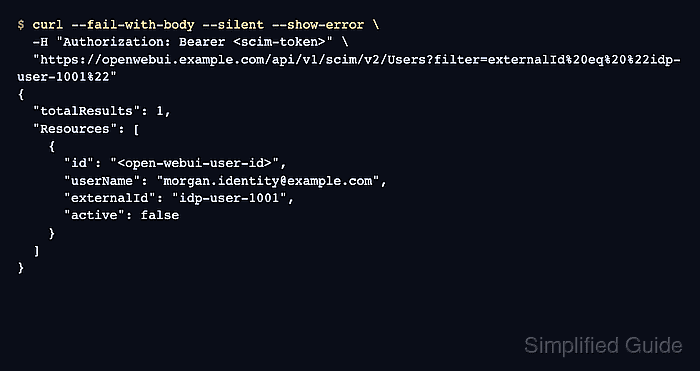
$ curl --fail-with-body --silent --show-error \
  -H "Authorization: Bearer <scim-token>" \
  "https://openwebui.example.com/api/v1/scim/v2/Users?filter=externalId%20eq%20%22idp-user-1001%22"
{
  "totalResults": 1,
  "Resources": [
    {
      "id": "<open-webui-user-id>",
      "userName": "morgan.identity@example.com",
      "externalId": "idp-user-1001",
      "active": false
    }
  ]
}
The lookup proves SCIM_AUTH_PROVIDER is storing externalId values under the provider key that Open WebUI uses for account linking.

Mohd Shakir Zakaria is a cloud architect with deep roots in software development and open-source advocacy. Certified in AWS, Red Hat, VMware, ITIL, and Linux, he specializes in designing and managing robust cloud and on-premises infrastructures.


