Application settings are often loaded before a Node.js process can start its real work. A JSON reader needs to turn the file into a JavaScript value while keeping a missing path distinguishable from invalid JSON.
The promise-based readFile() function from node:fs/promises reads the file without blocking the event loop. Passing utf8 returns a string for JSON.parse() instead of a Buffer.
Runtime file paths suit an explicit read-and-parse function because the application controls when the bytes are read and how failures are reported. Static JSON module imports require with { type: “json” } and cache the imported value, so they serve a different use case.
Steps to read a JSON file in Node.js:
- Create the application settings in app-config.json.
- app-config.json
{
  "service": "orders-api",
  "port": 8080,
  "features": {
    "payments": true,
    "exports": false
  }
}
JSON copied from payloads or changed by hand may contain syntax mistakes.
Tool: JSON Validator - Create read-json.mjs with the runtime path and asynchronous JSON loader.
- read-json.mjs
import { readFile } from "node:fs/promises";

const filePath = process.argv[2] ?? "app-config.json";

async function readJson(path) {
  const text = await readFile(path, "utf8");
  return JSON.parse(text);
}
- Append the selected configuration output below readJson().
- read-json.mjs
function printConfig(config, path) {
  console.log(`file=${path}`);
  console.log(`service=${config.service}`);
  console.log(`port=${config.port}`);
  console.log(`payments=${config.features.payments}`);
}
Selected fields keep configuration output focused because complete settings may contain credentials or tokens.
- Append the error classifier below printConfig().
- read-json.mjs
function reportError(error, path) {
  if (error.code === "ENOENT") {
    console.error(`missing=${path}`);
  } else if (error instanceof SyntaxError) {
    console.error(`invalid-json=${path}`);
  } else {
    throw error;
  }

  process.exitCode = 1;
}
ENOENT identifies a path that readFile() could not find, while SyntaxError identifies text that JSON.parse() rejected.
- Append the top-level read operation below reportError().
- read-json.mjs
try {
  const config = await readJson(filePath);
  printConfig(config, filePath);
} catch (error) {
  reportError(error, filePath);
}
- Compare the assembled read-json.mjs with the complete source.
- read-json.mjs
import { readFile } from "node:fs/promises";

const filePath = process.argv[2] ?? "app-config.json";

async function readJson(path) {
  const text = await readFile(path, "utf8");
  return JSON.parse(text);
}

function printConfig(config, path) {
  console.log(`file=${path}`);
  console.log(`service=${config.service}`);
  console.log(`port=${config.port}`);
  console.log(`payments=${config.features.payments}`);
}

function reportError(error, path) {
  if (error.code === "ENOENT") {
    console.error(`missing=${path}`);
  } else if (error instanceof SyntaxError) {
    console.error(`invalid-json=${path}`);
  } else {
    throw error;
  }

  process.exitCode = 1;
}

try {
  const config = await readJson(filePath);
  printConfig(config, filePath);
} catch (error) {
  reportError(error, filePath);
}
- Run the reader against a missing JSON path.
$ node read-json.mjs missing.json
missing=missing.json
- Create malformed input in broken-config.json.
- broken-config.json
{
  "service": "orders-api",
  "port": 8080,
}
Strict JSON rejects the trailing comma after 8080.
- Run the reader against broken-config.json.
$ node read-json.mjs broken-config.json
invalid-json=broken-config.json
- Remove the malformed test file.
$ rm broken-config.json
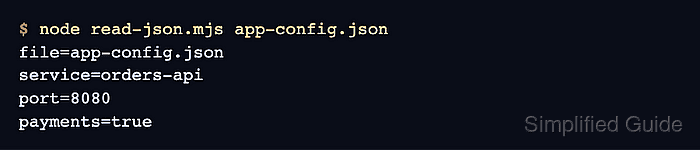
- Run the reader against app-config.json to confirm the parsed settings.
$ node read-json.mjs app-config.json
file=app-config.json
service=orders-api
port=8080
payments=true