Subnet scans with Nmap turn a written network scope into a list of responsive addresses and exposed services for review. Security teams run them during asset inventory, firewall review, and migration checks when the approved target is an owned CIDR block instead of one host.
Nmap accepts CIDR targets and expands them into the addresses covered by that prefix. A list scan checks the target expression first, while the port scan uses the approved port list so the run does not drift into unrelated services.
Keep the subnet, excluded addresses, and port list aligned with the written authorization. Reverse DNS lookup is optional for many internal reviews, and the output view should match the handoff: open-port triage needs less detail than a full closed, open, and filtered state record.
Related: How to install Nmap on Ubuntu or Debian
Related: How to discover live hosts with Nmap
Related: How to scan a port range with Nmap
Related: How to save Nmap scan output
Steps to scan an authorized subnet with Nmap:
- Confirm the approved subnet and port list before sending probes.
Do not scan Internet ranges, neighboring subnets, customer networks, or shared infrastructure unless the written scope explicitly includes those targets.
- Preview the target list without probing hosts.
$ nmap -sL -n 192.168.10.0/29
Starting Nmap 7.98 ( https://nmap.org ) at 2026-06-27 09:41 +08
Nmap scan report for 192.168.10.0
Nmap scan report for 192.168.10.1
Nmap scan report for 192.168.10.2
Nmap scan report for 192.168.10.3
Nmap scan report for 192.168.10.4
Nmap scan report for 192.168.10.5
Nmap scan report for 192.168.10.6
Nmap scan report for 192.168.10.7
Nmap done: 8 IP addresses (0 hosts up) scanned in 0.00 seconds
-sL performs a list scan, so the 0 hosts up summary is expected. Use it to catch a wrong prefix or unexpectedly large target set before sending discovery or port probes.
- Scan the approved subnet for the approved TCP ports.
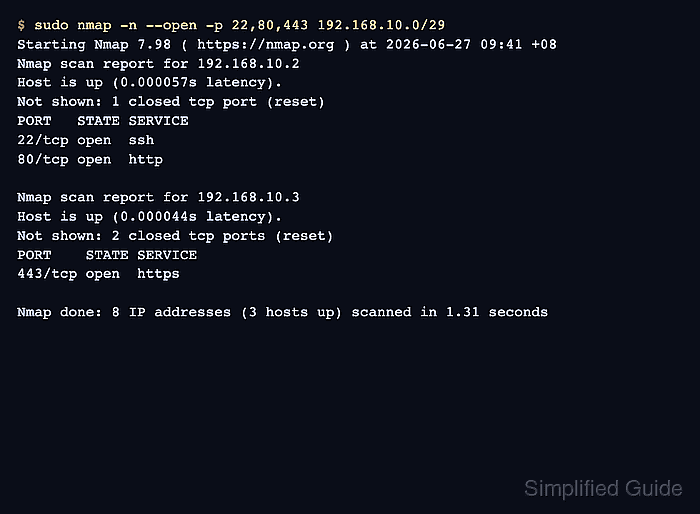
$ sudo nmap -n --open -p 22,80,443 192.168.10.0/29
Starting Nmap 7.98 ( https://nmap.org ) at 2026-06-27 09:41 +08
Nmap scan report for 192.168.10.2
Host is up (0.000057s latency).
Not shown: 1 closed tcp port (reset)
PORT   STATE SERVICE
22/tcp open  ssh
80/tcp open  http

Nmap scan report for 192.168.10.3
Host is up (0.000044s latency).
Not shown: 2 closed tcp ports (reset)
PORT    STATE SERVICE
443/tcp open  https

Nmap done: 8 IP addresses (3 hosts up) scanned in 1.31 seconds
Replace 192.168.10.0/29 and 22,80,443 with the authorized subnet and port expression. --open hides hosts that have no open approved ports, while the final summary still reports the scanned address count and host-up count.
Related: How to scan a port range with Nmap - Run a full port-state view when the review must include responsive hosts with no open approved ports.
$ sudo nmap -n -p 22,80,443 192.168.10.0/29
Starting Nmap 7.98 ( https://nmap.org ) at 2026-06-27 09:41 +08
Nmap scan report for 192.168.10.1
Host is up (0.000096s latency).

PORT    STATE  SERVICE
22/tcp  closed ssh
80/tcp  closed http
443/tcp closed https

Nmap scan report for 192.168.10.2
Host is up (0.000061s latency).

PORT    STATE  SERVICE
22/tcp  open   ssh
80/tcp  open   http
443/tcp closed https

Nmap scan report for 192.168.10.3
Host is up (0.00019s latency).

PORT    STATE  SERVICE
22/tcp  closed ssh
80/tcp  closed http
443/tcp open   https

Nmap done: 8 IP addresses (3 hosts up) scanned in 1.35 seconds
Use this view when the handoff needs the closed or filtered state for every responsive host in the approved range.
- Verify the final summary and port rows against the approval record.
The scanned IP count should match the target expression, and each open or filtered row should have an owner or follow-up. Save the exact scan command and output when the result becomes ticket evidence.
Related: How to save Nmap scan output
Related: How to exclude targets from an Nmap scan
Tool: Port Exposure Summary Checker

Mohd Shakir Zakaria is a cloud architect with deep roots in software development and open-source advocacy. Certified in AWS, Red Hat, VMware, ITIL, and Linux, he specializes in designing and managing robust cloud and on-premises infrastructures.


