Port scope matters as much as host scope during an Nmap check. A service ticket, firewall review, or change window may approve only a small TCP span, and -p keeps the scan on those numbers instead of Nmap's default common-port set.
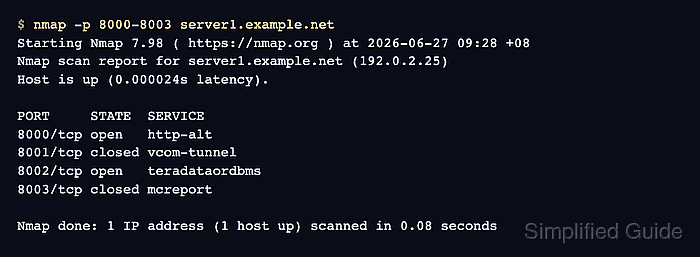
The -p option accepts individual ports, comma-separated lists, and inclusive hyphen ranges. Without a protocol qualifier, the values apply to the active scan protocol; the normal scan shown here is a TCP scan.
Use the smallest expression that matches the written scope. The port table should show only the requested port numbers, their state, and Nmap's service-name guess; unexpected open or filtered rows are findings to review before widening the scan.
Related: How to scan an authorized host with Nmap
Related: How to save Nmap scan output
Related: How to detect service versions with Nmap
Steps to scan a port range with Nmap:
- Confirm the target host and port range are inside the approved scan scope.
Do not use -p- or broad ranges unless the written scope includes every port in that span.
- Write the approved port expression in Nmap syntax.
Use a hyphen for an inclusive span such as 8000-8003, commas for separated ports such as 8000,8002,8443, and no spaces inside the -p value.
Tool: Port List Checker - Scan the inclusive TCP port range.
$ nmap -p 8000-8003 server1.example.net
Starting Nmap 7.98 ( https://nmap.org ) at 2026-06-27 09:28 +08
Nmap scan report for server1.example.net (192.0.2.25)
Host is up (0.000024s latency).

PORT     STATE  SERVICE
8000/tcp open   http-alt
8001/tcp closed vcom-tunnel
8002/tcp open   teradataordbms
8003/tcp closed mcreport

Nmap done: 1 IP address (1 host up) scanned in 0.08 seconds
A hyphenated -p value includes both endpoints. Nmap's service label comes from its port-name data and does not prove the application banner.
- Scan a noncontiguous TCP list when the scope names separated ports.
$ nmap -p 8000,8002,8443 server1.example.net
Starting Nmap 7.98 ( https://nmap.org ) at 2026-06-27 09:28 +08
Nmap scan report for server1.example.net (192.0.2.25)
Host is up (0.000037s latency).

PORT     STATE  SERVICE
8000/tcp open   http-alt
8002/tcp open   teradataordbms
8443/tcp closed https-alt

Nmap done: 1 IP address (1 host up) scanned in 0.07 seconds
Comma-separated values keep the scan on named ports without filling the gap between them.
- Confirm the final summary and port table match the approved scope.
The summary should stay on the intended host count, and the table should contain only the requested ports. Save the result for review only after unexpected open or filtered rows have an owner or follow-up task.
Related: How to save Nmap scan output

Mohd Shakir Zakaria is a cloud architect with deep roots in software development and open-source advocacy. Certified in AWS, Red Hat, VMware, ITIL, and Linux, he specializes in designing and managing robust cloud and on-premises infrastructures.


