Nmap timing controls decide how quickly probes are sent, how long responses are allowed to take, and how many retries happen before a port is marked. Security operators adjust those controls when an approved scan must fit a maintenance window, avoid flooding a sensitive link, or keep packet rate inside a written authorization.
The -T timing template is the broad control, with -T3 as the normal default and -T4 commonly used on low-latency, low-loss networks. Fine-grained options such as --scan-delay, --max-rate, and --max-retries can override parts of the template when the scan needs a specific pace.
Timing changes do not expand scan permission. Keep the target and port expression fixed while testing timing, compare the elapsed time in the final Nmap done summary, and treat faster settings as an accuracy tradeoff when targets are filtered, rate-limited, or slow to respond.
Related: How to scan an authorized host with Nmap
Related: How to scan a port range with Nmap
Steps to control Nmap scan timing:
- Confirm the target host, port range, and scan window are inside the approved scope.
Do not use timing controls as permission to scan outside authorization, exceed a written packet-rate limit, or widen the target list beyond the approved host and port set.
- Start with a timing template that matches the network.
$ nmap -T4 -p 8000-8003 server1.example.net
Starting Nmap 7.98 ( https://nmap.org ) at 2026-06-27 09:33 +08
Nmap scan report for server1.example.net (192.0.2.25)
Host is up (0.000034s latency).

PORT     STATE  SERVICE
8000/tcp open   http-alt
8001/tcp closed vcom-tunnel
8002/tcp open   teradataordbms
8003/tcp closed mcreport

Nmap done: 1 IP address (1 host up) scanned in 0.07 seconds
-T4 reduces several timeout and retry ceilings for low-latency, low-loss networks. Stay with -T3 or a slower explicit setting when latency, packet loss, or fragile targets matter more than speed.
- Add a scan delay when each probe needs spacing.
$ nmap -T2 --scan-delay 250ms -p 8000-8003 server1.example.net
Starting Nmap 7.98 ( https://nmap.org ) at 2026-06-27 09:33 +08
Nmap scan report for server1.example.net (192.0.2.25)
Host is up (0.00016s latency).

PORT     STATE  SERVICE
8000/tcp open   http-alt
8001/tcp closed vcom-tunnel
8002/tcp open   teradataordbms
8003/tcp closed mcreport

Nmap done: 1 IP address (1 host up) scanned in 1.07 seconds
--scan-delay waits at least the requested time between probes sent to a host. Use it when a target or network policy requires pacing rather than maximum throughput.
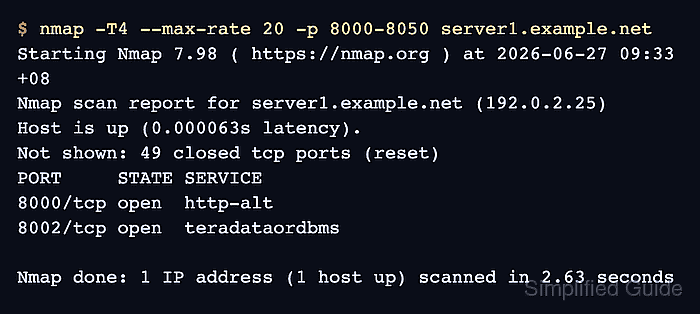
- Cap the sending rate for a wider approved port set.
$ nmap -T4 --max-rate 20 -p 8000-8050 server1.example.net
Starting Nmap 7.98 ( https://nmap.org ) at 2026-06-27 09:33 +08
Nmap scan report for server1.example.net (192.0.2.25)
Host is up (0.000063s latency).
Not shown: 49 closed tcp ports (reset)
PORT     STATE SERVICE
8000/tcp open  http-alt
8002/tcp open  teradataordbms

Nmap done: 1 IP address (1 host up) scanned in 2.63 seconds
--max-rate limits the average packet send rate for the scan. Use --min-rate only when the authorization requires a minimum send rate and the accuracy tradeoff is accepted.
- Lower retry attempts only when missed responses are acceptable.
$ nmap -T4 --max-retries 2 -p 8000-8003 server1.example.net
Starting Nmap 7.98 ( https://nmap.org ) at 2026-06-27 09:33 +08
Nmap scan report for server1.example.net (192.0.2.25)
Host is up (0.000024s latency).

PORT     STATE  SERVICE
8000/tcp open   http-alt
8001/tcp closed vcom-tunnel
8002/tcp open   teradataordbms
8003/tcp closed mcreport

Nmap done: 1 IP address (1 host up) scanned in 0.07 seconds
Low --max-retries values can miss ports when packets are lost, filtered, or rate-limited. Use the setting for bounded surveys only when incomplete answers are acceptable.
- Verify the chosen timing run stayed inside the intended scope.
The final summary should show the expected IP address count, host-up count, and elapsed time. Save the exact command and output when the scan result becomes evidence.
Related: How to save Nmap scan output

Mohd Shakir Zakaria is a cloud architect with deep roots in software development and open-source advocacy. Certified in AWS, Red Hat, VMware, ITIL, and Linux, he specializes in designing and managing robust cloud and on-premises infrastructures.


