Removing an NFS export should retire one shared path without disturbing the other directories that the server still publishes. The saved export files and the active export table both matter, because a runtime-only change can return after a reload while a saved-only edit can leave clients seeing the old table until exportfs is reapplied.
Linux NFS servers read export definitions from /etc/exports and from files ending in .exports under /etc/exports.d. The exportfs -r mode synchronizes the active table with those saved files, removing entries that were deleted from the configuration while keeping unrelated exports loaded.
Identify the exact path and client selector before removing anything. Existing clients may need an outage window or a replacement mount path; when the last client entry for an NFSv4 export disappears, open files, locks, and delegations for that path can be revoked.
Related: List NFS exports from the server
Related: Clean up a stale NFS client mount
Steps to remove an NFS export:
- Open a shell on the NFS server with an account that can use sudo.
- List the active export table and identify the exact export to remove.
$ sudo exportfs -v
/srv/nfs/projects
		192.0.2.0/24(sync,wdelay,hide,no_subtree_check,sec=sys,rw,secure,root_squash,no_all_squash)
/srv/nfs/archive
		192.0.2.0/24(sync,wdelay,hide,no_subtree_check,sec=sys,ro,secure,root_squash,no_all_squash)
The path line and the indented client selector must both match the retired share. The example removes /srv/nfs/projects and leaves /srv/nfs/archive exported.
- Open the saved export file that contains the retired path.
$ sudoedit /etc/exports
The export may instead live in a file under /etc/exports.d. Only drop-in files whose names end in .exports are read by exportfs.
- Confirm that clients no longer need new mounts to the retired path.
Removing the export blocks new mounts for that path and can revoke active NFSv4 state. Schedule the change before deleting the saved line when clients still use the share.
- Remove only the retired export line from the saved file.
/srv/nfs/archive 192.0.2.0/24(ro,sync,no_subtree_check)
Leave unrelated export lines, comments, and environment-specific ownership notes in place. If a dedicated /etc/exports.d/projects.exports file contains only the retired path, remove that drop-in file instead.
- Reload the active export table from the saved files.
$ sudo exportfs -ra
No output normally means exportfs accepted the saved definitions. Fix any reported path, selector, or option error before continuing.
Related: Reload NFS exports
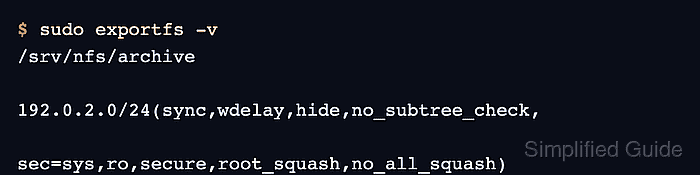
- Verify that the removed path no longer appears in the active table.
$ sudo exportfs -v
/srv/nfs/archive
		192.0.2.0/24(sync,wdelay,hide,no_subtree_check,sec=sys,ro,secure,root_squash,no_all_squash)
exportfs may show defaults such as wdelay, hide, sec=sys, secure, and root_squash even when the saved line lists only the options that were set explicitly.
- Create an empty temporary mount point on a client that used to match the removed selector.
$ sudo install -d -m 0755 /mnt/projects
Run the client-side check from a host that previously had access to the export. A server-side table check is enough for configuration review, but a client mount test proves the retired path is no longer mountable from the network.
- Attempt to mount the retired export from the client.
$ sudo mount -t nfs4 files.example.net:/srv/nfs/projects /mnt/projects
mount.nfs4: access denied by server while mounting files.example.net:/srv/nfs/projects
Replace files.example.net with the NFS server name. A timeout points to network, firewall, or server reachability instead of a clean export removal.
Related: Mount an NFS export on Linux
- Remove the temporary client mount point after the failed mount test.
$ sudo rmdir /mnt/projects

Mohd Shakir Zakaria is a cloud architect with deep roots in software development and open-source advocacy. Certified in AWS, Red Hat, VMware, ITIL, and Linux, he specializes in designing and managing robust cloud and on-premises infrastructures.


