Nextcloud keeps deleted files in a trash bin before permanent deletion, giving users a chance to recover documents, folders, photos, and other items removed from the Files app by mistake. Restoring from the Deleted files view is the normal recovery path when the item still exists in the account's trash bin.
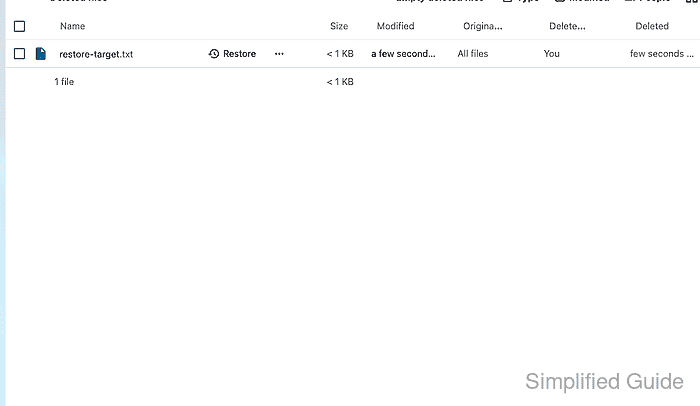
The Deleted files view belongs to the Files app in the Nextcloud web interface. A restore action returns the selected item from the trash bin to the user's file area, while the permanent delete action removes it from the trash bin and makes normal user-level restore unavailable.
Trash retention depends on the server's deleted-files policy and available storage. Deleted files are not a replacement for backups, so items that expired from the trash bin, were permanently deleted, or were removed by a shared-file owner may require help from the file owner or a server backup.
Steps to restore a deleted file in Nextcloud:
- Sign in to the Nextcloud web interface as the user who deleted or owned the file.
- Open the Files app.
- Select Deleted files from the Files sidebar.
The Deleted files area of the Files page holds restore and permanent delete actions for trashed items.
- Find the deleted file or folder in the trash bin list.
Shared files can appear in different users' trash bins depending on who owned the file and who deleted it. Ask the owner to check their trash bin when a shared item is missing from yours. Trash policies can also remove old deleted files automatically or sooner when server storage limits require cleanup.
Related: How to restore Nextcloud from backup - Click Restore for the item that should return to the file list.
Do not choose the permanent delete action unless the item should be removed from the trash bin and made unavailable for normal user restore.
- Open the original folder in Files.
- Confirm that the restored item appears in the folder.
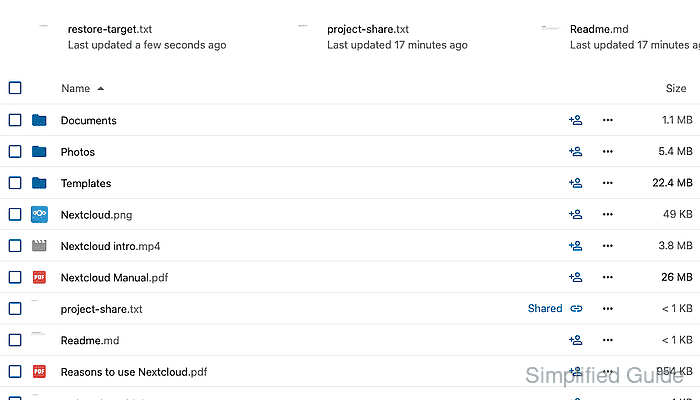
- Open the restored file to confirm the expected content loads.

Mohd Shakir Zakaria is a cloud architect with deep roots in software development and open-source advocacy. Certified in AWS, Red Hat, VMware, ITIL, and Linux, he specializes in designing and managing robust cloud and on-premises infrastructures.


