A TCP service can accept connections while still returning the wrong health response, greeting, or backend content after a deployment. Netcat gives an operator a small smoke test that sends the first expected bytes and shows the raw reply before the endpoint is handed back to users, monitors, or automation.
A smoke test is stronger than a port-open check because it verifies the service speaks the expected protocol at least once. With OpenBSD Netcat, -w sets a short timeout and -N closes the sending side after the request payload reaches end-of-file, which keeps one-shot services from waiting for more input.
The examples use netcat-openbsd on Ubuntu 26.04 against a loopback HTTP-style health endpoint. Replace the address, port, request, and expected text with the service being checked, avoid sending credentials over plaintext TCP, and use Ncat or OpenSSL when the target requires TLS before application data.
Steps to smoke test a TCP service with Netcat:
- Define the endpoint and the smallest safe request before opening the socket. Record the host, port, request payload, expected response text, and timeout value so the test has one pass condition instead of a vague connection result.
Host: service.example.net
Port: 8080
Request: GET /health with Host header
Expected text: smoke test ok
Timeout: 3 seconds
Use a zero-I/O port test first when the only question is whether the TCP socket accepts connections. A smoke test should send or receive enough bytes to prove the service layer answered. Related: How to test a TCP port with Netcat
- Send the request through Netcat with a timeout and close the socket after the payload is sent.
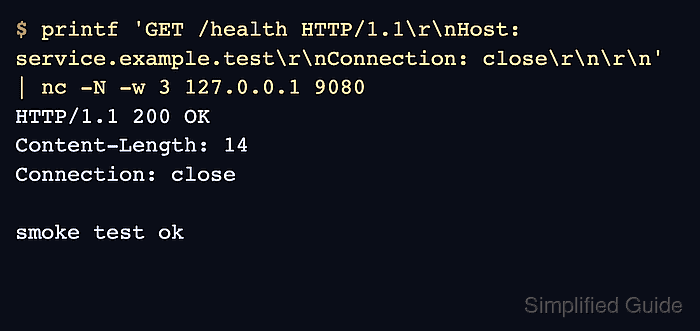
$ printf 'GET /health HTTP/1.1\r\nHost: service.example.test\r\nConnection: close\r\n\r\n' | nc -N -w 3 127.0.0.1 9080
HTTP/1.1 200 OK
Content-Length: 14
Connection: close

smoke test ok
printf sends exact CRLF line endings, -N closes the client sending side after the request ends, and -w 3 prevents the command from waiting indefinitely for a quiet endpoint.
- Check the shell exit status immediately after the Netcat command.
$ echo $?
0
A zero exit status means the nc process completed without a local command error. It does not replace checking the response body or greeting for the expected service text.
- Compare the response with the expected service signal before passing the endpoint. The example is a pass only when the output includes HTTP/1.1 200 OK and smoke test ok. A different status line, an old banner, an empty response, or a missing expected string should keep the service in review.
Use a protocol-specific client when the smoke test needs redirects, TLS validation, cookies, authentication, or request bodies that are easier to express outside raw TCP. Related: How to debug an HTTP request with Netcat
Related: How to connect to a TLS service with Ncat - Route failures by the first visible signal. Connection refused usually means the host was reached but nothing listened on that port, a timeout points toward routing, firewall, address, or bind-path issues, and a successful TCP exchange with wrong content points toward the application or backend selected by the service.
- Save the validated command and expected text in the deployment checklist only after the smoke test matches the real service. Keep hostnames, credentials, tenant names, and private endpoints out of shared transcripts, tickets, and screenshots unless they have been sanitized.

Mohd Shakir Zakaria is a cloud architect with deep roots in software development and open-source advocacy. Certified in AWS, Red Hat, VMware, ITIL, and Linux, he specializes in designing and managing robust cloud and on-premises infrastructures.


