DNS monitoring in Nagios Core checks whether a resolver returns the address an application depends on, not only whether port 53 accepts packets. A lookup check can catch a broken recursive resolver, a stale authoritative answer, or a changed record before users start seeing hostname failures.
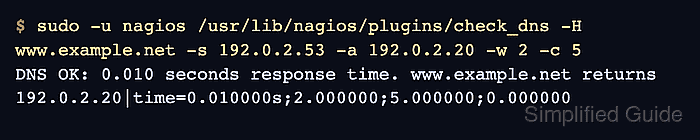
The check_dns plugin asks a chosen DNS server for a hostname and returns a Nagios state with response-time performance data. Supplying an expected address turns the check into a record-answer test, so the service can alert when resolution still works but the answer is no longer the one your environment expects.
Ubuntu and Debian package installs place plugins under /usr/lib/nagios/plugins and load custom object files from /etc/nagios4/conf.d. Source installs often use /usr/local/nagios paths instead. In either layout, a host represents the DNS server, and a service check supplies the query name, expected answer, and timing thresholds.
Related: How to install Nagios plugins
Related: How to add a host in Nagios Core
Related: How to run a Nagios plugin manually
Steps to monitor DNS with Nagios Core:
- Run check_dns manually from the monitoring server.
$ sudo -u nagios /usr/lib/nagios/plugins/check_dns -H www.example.net -s 192.0.2.53 -a 192.0.2.20 -w 2 -c 5
DNS OK: 0.010 seconds response time. www.example.net returns 192.0.2.20|time=0.010000s;2.000000;5.000000;0.000000
Use -s for the resolver or authoritative DNS server being monitored. Use -H for the name to query and -a only when the returned address should stay fixed.
Tool: DNS Record Lookup - Create an object file for the DNS lookup service.
$ sudo vi /etc/nagios4/conf.d/dns-service-monitor.cfg
Use an existing host object when Nagios already has one for the DNS server. Do not define the same host_name twice.
Related: How to add a host in Nagios Core - Add the host, command, and service objects.
define host{
    use                     linux-server
    host_name               resolver01.example.net
    alias                   Recursive DNS resolver
    address                 192.0.2.53
}

define command{
    command_name            check_dns_expected
    command_line            /usr/lib/nagios/plugins/check_dns -H '$ARG1$' -s '$HOSTADDRESS$' -a '$ARG2$' -w '$ARG3$' -c '$ARG4$'
}

define service{
    use                     generic-service
    host_name               resolver01.example.net
    service_description     DNS Lookup
    check_command           check_dns_expected!www.example.net!192.0.2.20!2!5
}
The command queries the host object's address as the DNS server. The service arguments keep the lookup name, expected address, warning seconds, and critical seconds visible in one line.
- Validate the Nagios configuration before applying it.
$ sudo nagios4 -v /etc/nagios4/nagios.cfg
Nagios Core 4.4.6
Reading configuration data...
   Read main config file okay...
   Read object config files okay...

Running pre-flight check on configuration data...

Checking objects...
	Checked 9 services.
	Checked 2 hosts.
	Checked 1 host groups.
	Checked 0 service groups.
	Checked 1 contacts.
	Checked 1 contact groups.
	Checked 181 commands.
	Checked 5 time periods.
##### snipped #####
Total Warnings: 0
Total Errors:   0

Things look okay - No serious problems were detected during the pre-flight check
Fix every object or command error before reloading Nagios.
Related: How to validate the Nagios Core configuration - Reload the nagios4 service.
$ sudo systemctl reload nagios4
The packaged Ubuntu and Debian unit reloads Nagios with SIGHUP. Use the service name and control method from your installation when Nagios Core was installed from source.
Related: How to manage the Nagios Core system service - Check the service result in the Nagios Core web UI.
http://monitor.example.net/nagios4/
Open Services and confirm the DNS Lookup row for resolver01.example.net shows OK with plugin output that starts with DNS OK. If the new service is still PENDING, wait for the next active check or schedule one manually.
Related: How to reschedule an active check in Nagios Core

Mohd Shakir Zakaria is a cloud architect with deep roots in software development and open-source advocacy. Certified in AWS, Red Hat, VMware, ITIL, and Linux, he specializes in designing and managing robust cloud and on-premises infrastructures.


