Renaming a MySQL or MariaDB table is a metadata change for a table whose current name no longer matches its role. It is also the handoff point during a release when a prepared replacement table must take over the old production name.
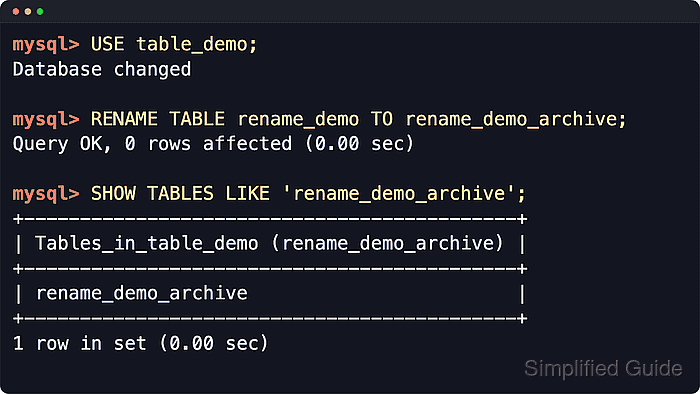
RENAME TABLE changes the stored table name without copying rows. The same statement can rename multiple tables atomically, so a swap such as orders to orders_old and orders_new to orders can happen as one DDL statement instead of two separate release steps.
The rename still waits on metadata locks, and current MySQL documents that lock acquisition order can change the outcome of concurrent table swaps. Moving a table to another database stays on the same server and can fail for filesystem or trigger boundaries, while views, stored SQL text, and table-specific grants that reference the old name need a manual review after the rename.
Steps to rename a table in MySQL or MariaDB:
- Start the MySQL or MariaDB client as an account allowed to rename the source table and create the destination name.
$ mysql --host=db-01.example.net --port=3306 --user=dbadmin --password --database=appdb
Enter password:
Welcome to the MySQL monitor. Commands end with ; or \g.
mysql>
Current MySQL documents ALTER and DROP privileges for the original table plus CREATE and INSERT for the new table name. Current MariaDB documents DROP, CREATE, and INSERT privileges for the table or database, and the same SQL works in the mysql or mariadb client.
- Confirm the source table name exactly as stored.
mysql> SHOW FULL TABLES LIKE 'customers';
+-----------------------------+------------+
| Tables_in_appdb (customers) | Table_type |
+-----------------------------+------------+
| customers                   | BASE TABLE |
+-----------------------------+------------+
1 ROW IN SET (0.00 sec)
This check catches misspelled names, view-versus-table confusion, and case mismatches before the rename runs.
- Confirm the destination name is still unused.
mysql> SHOW FULL TABLES LIKE 'customers_archive';
Empty SET (0.00 sec)
Current MariaDB also supports IF EXISTS on RENAME TABLE, but the explicit existence check stays portable across current MySQL and MariaDB releases.
- Rename the table with RENAME TABLE.
mysql> RENAME TABLE customers TO customers_archive;
Query OK, 0 ROWS affected (0.00 sec)
The statement waits on a metadata lock. A long-running query or transaction that still touches the table can block the rename until that session finishes.
- Use one RENAME TABLE statement for an atomic table swap during a cutover.
mysql> RENAME TABLE orders TO orders_old, orders_new TO orders;
Query OK, 0 ROWS affected (0.00 sec)
Renames run left to right, while MySQL metadata locks are acquired in name order. Choose temporary names deliberately when concurrent writes could be waiting on the same tables.
- Verify that the new name now appears in the database.
mysql> SHOW TABLES LIKE 'customers_archive';
+-------------------------------------+
| Tables_in_appdb (customers_archive) |
+-------------------------------------+
| customers_archive                   |
+-------------------------------------+
1 ROW IN SET (0.00 sec)
- Confirm that the old name no longer resolves.
mysql> DESCRIBE customers;
ERROR 1146 (42S02): TABLE 'appdb.customers' doesn't exist
- Move the table to another database only when both databases are on the same server and the table has no triggers.
mysql> RENAME TABLE appdb.move_demo TO archive_db.move_demo;
Query OK, 0 ROWS affected (0.00 sec)
Current MySQL and MariaDB both fail a cross-database move when the table has triggers, returning ERROR 1435 (HY000): Trigger in wrong schema. Views cannot be moved to another database with RENAME TABLE.
- Verify the moved table in the destination database.
mysql> SHOW TABLES FROM archive_db LIKE 'move_demo';
+----------------------------------+
| Tables_in_archive_db (move_demo) |
+----------------------------------+
| move_demo                        |
+----------------------------------+
1 ROW IN SET (0.00 sec)
Cross-database moves remain server-local. If the databases are on different underlying filesystems, current MySQL documents the result as platform-specific, and current MariaDB documents the move as requiring the same filesystem.
- Review dependent SQL text and table-specific grants that still mention the old name.
RENAME TABLE does not rewrite view definitions, stored routines, triggers, events, or application queries that embed the old table name. Current MySQL documentation also notes that privileges granted specifically for the old table name are not migrated automatically, and current MariaDB documentation likewise says the privileges associated with the table are not renamed.
- Use an intermediate temporary name for case-only renames when the server or filesystem treats table names case-insensitively.
lower_case_table_names and filesystem case rules can make Orders to orders renames behave differently across platforms. Rename through a temporary name first when needed, then verify the final name with SHOW TABLES.

Mohd Shakir Zakaria is a cloud architect with deep roots in software development and open-source advocacy. Certified in AWS, Red Hat, VMware, ITIL, and Linux, he specializes in designing and managing robust cloud and on-premises infrastructures.


