Listing tables in MySQL or MariaDB confirms which objects are actually visible inside a database before running migrations, cleanup statements, exports, or application queries. A quick inventory helps catch a wrong schema name, a missing deployment, or an unexpected view before the next command touches data.
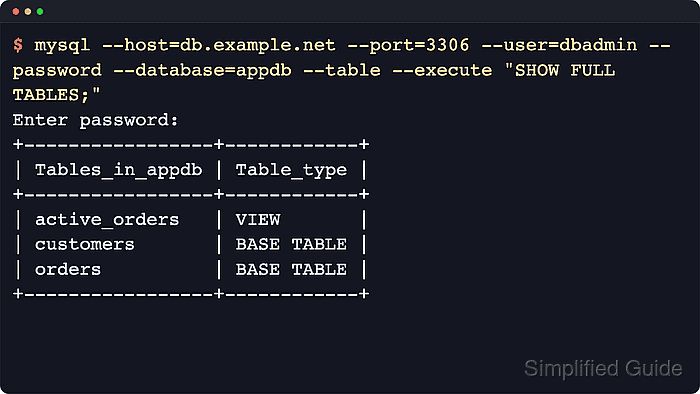
MySQL and MariaDB expose non-temporary database objects through SHOW TABLES, and SHOW FULL TABLES adds a Table_type column so base tables can be separated from views. MariaDB can also return sequences in the same list, while MySQL can show system views when querying system schemas; information_schema.TABLES exposes the catalog through regular SQL with TABLE_NAME and TABLE_TYPE columns.
Results are scoped to the connected account, so an empty list can mean missing privileges as easily as an empty schema. The examples use explicit host, port, and database options so the same pattern works in remote sessions and scripts; keep --password without a value so the client prompts instead of exposing credentials in shell history or process listings.
Steps to list tables in MySQL or MariaDB:
- Open a terminal session that can reach the database server.
- List the visible object names in one database.
$ mysql --host=db.example.net --port=3306 --user=dbadmin --password --database=appdb --table --execute "SHOW TABLES;"
Enter password:
+-----------------+
| Tables_in_appdb |
+-----------------+
| active_orders   |
| customers       |
| orders          |
+-----------------+
Use --password so the client prompts. Avoid --password=secret because command-line passwords can be exposed through shell history and process listings.
On current MariaDB systems, mariadb is the primary client name and a mysql symlink is usually available on Unix. SHOW TABLES can include views, and current MariaDB releases can also show sequences.
- List names from a specific schema without setting a default database for the whole client session.
$ mysql --host=db.example.net --port=3306 --user=dbadmin --password --table --execute "SHOW TABLES FROM appdb;"
Enter password:
+-----------------+
| Tables_in_appdb |
+-----------------+
| active_orders   |
| customers       |
| orders          |
+-----------------+
In an interactive session, the same result comes from USE appdb; followed by SHOW TABLES;.
- Filter the list by name pattern when only one prefix or object family matters.
$ mysql --host=db.example.net --port=3306 --user=dbadmin --password --table --execute "SHOW TABLES FROM appdb LIKE 'ord%';"
Enter password:
+------------------------+
| Tables_in_appdb (ord%) |
+------------------------+
| orders                 |
+------------------------+
LIKE uses SQL wildcards: '%' matches any number of characters and '_' matches exactly one character.
- Show object type so base tables can be separated from views.
$ mysql --host=db.example.net --port=3306 --user=dbadmin --password --database=appdb --table --execute "SHOW FULL TABLES;"
Enter password:
+-----------------+------------+
| Tables_in_appdb | Table_type |
+-----------------+------------+
| active_orders   | VIEW       |
| customers       | BASE TABLE |
| orders          | BASE TABLE |
+-----------------+------------+
On current MariaDB servers, the same statement can also return SEQUENCE in the Table_type column.
- List only real tables when views or sequences should be excluded.
$ mysql --host=db.example.net --port=3306 --user=dbadmin --password --database=appdb --table --execute "SHOW FULL TABLES WHERE Table_type = 'BASE TABLE';"
Enter password:
+-----------------+------------+
| Tables_in_appdb | Table_type |
+-----------------+------------+
| customers       | BASE TABLE |
| orders          | BASE TABLE |
+-----------------+------------+
An empty result can mean the schema has no base tables or the connected account does not have permission to see them.
- Query information_schema.TABLES when the result needs sorting or additional SQL filtering.
$ mysql --host=db.example.net --port=3306 --user=dbadmin --password --table --execute "SELECT TABLE_NAME, TABLE_TYPE FROM information_schema.TABLES WHERE TABLE_SCHEMA = 'appdb' ORDER BY TABLE_NAME;"
Enter password:
+---------------+------------+
| TABLE_NAME    | TABLE_TYPE |
+---------------+------------+
| active_orders | VIEW       |
| customers     | BASE TABLE |
| orders        | BASE TABLE |
+---------------+------------+
- Verify one exact table exists before using it in a script, migration, or backup selection.
$ mysql --host=db.example.net --port=3306 --user=dbadmin --password --table --execute "SELECT COUNT(*) AS found FROM information_schema.TABLES WHERE TABLE_SCHEMA = 'appdb' AND TABLE_NAME = 'orders' AND TABLE_TYPE = 'BASE TABLE';"
Enter password:
+-------+
| found |
+-------+
|     1 |
+-------+
A value of 0 means the table name is absent, the object is a different type, or the connected account cannot see it.

Mohd Shakir Zakaria is a cloud architect with deep roots in software development and open-source advocacy. Certified in AWS, Red Hat, VMware, ITIL, and Linux, he specializes in designing and managing robust cloud and on-premises infrastructures.


