Hardening a fresh MySQL or MariaDB server removes the default database access that does not belong on a production host, such as anonymous logins, the shared test database, and overly broad administrative access. Running the secure-installation utility before application users and remote clients are added closes those defaults while the server is still in a controlled post-install state.
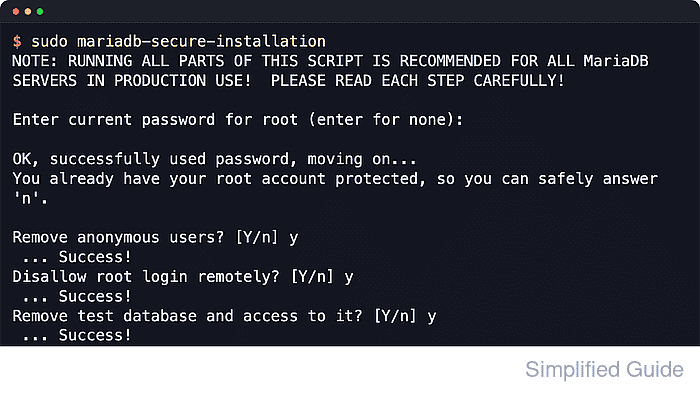
The secure-installation utility connects to the local server and walks through the common post-install lock-down tasks: root authentication, anonymous-user removal, remote root restrictions, test-database removal, and a privilege-table reload. Current MariaDB releases use mariadb-secure-installation, while MySQL uses mysql_secure_installation.
Prompt order and exact wording vary by server family and package source. MariaDB 10.4 and later often start with a root account that is already protected by unix_socket, and current Debian or Ubuntu packages can report that the installation is already secure by default. MySQL can instead ask about the validate_password component and may skip setting a root password when auth_socket authentication is active, so keep local console access available until administrative login still works after the hardening pass.
Steps to secure MySQL or MariaDB installation:
- Open a local console session on the database host with an account that can use sudo.
Run the hardening utility locally, not through an application account or a remote root session that could be disabled before verification is complete.
- Run the secure-installation utility for the server family that is installed.
$ sudo mariadb-secure-installation
NOTE: MariaDB is secure by default in Debian. Running this script is
      useless at best, and misleading at worst. This script will be
      removed in a future MariaDB release in Debian. Please read
      /usr/share/doc/mariadb-server/README.Debian.gz for details.

Enter current password for root (enter for none):

OK, successfully used password, moving on...

Setting the root password or using the unix_socket ensures that nobody
can log into the MariaDB root user without the proper authorisation.

You already have your root account protected, so you can safely answer 'n'.
Switch to unix_socket authentication [Y/n] n
 ... skipping.
You already have your root account protected, so you can safely answer 'n'.
Change the root password? [Y/n] n
 ... skipping.
Remove anonymous users? [Y/n] y
SQL executed without errors!
Disallow root login remotely? [Y/n] y
SQL executed without errors!
Remove test database and access to it? [Y/n] y
 - Dropping test database...
SQL executed without errors!
 - Removing privileges on test database...
SQL executed without errors!
Reload privilege tables now? [Y/n] y
 ... Success!

All done!  If you've completed all of the above steps, your MariaDB
installation should now be secure.
Use sudo mysql_secure_installation on MySQL. Some MariaDB builds still keep mysql_secure_installation as a legacy name, but current Ubuntu MariaDB packages expose only mariadb-secure-installation.
If MySQL installation already assigned or generated a root password, enter that current value at the first prompt instead of pressing Enter.
- Apply the hardening choices intentionally instead of answering every prompt blindly.
Keep anonymous users removed, disallow remote root login, remove the test database, and reload privileges. If MariaDB already protects root with unix_socket and local OS-authenticated administration is acceptable, leaving the socket-authentication and root-password prompts at n preserves that local-only model. If MySQL offers to install the validate_password component, enable it when the server should enforce password-strength rules.
- Confirm that local administrative access still works before leaving the console.
$ sudo mariadb --table -e "SELECT VERSION();"
+------------------------------+
| VERSION()                    |
+------------------------------+
| 11.8.6-MariaDB-5 from Ubuntu |
+------------------------------+
Use sudo mysql in the verification commands on MySQL when the root account still uses socket-based authentication. If the script changed root to password authentication, verify with mysql -u root -p --table -e "SELECT VERSION();" instead.
- Verify that the anonymous accounts were removed.
$ sudo mariadb --table -e "SELECT COUNT(*) AS anonymous_accounts FROM mysql.user WHERE User = '';"
+--------------------+
| anonymous_accounts |
+--------------------+
|                  0 |
+--------------------+
- Verify that root is now limited to the local host.
$ sudo mariadb --table -e "SELECT User, Host FROM mysql.user WHERE User = 'root';"
+------+-----------+
| User | Host      |
+------+-----------+
| root | localhost |
+------+-----------+
Any root row for '%', a remote IP address, or another hostname should be removed or corrected before relying on the hardening pass.
- Check the full root authentication definition when the server is MariaDB.
$ sudo mariadb -e "SHOW CREATE USER 'root'@'localhost'\G"
*************************** 1. row ***************************
CREATE USER for root@localhost: CREATE USER `root`@`localhost` IDENTIFIED VIA mysql_native_password USING 'invalid' OR unix_socket
On MariaDB 10.4 and later, SHOW CREATE USER is more reliable than checking only mysql.user.plugin because the account can still keep unix_socket authentication even when the plugin column shows mysql_native_password. On MySQL, check the active plugin with sudo mysql --table -e "SELECT User, Host, plugin FROM mysql.user WHERE User = 'root';".
- Verify that the test database is gone.
$ sudo mariadb --table -e "SELECT COUNT(*) AS test_schema_count FROM INFORMATION_SCHEMA.SCHEMATA WHERE SCHEMA_NAME = 'test';"
+-------------------+
| test_schema_count |
+-------------------+
|                 0 |
+-------------------+

Mohd Shakir Zakaria is a cloud architect with deep roots in software development and open-source advocacy. Certified in AWS, Red Hat, VMware, ITIL, and Linux, he specializes in designing and managing robust cloud and on-premises infrastructures.


