TLS protects MySQL and MariaDB logins, queries, and result sets from passive capture on any network path between the client and the server. That matters as soon as connections leave the local Unix socket, because plain TCP exposes database credentials and application data to anyone who can observe the traffic.
The server side of a TLS-enabled database connection is controlled by the ssl_ca, ssl_cert, and ssl_key settings. Those files provide the certificate authority chain, the server certificate, and the matching private key that the database process loads during startup, while require_secure_transport blocks plain TCP sessions that do not negotiate TLS first.
Current releases add some shortcuts, but those shortcuts do not remove the need for deliberate certificate management. MySQL can auto-generate certificate files in the data directory when no TLS options are set, and MariaDB 11.4+ can enable verified zero-configuration TLS between current MariaDB clients and servers; a CA-managed certificate with the correct subjectAltName is still the safer choice when clients need predictable host validation, mixed MySQL/MariaDB fleets, or mutual TLS later. Examples below use the common Debian and Ubuntu layout under /etc/mysql/.
Steps to configure MySQL or MariaDB server SSL/TLS:
- Open a terminal session with an account that can use sudo.
- Check the current server TLS state before changing files.
$ mysql -u root -p -e "SHOW GLOBAL VARIABLES WHERE Variable_name IN ('ssl_ca','ssl_cert','ssl_key','require_secure_transport')"Use mariadb instead of mysql on MariaDB packages that do not ship the compatibility client name. Non-empty ssl_ca, ssl_cert, or ssl_key values mean the server already has a configured TLS context.
MySQL can auto-discover ca.pem, server-cert.pem, and server-key.pem in the data directory. Replace those defaults when clients need VERIFY_IDENTITY against a real host name, because the auto-generated MySQL certificates do not carry a host-specific identity for that check.
- Create a directory for CA-managed TLS files.
$ sudo install -d -m 0750 -o mysql -g mysql /etc/mysql/ssl
- Create a local certificate authority and a server certificate with a matching subjectAltName, then inspect the server certificate details before installing it.
$ sudo openssl genrsa -out /etc/mysql/ssl/ca-key.pem 4096
$ sudo openssl req -x509 -new -nodes -key /etc/mysql/ssl/ca-key.pem -sha256 -days 3650 -out /etc/mysql/ssl/ca-cert.pem -subj "/CN=Example Database CA"
$ sudo openssl genrsa -out /etc/mysql/ssl/server-key.pem 2048
$ sudo openssl req -new -key /etc/mysql/ssl/server-key.pem -out /etc/mysql/ssl/server-req.pem -subj "/CN=db.example.net"
$ sudo tee /etc/mysql/ssl/server-ext.cnf >/dev/null <<'EOF'
subjectAltName=DNS:db.example.net,IP:192.0.2.15
extendedKeyUsage=serverAuth
EOF
$ sudo openssl x509 -req -in /etc/mysql/ssl/server-req.pem -CA /etc/mysql/ssl/ca-cert.pem -CAkey /etc/mysql/ssl/ca-key.pem -CAcreateserial -out /etc/mysql/ssl/server-cert.pem -days 3650 -sha256 -extfile /etc/mysql/ssl/server-ext.cnf
Certificate request self-signature ok
subject=CN = db.example.net
Replace db.example.net and 192.0.2.15 with the DNS name and IP address that clients really use. Use a certificate from an internal or public CA instead of a self-signed CA when the environment already has a trusted PKI.
Hostname validation depends on the subjectAltName extension. A Common Name alone is not enough for current TLS client verification.
- Set file ownership and permissions so the database service can read the server key and certificate.
$ sudo chown mysql:mysql /etc/mysql/ssl/server-key.pem /etc/mysql/ssl/server-cert.pem
$ sudo chmod 600 /etc/mysql/ssl/server-key.pem
$ sudo chmod 644 /etc/mysql/ssl/ca-cert.pem /etc/mysql/ssl/server-cert.pem
Protect the CA private key carefully. Move it off the database host after signing if the server does not also act as the certificate authority.
- Create a custom TLS include file for the server.
/etc/mysql/conf.d/ssl.cnf
[mysqld]
ssl_ca=/etc/mysql/ssl/ca-cert.pem
ssl_cert=/etc/mysql/ssl/server-cert.pem
ssl_key=/etc/mysql/ssl/server-key.pem
require_secure_transport=ON
On MariaDB packages for Debian and Ubuntu, create /etc/mysql/mariadb.conf.d/z-custom-my.cnf instead and use a [mariadb] or [server] section. Keep custom TLS settings in a separate include file instead of editing the bundled 50-server.cnf directly.
require_secure_transport=ON rejects unencrypted TCP connections while still allowing secure local transports such as the Unix socket.
- Restart the database service so the new TLS context loads.
$ sudo systemctl restart mysql
Use sudo systemctl restart mariadb on MariaDB packages whose unit name is mariadb.
If the restart fails, inspect sudo journalctl -u mysql -b --no-pager or the MariaDB unit name before retrying. A wrong certificate path or unreadable key file usually prevents startup.
- Confirm that the server is active and that it loaded the TLS files.
$ mysql -u root -p -e "SHOW GLOBAL VARIABLES WHERE Variable_name IN ('ssl_ca','ssl_cert','ssl_key','require_secure_transport')"
Variable_name	Value
require_secure_transport	ON
ssl_ca	/etc/mysql/ssl/ca-cert.pem
ssl_cert	/etc/mysql/ssl/server-cert.pem
ssl_key	/etc/mysql/ssl/server-key.pem
The file paths should match the include file that was just added. Current MySQL releases verify loaded TLS configuration through these variables and the client session status rather than the older have_ssl variable.
- Create a temporary TCP test account.
$ mysql -u root -p -e "CREATE USER 'tlscheck'@'%' IDENTIFIED BY 'StrongPass123'"
Replace StrongPass123 with a unique temporary password. The account needs no application privileges for the session status checks below.
- Verify that a TCP client connection negotiates TLS with server identity checking.
$ mysql --protocol=TCP -h db.example.net --ssl-mode=VERIFY_IDENTITY --ssl-ca=/etc/mysql/ssl/ca-cert.pem -u tlscheck -p -e "SHOW STATUS WHERE Variable_name IN ('Ssl_cipher','Ssl_version')"
Enter password:
Variable_name	Value
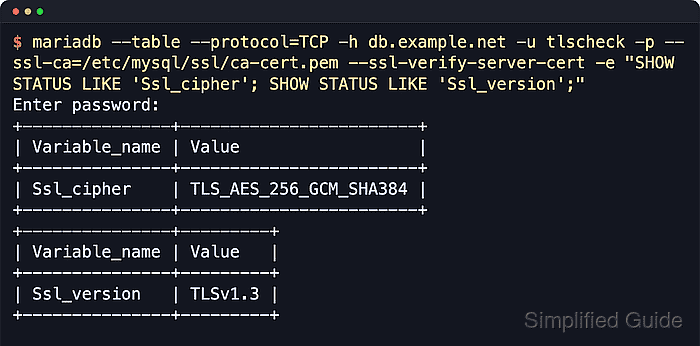
Ssl_cipher	TLS_AES_128_GCM_SHA256
Ssl_version	TLSv1.3
On current MariaDB clients, the equivalent check is typically mariadb --protocol=TCP -h db.example.net --ssl-ca=/etc/mysql/ssl/ca-cert.pem --ssl-verify-server-cert -u tlscheck -p -e "SHOW STATUS WHERE Variable_name IN ('Ssl_cipher','Ssl_version')".
If Ssl_cipher is empty, the connection is not using TLS. Re-check the certificate paths, the server restart, and whether the client connected over TCP instead of the local socket.
- Verify that plain TCP is rejected by the server transport policy.
$ mysql --protocol=TCP -h db.example.net --ssl-mode=DISABLED --get-server-public-key -u tlscheck -p -e "SELECT 1"
Enter password:
ERROR 3159 (HY000): Connections using insecure transport are prohibited while --require_secure_transport=ON.
--get-server-public-key lets current MySQL clients using caching_sha2_password reach the transport-policy error during this negative test. If the client reports a different authentication-level error first, the important result is still that an unencrypted TCP session cannot log in.
- Remove the temporary account when the test is complete.
$ mysql -u root -p -e "DROP USER 'tlscheck'@'%'"
To keep encryption mandatory for a real application account, use ALTER USER 'app'@'%' REQUIRE SSL; or stronger certificate-based requirements such as REQUIRE X509.

Mohd Shakir Zakaria is a cloud architect with deep roots in software development and open-source advocacy. Certified in AWS, Red Hat, VMware, ITIL, and Linux, he specializes in designing and managing robust cloud and on-premises infrastructures.


