Role-based access keeps repeated schema privileges in one reusable place, but the grant only helps when the role is attached to the right account and active in the session that needs it. A user can own a role grant without currently using that role, so access reviews need to check the role's privileges, the user's role assignment, and the user's default or current role state.
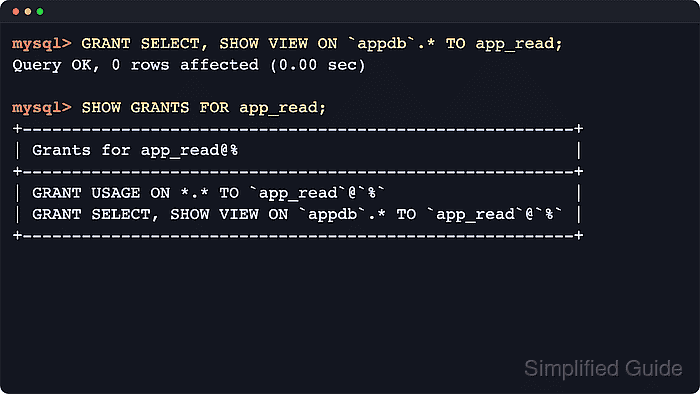
In MySQL and MariaDB, a role holds privileges while each login remains a separate 'user'@'host' account. The normal flow is to create the role, grant schema privileges to the role, grant the role to the user, and set a default role when the account should receive that access immediately after login.
The examples use schema appdb, roles app_read and app_write, and user appuser@'%'. MySQL displays hostless role names as `role`@`%` and uses SET DEFAULT ROLE ... TO, while MariaDB displays hostless roles without the host suffix and uses SET DEFAULT ROLE ... FOR. Keep role grants to one role per statement so the workflow stays portable across both engines.
Related: How to grant privileges to a MySQL or MariaDB user
Related: How to view permissions for a MySQL or MariaDB user
Example identifiers in steps: schema appdb, roles app_read and app_write, user appuser@'%'.
Steps to create and manage roles in MySQL or MariaDB:
- Connect with an administrative account in the mysql or mariadb client.
$ mysql -u root -p
Enter password:
mysql>
Some Linux installations authenticate the local administrator through the Unix socket, so sudo mysql or sudo mariadb can be the expected entry point.
- Create the roles that will hold the shared privilege sets.
mysql> CREATE ROLE app_read, app_write;
Query OK, 0 ROWS affected (0.01 sec)
Hostless role names keep the syntax short. MySQL stores them with an internal '%' host part, while MariaDB usually displays only the role name.
- Grant read-only schema access to the read role.
mysql> GRANT SELECT, SHOW VIEW ON `appdb`.* TO app_read;
Query OK, 0 ROWS affected (0.00 sec)
Grant schema-level privileges such as `appdb`.* instead of *.* whenever the role does not need server-wide access.
- Grant write privileges to the write role.
mysql> GRANT SELECT, INSERT, UPDATE, DELETE ON `appdb`.* TO app_write;
Query OK, 0 ROWS affected (0.00 sec)
Adding global privileges or WITH GRANT OPTION to an application role expands the impact if that account is compromised.
- Create the user account that will receive the roles.
mysql> CREATE USER 'appuser'@'%' IDENTIFIED BY 'RolePass123!';
Query OK, 0 ROWS affected (0.00 sec)
Replace the example password and narrow the host component to a specific host or subnet whenever possible instead of leaving '%' in production.
- Grant the read role to the user account.
mysql> GRANT app_read TO 'appuser'@'%';
Query OK, 0 ROWS affected (0.00 sec)
- Grant the write role to the user account.
mysql> GRANT app_write TO 'appuser'@'%';
Query OK, 0 ROWS affected (0.00 sec)
MySQL accepts comma-separated role lists in this statement, but using one GRANT role TO user statement per role avoids MariaDB syntax differences.
- Set the default role that should activate when the user signs in.
MySQL:
mysql> SET DEFAULT ROLE app_read TO 'appuser'@'%';
Query OK, 0 ROWS affected (0.00 sec)

MariaDB:
mysql> SET DEFAULT ROLE app_read FOR 'appuser'@'%';
Query OK, 0 ROWS affected (0.00 sec)
Use SET DEFAULT ROLE NONE to stop automatic role activation, or SET ROLE DEFAULT inside a session to return to the account's default role.
- Inspect the privileges stored on the role itself.
mysql> SHOW GRANTS FOR app_read;
+--------------------------------------------------------+
| Grants FOR app_read@%                                  |
+--------------------------------------------------------+
| GRANT USAGE ON *.* TO `app_read`@`%`                   |
| GRANT SELECT, SHOW VIEW ON `appdb`.* TO `app_read`@`%` |
+--------------------------------------------------------+
2 ROWS IN SET (0.00 sec)
MariaDB shows the same role without the host suffix, for example Grants for app_read, but the schema privileges are the same.
- Inspect the role grants attached to the user account.
mysql> SHOW GRANTS FOR 'appuser'@'%';
+-------------------------------------------------------+
| Grants FOR appuser@%                                  |
+-------------------------------------------------------+
| GRANT USAGE ON *.* TO `appuser`@`%`                   |
| GRANT `app_read`@`%`,`app_write`@`%` TO `appuser`@`%` |
+-------------------------------------------------------+
2 ROWS IN SET (0.00 sec)
MariaDB usually shows one role grant per line and also records the default role as SET DEFAULT ROLE `app_read` FOR `appuser`@`%`. Redact any IDENTIFIED BY PASSWORD hash before sharing grant output.
- Open a new client session as the user account.
$ mysql -u appuser -p
Enter password:
mysql>
- Confirm that the default role is active.
mysql> SELECT CURRENT_ROLE();
+----------------+
| CURRENT_ROLE() |
+----------------+
| `app_read`@`%` |
+----------------+
1 ROW IN SET (0.00 sec)
MariaDB returns the same active role as app_read without the host component.
- Switch to the write role for the current session.
mysql> SET ROLE app_write;
Query OK, 0 ROWS affected (0.00 sec)
MariaDB keeps one current role at a time. MySQL can activate several granted roles when they are listed explicitly, but one active role per step is easier to verify across both engines.
- Confirm that the write role is active.
mysql> SELECT CURRENT_ROLE();
+-----------------+
| CURRENT_ROLE()  |
+-----------------+
| `app_write`@`%` |
+-----------------+
1 ROW IN SET (0.00 sec)
Use SET ROLE NONE to disable all granted roles for the current session, or SET ROLE DEFAULT to re-apply the account's default role.
- Create the account that will be allowed to delegate a role.
mysql> CREATE USER 'delegator'@'%' IDENTIFIED BY 'RolePass123!';
Query OK, 0 ROWS affected (0.00 sec)
Use a separate administrative account for delegation instead of giving normal application accounts role-management authority.
- Grant the role with administrative delegation rights.
mysql> GRANT app_read TO 'delegator'@'%' WITH ADMIN OPTION;
Query OK, 0 ROWS affected (0.00 sec)
WITH ADMIN OPTION lets that account grant or revoke the role for other users, so treat it like an administrative permission rather than normal application access.
- Revoke a role from the user when access is no longer required.
mysql> REVOKE app_write FROM 'appuser'@'%';
Query OK, 0 ROWS affected (0.00 sec)
Role revocation can break application sessions when the role provides privileges required by the workload.
- Verify that the revoked role no longer appears on the account.
mysql> SHOW GRANTS FOR 'appuser'@'%';
+---------------------------------------+
| Grants FOR appuser@%                  |
+---------------------------------------+
| GRANT USAGE ON *.* TO `appuser`@`%`   |
| GRANT `app_read`@`%` TO `appuser`@`%` |
+---------------------------------------+
2 ROWS IN SET (0.00 sec)
MariaDB can still show the default-role line for the remaining default role. Clear it with SET DEFAULT ROLE NONE FOR 'appuser'@'%' before removing the role that is still set as default.
- Drop a role that is no longer needed.
mysql> DROP ROLE app_write;
Query OK, 0 ROWS affected (0.00 sec)
Dropping a role removes that role from every account that had it granted.

Mohd Shakir Zakaria is a cloud architect with deep roots in software development and open-source advocacy. Certified in AWS, Red Hat, VMware, ITIL, and Linux, he specializes in designing and managing robust cloud and on-premises infrastructures.


