Reviewing an account's grants is the quickest way to explain access-denied errors, unexpected schema visibility, or application credentials that can do more than intended.
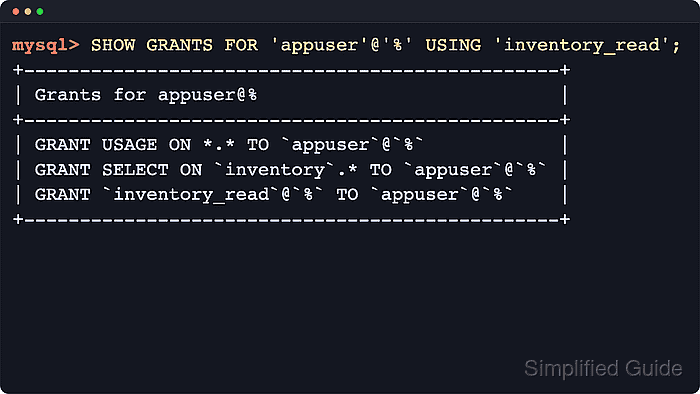
In MySQL and MariaDB, privileges belong to the full account identity written as 'user'@'host', not just the username. SHOW GRANTS returns the statements that recreate that account's access. MySQL can expand granted roles with the USING clause, while MariaDB shows the role's own privileges when the role is queried with SHOW GRANTS.
The most common mistakes are checking the wrong host-qualified account, assuming a role grant includes the role's schema or table privileges inline, or using an account that is not allowed to inspect other users. Managed services can restrict reads from the mysql system schema, MySQL 8.4 now lists individual global privileges for powerful accounts instead of a single ALL PRIVILEGES line, and MariaDB can include password hashes in grant text.
Steps to view permissions for a MySQL or MariaDB user:
- Connect to the server with the mysql or mariadb client using an account that can inspect grants.
$ mysql -h host.example.net -u auditor -p
Enter password:
Welcome to the MySQL monitor.  Commands end with ; or \g.
Your MySQL connection id is 75
Server version: 8.4.8 MySQL Community Server - GPL
##### snipped #####
mysql>
Some installations authenticate administrative access through the local Unix socket, so sudo mysql can replace mysql -u root -p or mariadb -u root -p.
- If the host portion is unknown and the connected account can read the mysql system schema, list the matching account entries.
mysql> SELECT User, Host FROM mysql.user WHERE User = 'appuser' ORDER BY Host;
+---------+-----------+
| User    | Host      |
+---------+-----------+
| appuser | %         |
| appuser | localhost |
+---------+-----------+
2 rows in set (0.00 sec)
Privileges apply to the exact 'user'@'host' pair, so 'appuser'@'localhost', 'appuser'@'192.0.2.%', and 'appuser'@'%' can each return different grant sets.
If the exact host is already known, skip this query and go straight to SHOW GRANTS. Managed services may block direct reads from mysql.user.
- Display the grants for the exact account entry.
mysql> SHOW GRANTS FOR 'appuser'@'%';
+---------------------------------------------+
| Grants for appuser@%                        |
+---------------------------------------------+
| GRANT USAGE ON *.* TO `appuser`@`%`         |
| GRANT `inventory_read`@`%` TO `appuser`@`%` |
+---------------------------------------------+
2 rows in set (0.00 sec)
GRANT USAGE ON *.* confirms that the account exists even when it has no direct schema privileges. If the host portion is omitted, both MySQL and MariaDB default it to '%', but using the full 'user'@'host' form avoids inspecting the wrong account.
MariaDB can include IDENTIFIED BY PASSWORD hashes in SHOW GRANTS output. Redact those lines before sharing logs, tickets, or screenshots.
- Expand role-based access when the output shows only role assignments.
mysql> SHOW GRANTS FOR 'appuser'@'%' USING 'inventory_read';
+------------------------------------------------+
| Grants for appuser@%                           |
+------------------------------------------------+
| GRANT USAGE ON *.* TO `appuser`@`%`            |
| GRANT SELECT ON `inventory`.* TO `appuser`@`%` |
| GRANT `inventory_read`@`%` TO `appuser`@`%`    |
+------------------------------------------------+
3 rows in set (0.00 sec)
Use the USING clause in MySQL to expand one or more granted roles inline. MariaDB does not use that SHOW GRANTS form; inspect the role itself with SHOW GRANTS FOR inventory_read; to see the schema or table privileges granted to that role.
- Show the grants for the account behind the current session when troubleshooting the active connection.
mysql> SHOW GRANTS FOR CURRENT_USER();
+-------------------------------------------------+
| Grants for auditor@%                            |
+-------------------------------------------------+
| GRANT USAGE ON *.* TO `auditor`@`%`             |
| GRANT SELECT ON `mysql`.* TO `auditor`@`%`      |
+-------------------------------------------------+
2 rows in set (0.00 sec)
SHOW GRANTS, SHOW GRANTS FOR CURRENT_USER, and SHOW GRANTS FOR CURRENT_USER(); are equivalent for the connected account. In MariaDB, root often still appears as GRANT ALL PRIVILEGES, while MySQL 8.4 expands global administrator privileges into a longer explicit list.
- Confirm the grant lines match the access being audited, then exit the client.
mysql> exit
Bye

Mohd Shakir Zakaria is a cloud architect with deep roots in software development and open-source advocacy. Certified in AWS, Red Hat, VMware, ITIL, and Linux, he specializes in designing and managing robust cloud and on-premises infrastructures.


