Use the query cache only when a MariaDB or legacy MySQL server repeatedly serves identical SELECT statements from read-mostly tables. In that narrow workload, the server can return a cached result from memory instead of parsing and executing the same statement again, which can reduce latency for hot lookup queries.
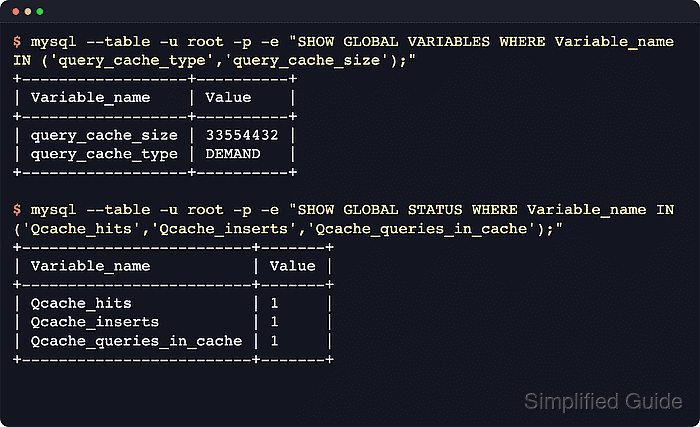
The cache matches the exact SQL text and invalidates cached results when a referenced table changes, so it fits predictable queries against tables that rarely change. Different statement text, a different default database, a different protocol version, or a different default character set creates a separate cache entry.
Current MySQL 8.x releases removed query cache support, and MySQL 8.4 also removed the SQL_CACHE modifier. On MariaDB or older MySQL builds that still expose the cache, start with a support check, keep the cache small, prefer DEMAND mode so only statements marked with SQL_CACHE use it, and watch Qcache counters for churn, pruning, and misses instead of assuming a larger cache will help.
Steps to optimize query cache in MariaDB or legacy MySQL:
- Confirm that the running server still exposes query cache support before tuning it.
$ mysql --table -u root -p -e "SHOW VARIABLES WHERE Variable_name IN ('have_query_cache','query_cache_type','query_cache_size','query_cache_limit');"
+-------------------+----------+
| Variable_name     | Value    |
+-------------------+----------+
| have_query_cache  | YES      |
| query_cache_limit | 1048576  |
| query_cache_size  | 1048576  |
| query_cache_type  | OFF      |
+-------------------+----------+
Stop if the command returns no rows or if have_query_cache is not YES. MySQL 8.0 and newer do not expose query-cache variables, so do not add query_cache_* settings to those servers.
- Baseline the current query cache settings and counters before changing them.
$ mysql --table -u root -p -e "SHOW VARIABLES WHERE Variable_name IN ('query_cache_type','query_cache_size','query_cache_limit','query_cache_min_res_unit'); SHOW GLOBAL STATUS WHERE Variable_name IN ('Qcache_hits','Qcache_inserts','Qcache_not_cached','Qcache_lowmem_prunes','Qcache_queries_in_cache');"
+--------------------------+---------+
| Variable_name            | Value   |
+--------------------------+---------+
| query_cache_limit        | 1048576 |
| query_cache_min_res_unit | 4096    |
| query_cache_size         | 1048576 |
| query_cache_type         | OFF     |
+--------------------------+---------+
+-------------------------+-------+
| Variable_name           | Value |
+-------------------------+-------+
| Qcache_hits             | 0     |
| Qcache_inserts          | 0     |
| Qcache_lowmem_prunes    | 0     |
| Qcache_not_cached       | 0     |
| Qcache_queries_in_cache | 0     |
+-------------------------+-------+
Run this before and after representative application traffic. Flat Qcache_hits, rising Qcache_not_cached, or frequent Qcache_lowmem_prunes usually means the workload is a poor fit for query caching.
- Add conservative query cache settings under [mysqld] in the server option file.
[mysqld]
query_cache_type = DEMAND
query_cache_size = 32M
query_cache_limit = 1M
DEMAND caches only statements marked with SQL_CACHE, which avoids forcing every cacheable SELECT into the query cache. Set query_cache_type and query_cache_size together because a non-zero custom cache size can otherwise enable ON mode at startup in MariaDB.
Keep the cache small because larger query caches increase prune cost and mutex contention on busy write-heavy systems.
- Restart the database service so the new query cache settings apply to fresh sessions.
$ sudo systemctl restart mariadb
Use the installed unit name such as mysql, mariadb, or mysqld.
- Verify the active query cache settings from a new client session.
$ mysql --table -u root -p -e "SHOW VARIABLES WHERE Variable_name IN ('query_cache_type','query_cache_size','query_cache_limit');"
+-------------------+----------+
| Variable_name     | Value    |
+-------------------+----------+
| query_cache_limit | 1048576  |
| query_cache_size  | 33554432 |
| query_cache_type  | DEMAND   |
+-------------------+----------+
The reported size can be rounded to the nearest internal allocation block.
- Run the same cacheable SELECT twice with SQL_CACHE against a stable read-mostly table.
$ mysql --table -u root -p appdb -e "SELECT SQL_CACHE value_text FROM lookup WHERE id = 1; SELECT SQL_CACHE value_text FROM lookup WHERE id = 1; SHOW GLOBAL STATUS WHERE Variable_name IN ('Qcache_hits','Qcache_inserts','Qcache_queries_in_cache');"
+------------+
| value_text |
+------------+
| alpha      |
+------------+
+------------+
| value_text |
+------------+
| alpha      |
+------------+
+-------------------------+-------+
| Variable_name           | Value |
+-------------------------+-------+
| Qcache_hits             | 1     |
| Qcache_inserts          | 1     |
| Qcache_queries_in_cache | 1     |
+-------------------------+-------+
If Qcache_hits stays at 0, the statement may be uncacheable, the table may be changing between runs, or the client session may still be using OFF because a live SET GLOBAL change does not update an already-open session.
- Re-check the query cache counters during representative load and disable the cache if the workload does not benefit from it.
$ mysql --table -u root -p -e "SHOW GLOBAL STATUS WHERE Variable_name IN ('Qcache_hits','Qcache_inserts','Qcache_not_cached','Qcache_lowmem_prunes','Qcache_free_blocks','Qcache_total_blocks');"
+----------------------+-------+
| Variable_name        | Value |
+----------------------+-------+
| Qcache_free_blocks   | 1     |
| Qcache_hits          | 1     |
| Qcache_inserts       | 1     |
| Qcache_lowmem_prunes | 0     |
| Qcache_not_cached    | 0     |
| Qcache_total_blocks  | 4     |
+----------------------+-------+
A cache that helps usually shows rising Qcache_hits with controlled Qcache_lowmem_prunes. If inserts, invalidations, misses, or pruning dominate, switch the cache fully off with query_cache_type = 0 and query_cache_size = 0 instead of continuing to tune it.

Mohd Shakir Zakaria is a cloud architect with deep roots in software development and open-source advocacy. Certified in AWS, Red Hat, VMware, ITIL, and Linux, he specializes in designing and managing robust cloud and on-premises infrastructures.


