Point-in-time recovery restores the last good committed state after an accidental delete, a broken deploy, or an application bug without discarding every write that happened after the last backup. The workflow starts from a clean base backup and replays only the binary-log events that belong before the incident.
The recovery cutoff comes from two coordinates: the file and position recorded with the backup, and the stop time or stop position chosen before the bad transaction. Current MySQL logical dumps created with --source-data=2 record a commented CHANGE REPLICATION SOURCE TO line, current MariaDB dumps created with --master-data=2 still record CHANGE MASTER TO, and physical backups such as mariabackup or xtrabackup keep the same starting point in xtrabackup_binlog_info. mysqlbinlog or mariadb-binlog then turns the retained binary logs into replay SQL for the restore target.
Binary logging must already cover the incident window, and the safest restore target is an isolated host that matches the source product family and major release. If the dump does not include CREATE DATABASE and USE statements, create the target schema before loading it or generate the base dump with --databases. Current MySQL encrypted binary logs and current MariaDB InnoDB-backed binlogs require remote-read mode instead of direct file copies, and time-based stop filters are interpreted in the local time zone of the binlog client rather than the source server.
Prerequisites: a consistent backup taken before the incident, binary logs retained from that backup coordinate through the recovery point, and an isolated restore target running the same major MySQL or MariaDB release family as the source.
Steps to recover a MySQL or MariaDB database to a point in time:
- Identify the source product, current time zone context, and whether binary logging is active.
$ mysql --table -u root -p -e "SELECT NOW() AS source_now, UTC_TIMESTAMP() AS source_utc, @@global.time_zone AS global_tz, @@session.time_zone AS session_tz; SHOW VARIABLES WHERE Variable_name IN ('version','version_comment','log_bin','binlog_encryption','binlog_storage_engine');"
Enter password:
+---------------------+---------------------+-----------+------------+
| source_now          | source_utc          | global_tz | session_tz |
+---------------------+---------------------+-----------+------------+
| 2026-04-10 06:18:02 | 2026-04-10 06:18:02 | UTC       | SYSTEM     |
+---------------------+---------------------+-----------+------------+
+-------------------+------------------------------+
| Variable_name     | Value                        |
+-------------------+------------------------------+
| binlog_encryption | OFF                          |
| log_bin           | ON                           |
| version           | 8.4.9                        |
| version_comment   | MySQL Community Server - GPL |
+-------------------+------------------------------+
Current MySQL 8.4 reports log_bin=ON by default. Many MariaDB installs still report log_bin=OFF until log_bin is configured, and MariaDB 12.3 and newer can also show binlog_storage_engine=innodb when binlogs are stored inside InnoDB instead of ordinary files.
- Choose the recovery boundary before touching the restore host.
Use a recorded UTC stop time in YYYY-MM-DD HH:MM:SS format for a broad recovery window, or a stop position when the last safe event is known exactly. Both mysqlbinlog and mariadb-binlog interpret --start-datetime and --stop-datetime in the local time zone of the client process, not the server that wrote the log.
- List the retained binary logs and note whether the source still exposes file-based logs you can stage locally.
$ mysql --table -u root -p -e "SHOW BINARY LOGS;"
Enter password:
+---------------+-----------+-----------+
| Log_name      | File_size | Encrypted |
+---------------+-----------+-----------+
| binlog.000001 |       181 | No        |
| binlog.000002 |   2997943 | No        |
| binlog.000003 |      1499 | No        |
+---------------+-----------+-----------+
Current MySQL adds the Encrypted column. Current MariaDB omits that column and uses BINLOG MONITOR for SHOW BINARY LOGS. If MySQL shows Encrypted=Yes, or MariaDB is using binlog_storage_engine=innodb, plan to read the logs from the source with mysqlbinlog or mariadb-binlog remote-read mode instead of copying files out of /var/lib/mysql/.
Use
SHOW BINARY LOG STATUS;
on current MySQL or
SHOW BINLOG STATUS;
on current MariaDB when the current writable file and position must be recorded before the bad transaction lands.
- Create a restore workspace on the isolated recovery host.
$ sudo mkdir -p /root/sg-work/pitr/binlogs
- Copy or restore the base backup into that workspace.
$ cp /root/sg-work/backups/mysql/full-2026-04-10.sql.gz /root/sg-work/pitr/
Use the logical dump, physical backup set, or snapshot export that was taken before the incident. Keep any sidecar metadata such as xtrabackup_binlog_info or backup manifests beside the restore payload.
- Decompress the backup when it was stored as a compressed SQL dump.
$ gzip -dk /root/sg-work/pitr/full-2026-04-10.sql.gz
- Extract the recorded binary-log start coordinate from the backup metadata.
$ grep "CHANGE REPLICATION SOURCE TO" /root/sg-work/pitr/full-2026-04-10.sql
-- CHANGE REPLICATION SOURCE TO SOURCE_LOG_FILE='binlog.000003', SOURCE_LOG_POS=1182;
Current MySQL logical dumps created with --source-data=2 record CHANGE REPLICATION SOURCE TO. For a current MariaDB dump created with --master-data=2, search the same file for CHANGE MASTER TO instead. mariabackup and xtrabackup store the same file name and position in
xtrabackup_binlog_info
.
- Stage the required binary logs locally when the source uses readable binlog files.
$ cp /var/lib/mysql/binlog.000003 /root/sg-work/pitr/binlogs/
Use the actual file names reported by SHOW BINARY LOGS. Skip the file copy when the logs are encrypted on MySQL or stored with binlog_storage_engine=innodb on MariaDB, and read them from the source instead.
For remote reads, use mysqlbinlog –read-from-remote-server on MySQL or mariadb-binlog –read-from-remote-server on MariaDB. Current MySQL documentation recommends TLS verification such as --ssl-mode=VERIFY_CA or --ssl-mode=VERIFY_IDENTITY for that connection.
- Confirm the restore target is the correct product family and major version before importing anything.
$ mysql --table -u root -p -e "SELECT VERSION() AS version, @@version_comment AS version_comment;"
Enter password:
+---------+------------------------------+
| version | version_comment              |
+---------+------------------------------+
| 8.4.9   | MySQL Community Server - GPL |
+---------+------------------------------+
Loading a backup or replay file into the wrong server, or into a mismatched product family or major release, can change SQL mode behavior, collation handling, GTID state, or row-event decoding.
- Import the base backup into the isolated restore target.
$ mysql -u root -p < /root/sg-work/pitr/full-2026-04-10.sql
Enter password:
Run the import only against the disposable restore target. Point-in-time recovery destroys evidence if the replay is applied to the production source by mistake.
If the logical dump was created without --databases or --all-databases, create the target schema first or load the file into an already-selected database. A blank server has no current database for table-only dumps.
If the base backup is a recent MariaDB logical dump that begins with the sandbox-mode header, load it with mariadb instead of an older mysql client.
- Generate the replay SQL from the recorded start position up to the chosen stop time or stop position.
$ TZ=UTC mysqlbinlog --disable-log-bin --start-position=1182 --stop-position=1499 /root/sg-work/pitr/binlogs/binlog.000003 > /root/sg-work/pitr/replay.sql
Use mariadb-binlog instead of mysqlbinlog on current MariaDB hosts, even though some distributions still provide mysqlbinlog as a compatibility symlink.
Keep multiple log files in order when the recovery spans more than one file. --start-position applies to the first named file, and --stop-position applies to the last named file. Use --stop-datetime when the recovery time is known, or --stop-position when the final safe event is known exactly.
If direct file copies are not possible, keep the same start and stop options but replace the local file path with --read-from-remote-server --host ... --user ... and the binlog file name reported by SHOW BINARY LOGS.
- Preview the selected binary-log range and confirm it ends at the intended safe event.
$ mysqlbinlog --start-position=1182 --stop-position=1499 /root/sg-work/pitr/binlogs/binlog.000003
/*!50530 SET @@SESSION.PSEUDO_SLAVE_MODE=1*/;
/*!40019 SET @@session.max_delayed_threads=0*/;
/*!50003 SET @OLD_COMPLETION_TYPE=@@COMPLETION_TYPE,COMPLETION_TYPE=0*/;
DELIMITER /*!*/;
##### snipped
# at 1468
#260410  6:18:05 server id 101  end_log_pos 1499 CRC32 0xcca3108f 	Xid = 56
COMMIT/*!*/;
DELIMITER ;
# End of log file
ROLLBACK /* added by mysqlbinlog */;
/*!50003 SET COMPLETION_TYPE=@OLD_COMPLETION_TYPE*/;
/*!32316 SET SQL_LOG_BIN=@OLD_SQL_LOG_BIN*/;
/*!50530 SET @@SESSION.PSEUDO_SLAVE_MODE=0*/;
If the preview already includes the destructive DROP, DELETE, or broken deploy transaction you are trying to avoid, regenerate the replay file with an earlier stop time or stop position.
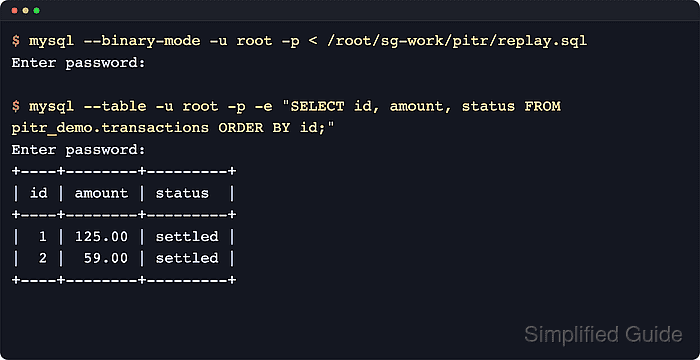
- Apply the replay SQL to advance the restored data to the selected point in time.
$ mysql --binary-mode -u root -p < /root/sg-work/pitr/replay.sql
Enter password:
Current MySQL documentation requires --binary-mode when the mysqlbinlog output contains null bytes. Use the matching client on MariaDB, for example
mariadb --binary-mode -u root -p < /root/sg-work/pitr/replay.sql
.
--disable-log-bin in the previous step keeps the replay session from writing the recovered statements into a new binary-log history on the restore target.
- Verify the recovered application state with focused queries against the affected schema or tables.
$ mysql --table -u root -p -e "SELECT id, amount, status FROM pitr_demo.transactions ORDER BY id;"
Enter password:
+----+--------+---------+
| id | amount | status  |
+----+--------+---------+
|  1 | 125.00 | settled |
|  2 |  59.00 | settled |
+----+--------+---------+
Use a query that proves the incident is gone and the expected good writes are still present, such as the last safe order ID, the restored row count, or the absence of a dropped table.
- Freeze the restored target against casual writes while validation continues.
$ mysql -u root -p -e "SET GLOBAL read_only=ON;"
Enter password:
Current MySQL can also use
SET GLOBAL super_read_only=ON;
to reduce accidental privileged writes. Keep application traffic off the restored host until validation and cutover planning are complete.
- Take a fresh backup of the recovered state and record the recovery metadata.
$ mysqldump -u backup -p --single-transaction --routines --triggers --events --all-databases > /root/sg-work/pitr/post-pitr.sql
Enter password:
Record the chosen stop time or stop position, the starting file and position from the backup, every binlog file included in the replay, and any product-specific caveat such as encrypted MySQL logs or MariaDB InnoDB-based binlogs.

Mohd Shakir Zakaria is a cloud architect with deep roots in software development and open-source advocacy. Certified in AWS, Red Hat, VMware, ITIL, and Linux, he specializes in designing and managing robust cloud and on-premises infrastructures.


