Enabling innodb_file_per_table keeps new InnoDB tables out of the shared system tablespace. Each table gets its own tablespace file, so table-level storage is easier to inspect and dropped or rebuilt tables can return space to the operating system instead of leaving reusable space inside a single shared file.
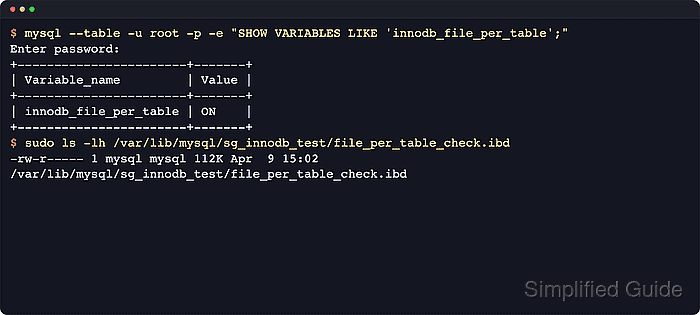
The setting is a global server variable read by mysqld or mariadbd at startup and available at runtime through SHOW VARIABLES and SET GLOBAL. When it is ON, new InnoDB tables usually create a matching .ibd file inside the schema directory under the server datadir. Tables that were created while the setting was OFF keep their original layout until they are rebuilt or moved.
Current MySQL and MariaDB releases already default to ON, and MariaDB 11.0.1 and later mark disabling the variable as deprecated. An explicit option-file override is still useful on hosts that previously disabled the setting or where configuration drift must be removed. Changing the runtime value requires an account that can modify global settings, and moving older tables into per-table tablespaces can be slow, space-hungry, and disruptive on busy systems.
Steps to enable innodb_file_per_table in MySQL or MariaDB:
- Connect with an account that can change global variables.
Examples below use mysql. On some MariaDB systems, the client command is mariadb instead. When root uses socket authentication, sudo mysql can replace mysql -u root -p.
- Check the current runtime value.
$ mysql --table -u root -p --execute "SHOW VARIABLES LIKE 'innodb_file_per_table';"
Enter password:
+-----------------------+-------+
| Variable_name         | Value |
+-----------------------+-------+
| innodb_file_per_table | ON    |
+-----------------------+-------+
- Enable the variable immediately when it is currently OFF.
$ mysql -u root -p --execute "SET GLOBAL innodb_file_per_table = ON;"
Enter password:
The runtime change affects new InnoDB tables right away. Existing tables that were created while the setting was OFF remain in their current tablespace until they are rebuilt or moved.
- Verify the runtime value again.
$ mysql --table -u root -p --execute "SHOW VARIABLES LIKE 'innodb_file_per_table';"
Enter password:
+-----------------------+-------+
| Variable_name         | Value |
+-----------------------+-------+
| innodb_file_per_table | ON    |
+-----------------------+-------+
- Check which option files the server reads at startup.
$ mysqld --verbose --help
mysqld  Ver 8.4.9 for Linux on aarch64 (MySQL Community Server - GPL)
##### snipped #####

Usage: mysqld [OPTIONS]

Default options are read from the following files in the given order:
/etc/my.cnf /etc/mysql/my.cnf /usr/etc/my.cnf ~/.my.cnf
The following groups are read: mysql_cluster mysqld server mysqld-8.4
The following options may be given as the first argument:
--print-defaults        Print the program argument list and exit.
--no-defaults           Don't read default options from any option file,
                        except for login file.
##### snipped #####
On MariaDB, mariadbd --verbose --help may be clearer. The output often points to drop-in directories such as /etc/mysql/mariadb.conf.d/ and /etc/mysql/conf.d/.
- Create a drop-in option file that keeps the setting enabled after restarts.
$ sudo tee /etc/mysql/conf.d/innodb-file-per-table.cnf >/dev/null <<'EOF'
[mysqld]
innodb_file_per_table=ON
EOF
Use a directory that is actually included on the server. Common alternatives are /etc/my.cnf.d/ and /etc/mysql/mariadb.conf.d/.
The running server already uses the value set with SET GLOBAL. This option file keeps the same behavior after the next service restart or host reboot.
- Confirm the option file content.
$ sudo cat /etc/mysql/conf.d/innodb-file-per-table.cnf
[mysqld]
innodb_file_per_table=ON
A typo or placing the directive outside [mysqld] can prevent the database service from starting cleanly after the next restart.
- Create a small test table after innodb_file_per_table is ON.
$ mysql -u root -p --execute "CREATE DATABASE IF NOT EXISTS sg_innodb_test; DROP TABLE IF EXISTS sg_innodb_test.file_per_table_check; CREATE TABLE sg_innodb_test.file_per_table_check (id INT PRIMARY KEY) ENGINE=InnoDB;"
Enter password:
- Check the server datadir so the expected tablespace path is clear.
$ mysql --table -u root -p --execute "SHOW VARIABLES LIKE 'datadir';"
Enter password:
+---------------+-----------------+
| Variable_name | Value           |
+---------------+-----------------+
| datadir       | /var/lib/mysql/ |
+---------------+-----------------+
- Confirm that the new table created its own .ibd file.
$ sudo ls -lh /var/lib/mysql/sg_innodb_test/file_per_table_check.ibd
-rw-r----- 1 mysql mysql 112K Jun  6 12:55 /var/lib/mysql/sg_innodb_test/file_per_table_check.ibd
The schema directory is the database name under datadir, and the tablespace file usually matches the table name with an .ibd suffix.
- Remove the test schema after validation.
$ mysql -u root -p --execute "DROP DATABASE sg_innodb_test;"
Enter password:
- Move older tables that were created while innodb_file_per_table was OFF into per-table tablespaces.
$ mysql -u root -p --execute "ALTER TABLE appdb.orders TABLESPACE=innodb_file_per_table;"
Enter password:
On MariaDB, rebuild the table with ALTER TABLE appdb.orders ENGINE=InnoDB; after the variable is ON.
Moving or rebuilding a large table can take time, consume extra disk space, and hold blocking locks depending on server version, table structure, and workload. Schedule the change during a maintenance window and confirm backups first.

Mohd Shakir Zakaria is a cloud architect with deep roots in software development and open-source advocacy. Certified in AWS, Red Hat, VMware, ITIL, and Linux, he specializes in designing and managing robust cloud and on-premises infrastructures.


