A MySQL or MariaDB backup drill protects recovery work from first-use surprises because the dump has to be created, imported into an isolated target, and queried before the backup procedure can be trusted.
The drill uses the same logical backup tools as a normal recovery path. MariaDB hosts should pair mariadb-dump with the mariadb client, while MySQL hosts should pair mysqldump with the mysql client, especially when recent MariaDB dump files include a sandbox-mode header that older MySQL clients cannot load.
Restore the drill into a disposable database name or a separate test server, never over the production schema. Use a table that always contains business data for the row-count comparison, match the source character set and collation when creating the restore target, and schedule a quiet window when the source contains non-transactional tables that --single-transaction cannot snapshot consistently.
Steps to run a MySQL or MariaDB backup and restore drill:
- Create a private directory for the drill artifacts.
$ install -d -m 0700 ~/mysql-drill
- Query a source table that should survive the restore.
$ mariadb --user=root --password -e "SELECT COUNT(*) AS source_rows FROM appdb.orders"
Enter password:
source_rows
3
Use mysql instead of mariadb on a MySQL server, and replace appdb.orders with a table that should always exist in the application database.
- Dump the source database into the drill directory.
$ mariadb-dump --user=dbbackup --password --single-transaction --quick --routines --events --triggers appdb > ~/mysql-drill/appdb-drill.sql
Enter password:
Use mysqldump instead of mariadb-dump on MySQL hosts. This example omits --databases so the dump can be imported into a differently named restore database.
--single-transaction is intended for transactional tables such as InnoDB. If the database includes MyISAM, MEMORY, or other non-transactional tables, pause writes or use the locking method approved for that application before taking the drill dump.
- Confirm that the dump file was written.
$ ls -lh ~/mysql-drill/appdb-drill.sql
-rw-r--r-- 1 dbadmin dbadmin 2.8K Jun  6 20:38 /home/dbadmin/mysql-drill/appdb-drill.sql
- Create an empty disposable database for the restore test.
$ mariadb --user=root --password -e "CREATE DATABASE appdb_restore_drill CHARACTER SET utf8mb4 COLLATE utf8mb4_unicode_ci"
Enter password:
Use a restore name that cannot be confused with production data. The restore command in the next step writes immediately to the database named on the client command line.
- Import the dump into the disposable restore database.
$ mariadb --user=root --password appdb_restore_drill < ~/mysql-drill/appdb-drill.sql
Enter password:
If the dump begins with a recent MariaDB sandbox-mode header, restore it with mariadb rather than an older mysql client.
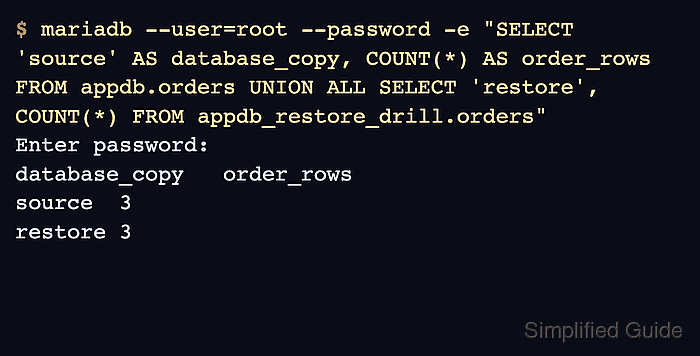
- Compare row counts between the source and restored table.
$ mariadb --user=root --password -e "SELECT 'source' AS database_copy, COUNT(*) AS order_rows FROM appdb.orders UNION ALL SELECT 'restore', COUNT(*) FROM appdb_restore_drill.orders"
Enter password:
database_copy	order_rows
source	3
restore	3
- Check the restored table for storage-engine errors.
$ mariadb --user=root --password -e "CHECK TABLE appdb_restore_drill.orders"
Enter password:
Table	Op	Msg_type	Msg_text
appdb_restore_drill.orders	check	status	OK
A stronger drill can add application-specific queries, stored routine calls, or a temporary application connection string that points only at appdb_restore_drill.
- Remove the disposable restore database after recording the drill evidence.
$ mariadb --user=root --password -e "DROP DATABASE appdb_restore_drill"
Enter password:
Do not run this cleanup against the source database. Keep the dump file and the row-count evidence according to the retention policy for restore drills.

Mohd Shakir Zakaria is a cloud architect with deep roots in software development and open-source advocacy. Certified in AWS, Red Hat, VMware, ITIL, and Linux, he specializes in designing and managing robust cloud and on-premises infrastructures.


