Some plots need to present one measurement in two familiar units without duplicating the underlying data. A secondary axis gives readers a converted tick scale while the plotted line remains tied to the original values.
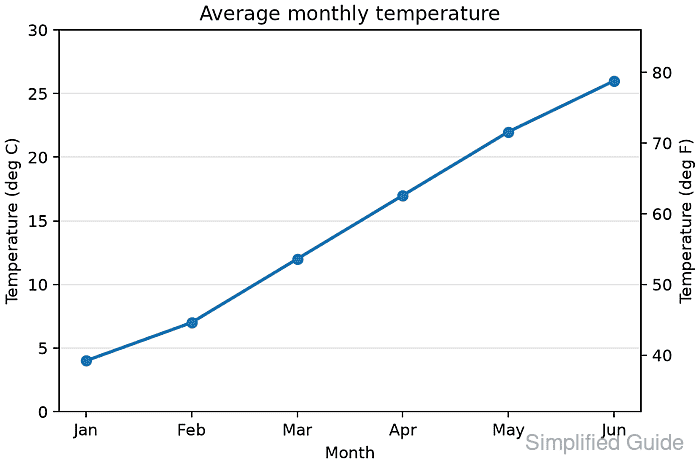
The secondary_yaxis() method creates a child axis whose limits follow the parent through a forward and inverse conversion pair. It suits related scales such as Celsius and Fahrenheit; an unrelated data series belongs on a separate plotting axis instead.
Both conversion functions must accept NumPy arrays and reverse each other across the displayed range. The secondary-axis API remains experimental, so the finished script checks the round trip and the converted limits before saving the figure.
Related: How to set axis labels in Matplotlib
Related: How to set axis limits in Matplotlib
Related: How to fix overlapping labels in Matplotlib
Steps to add a secondary axis in Matplotlib:
- Create secondary_axis_temperature.py with the imports and temperature series.
- secondary_axis_temperature.py
from pathlib import Path

import matplotlib
import matplotlib.pyplot as plt
import numpy as np


months = ["Jan", "Feb", "Mar", "Apr", "May", "Jun"]
temperature_c = np.array([4, 7, 12, 17, 22, 26])
- Add reversible Celsius and Fahrenheit conversion functions below the temperature series.
def celsius_to_fahrenheit(celsius):
    return celsius * 9 / 5 + 32


def fahrenheit_to_celsius(fahrenheit):
    return (fahrenheit - 32) * 5 / 9
Matplotlib passes tick values as NumPy arrays, so both functions use array-safe arithmetic.
- Add the primary temperature plot below the conversion functions.
fig, ax = plt.subplots(figsize=(6, 4), layout="constrained")
ax.plot(months, temperature_c, marker="o", linewidth=2)
ax.set_title("Average monthly temperature")
ax.set_xlabel("Month")
ax.set_ylabel("Temperature (deg C)")
ax.set_ylim(0, 30)
ax.grid(True, axis="y", alpha=0.3)
- Add the converted right-side axis below the primary plot.
secondary = ax.secondary_yaxis(
    "right", functions=(celsius_to_fahrenheit, fahrenheit_to_celsius)
)
secondary.set_ylabel("Temperature (deg F)")
The forward function maps the primary Celsius limits to Fahrenheit. The inverse function maps secondary tick positions back to the primary scale.
- Add the save and verification block below the secondary-axis label.
fig.canvas.draw()

check_c = np.array([0, 20, 30])
check_f = celsius_to_fahrenheit(check_c)
round_trip_c = fahrenheit_to_celsius(check_f)
secondary_limits = secondary.get_ylim()

np.testing.assert_allclose(round_trip_c, check_c)
np.testing.assert_allclose(secondary_limits, (32, 86))

output = Path("temperature-secondary-axis.png")
fig.savefig(output, dpi=160)

print(f"matplotlib: {matplotlib.__version__} ({matplotlib.get_backend()} backend)")
print(f"primary y label: {ax.get_ylabel()}")
print(f"secondary y label: {secondary.get_ylabel()}")
print(f"secondary limits: {secondary_limits[0]:.1f} to {secondary_limits[1]:.1f} deg F")
print(f"round trip max error: {np.max(np.abs(round_trip_c - check_c)):.1f} deg C")
print(f"saved: {output} ({output.stat().st_size} bytes)")

plt.close(fig)
The assertions stop the script if the conversion pair does not round-trip or if the right axis no longer follows the expected 32-86 deg F range.
- Run the completed script from the directory where the figure should be saved.
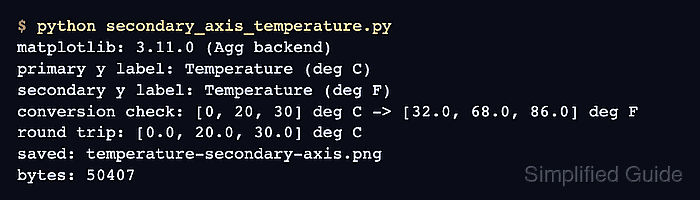
$ python secondary_axis_temperature.py
matplotlib: 3.11.0 (Agg backend)
primary y label: Temperature (deg C)
secondary y label: Temperature (deg F)
secondary limits: 32.0 to 86.0 deg F
round trip max error: 0.0 deg C
saved: temperature-secondary-axis.png (50407 bytes)
The byte count can vary with the backend, fonts, Matplotlib version, and DPI.
- Inspect temperature-secondary-axis.png for a right-side Temperature (deg F) scale aligned with the Celsius plot.

Mohd Shakir Zakaria is a cloud architect with deep roots in software development and open-source advocacy. Certified in AWS, Red Hat, VMware, ITIL, and Linux, he specializes in designing and managing robust cloud and on-premises infrastructures.


