A grid belongs to a plot's coordinate system, but it should remain visually quieter than the data. The useful choice is not simply whether grid lines are visible; it is which axis and tick levels need reference lines without turning the chart into graph paper.
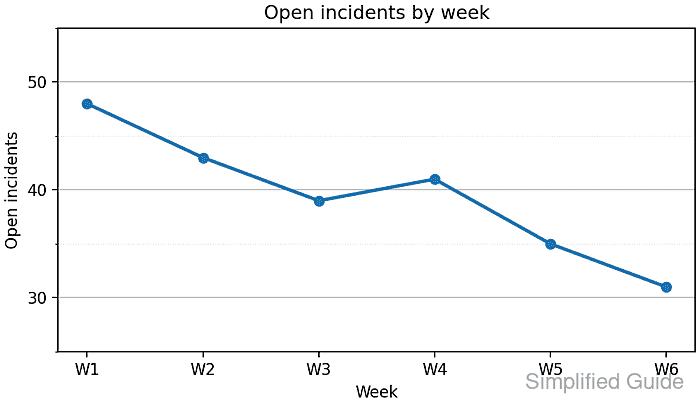
This weekly line chart uses categories along the x-axis and incident counts along the y-axis. Horizontal lines support value estimates against the numeric scale, while vertical lines at every week would add marks that the category labels already provide.
Solid major lines mark ten-incident intervals, and lighter dotted minor lines divide each interval once. AutoMinorLocator(2) supplies those minor positions on the linear y-axis, while set_axisbelow(True) keeps both grid levels behind the plotted line and markers.
Related: How to set axis labels in Matplotlib
Related: How to set axis limits in Matplotlib
Related: How to save a Matplotlib figure
Steps to scope and style Matplotlib grid lines:
- Define the weekly series and grid styles in grid_enable.py.
- grid_enable.py
from pathlib import Path

import matplotlib.pyplot as plt
from matplotlib.ticker import AutoMinorLocator, MultipleLocator


weeks = ["W1", "W2", "W3", "W4", "W5", "W6"]
incidents = [48, 43, 39, 41, 35, 31]
output = Path("grid-enable.png")

major_grid_style = {"color": "0.78", "linewidth": 0.9}
minor_grid_style = {"color": "0.90", "linestyle": ":", "linewidth": 0.6}
- Construct the weekly incident chart with a numeric y-axis range.
fig, ax = plt.subplots(figsize=(6.2, 3.6), layout="constrained")
ax.plot(weeks, incidents, marker="o", linewidth=2.2, color="tab:blue")
ax.set(
    title="Open incidents by week",
    xlabel="Week",
    ylabel="Open incidents",
    ylim=(25, 55),
)
- Divide the y-axis into major and minor tick positions.
ax.yaxis.set_major_locator(MultipleLocator(10))
ax.yaxis.set_minor_locator(AutoMinorLocator(2))
AutoMinorLocator(2) places one minor tick halfway between evenly spaced major ticks on a linear axis.
- Place the grid below the plotted line and markers.
ax.set_axisbelow(True)
- Draw solid grid lines at the major y-axis ticks.
ax.grid(True, axis="y", which="major", **major_grid_style)
axis=“y” limits the grid to horizontal lines; axis=“both” extends it to vertical lines at the x-axis tick positions.
- Draw lighter dotted grid lines at the minor y-axis ticks.
ax.grid(True, axis="y", which="minor", **minor_grid_style)
- Finish grid_enable.py with an export block guarded by grid-artist assertions.
fig.canvas.draw()

major_y_grid = [line for line in ax.get_ygridlines() if line.get_visible()]
minor_y_grid = [
    tick.gridline for tick in ax.yaxis.get_minor_ticks() if tick.gridline.get_visible()
]

if not major_y_grid or not minor_y_grid:
    raise RuntimeError("Expected visible major and minor y-grid lines")
if ax.get_axisbelow() is not True:
    raise RuntimeError("Expected the grid below the plotted data")

fig.savefig(output, dpi=160, facecolor="white")
plt.close(fig)

print(f"major y-grid lines: {len(major_y_grid)}")
print(f"minor y-grid lines: {len(minor_y_grid)}")
print(f"axis below data: {ax.get_axisbelow()}")
print(f"saved: {output}")
- Run grid_enable.py to render and structurally validate the grid.
$ python3 grid_enable.py
major y-grid lines: 5
minor y-grid lines: 4
axis below data: True
saved: grid-enable.png
The exact grid-line counts can change when the limits or tick locators change. A runtime error means one of the requested grid sets was not visible.
- Compare grid-enable.png with the intended grid hierarchy.
The solid major lines should be stronger than the dotted minor lines, and the blue line and markers should remain unobstructed above both grid levels.

Mohd Shakir Zakaria is a cloud architect with deep roots in software development and open-source advocacy. Certified in AWS, Red Hat, VMware, ITIL, and Linux, he specializes in designing and managing robust cloud and on-premises infrastructures.


