Mastodon media storage decides where uploaded images, videos, avatars, and preview files live after users and remote servers add them to the instance. Moving that storage to an S3-compatible bucket keeps the application host from becoming the long-term media disk and lets a separate media hostname or CDN serve public objects.
Mastodon reads object-storage settings from environment variables, usually /home/mastodon/live/.env.production on a source install. The Rails web and Sidekiq processes use the S3 API to write, delete, and change media permissions, while browsers and federation clients read the generated media URLs anonymously.
The bucket must allow Mastodon to write objects and allow public reads without allowing public writes or bucket listing. A new media hostname also needs CORS headers, because parts of the Mastodon web interface read media across origins; for an existing instance, keep old media URLs reachable while the new host is introduced.
Steps to configure Mastodon S3 media storage:
- Choose the bucket, region, public media host, and write credential.
Bucket: mastodon-media-example
Region: us-east-1
Public media host: media.example.com
Writable credential: mastodon-media-writer
The public media host should point to the bucket, storage gateway, reverse proxy, or CDN path that serves object keys without adding the bucket name to the visible URL.
- Confirm that the media host does not expose a directory listing.
$ curl -I https://media.example.com/
HTTP/2 403
content-type: application/xml
access-control-allow-origin: *
##### snipped #####
A root request may return 403 or another provider-specific denial. Object reads should work, but the root should not list bucket keys.
- Back up the current Mastodon environment file.
$ sudo -u mastodon cp /home/mastodon/live/.env.production /home/mastodon/live/.env.production.before-s3
- Open the Mastodon environment file.
$ sudo -u mastodon vi /home/mastodon/live/.env.production
- Add the S3 media storage settings.
S3_ENABLED=true
S3_BUCKET=mastodon-media-example
S3_REGION=us-east-1
AWS_ACCESS_KEY_ID=AKIAEXAMPLEMEDIA01
AWS_SECRET_ACCESS_KEY=replace-with-provider-secret
S3_PROTOCOL=https
S3_ALIAS_HOST=media.example.com
S3_PERMISSION=public-read
For an S3-compatible provider outside AWS, also set S3_ENDPOINT and the provider's documented hostname or path-style option. If the provider rejects public ACL uploads, set S3_PERMISSION to private and use a bucket policy, proxy, or CDN rule that still allows anonymous object reads.
- Restart the Mastodon services to load the new environment.
$ sudo systemctl restart mastodon-web mastodon-sidekiq mastodon-streaming
For a container install, recreate or restart the web, Sidekiq, and streaming containers with the same S3 variables in their environment.
- Upload a small test image through the Mastodon media API.
$ curl -sS \
  -H "Authorization: Bearer $MASTODON_ACCESS_TOKEN" \
  -F "file=@mastodon-s3-check.jpg" \
  -F "description=S3 storage check" \
  https://social.example.com/api/v2/media
{"id":"22348641","type":"image","url":"https://media.example.com/media_attachments/files/111/222/333/original/s3-storage-check.jpg","preview_url":"https://media.example.com/media_attachments/files/111/222/333/small/s3-storage-check.jpg","remote_url":null,"text_url":"https://social.example.com/media/4Zj6ewxzzzDi0g8JnZQ","description":"S3 storage check"}
Use a user token with write:media scope. If the response returns 202 and url is null, request /api/v1/media/:id after processing finishes.
Related: How to create a Mastodon access token
Related: How to upload media with the Mastodon API - List the uploaded object from the bucket.
$ aws s3 ls s3://mastodon-media-example/media_attachments/ \
  --recursive \
  --profile mastodon-media
2026-06-27 08:42:15      18432 media_attachments/files/111/222/333/original/s3-storage-check.jpg
2026-06-27 08:42:15       6144 media_attachments/files/111/222/333/small/s3-storage-check.jpg
Add the storage provider's --endpoint-url option when the bucket is not on AWS S3.
- Check the uploaded media URL headers.
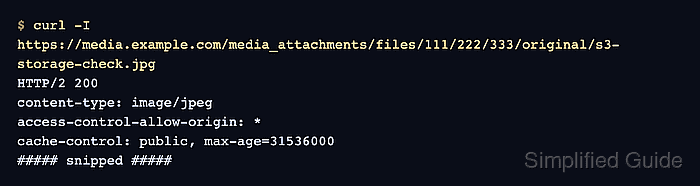
$ curl -I https://media.example.com/media_attachments/files/111/222/333/original/s3-storage-check.jpg
HTTP/2 200
content-type: image/jpeg
access-control-allow-origin: *
cache-control: public, max-age=31536000
##### snipped #####
The response should come from the public media host and include Access-Control-Allow-Origin: * for Mastodon browser reads.
Tool: CORS Policy Risk Checker - Delete the unattached test media item.
$ curl -i -X DELETE \
  -H "Authorization: Bearer $MASTODON_ACCESS_TOKEN" \
  https://social.example.com/api/v1/media/22348641
HTTP/2 200
content-length: 0
Delete only the temporary media attachment created for the storage check. Do not delete media that has already been attached to a status.

Mohd Shakir Zakaria is a cloud architect with deep roots in software development and open-source advocacy. Certified in AWS, Red Hat, VMware, ITIL, and Linux, he specializes in designing and managing robust cloud and on-premises infrastructures.


