A root filesystem that stays small after a disk or volume-group expansion can leave the server unable to install packages, write logs, or complete boot-time updates even though LVM has free extents available. Growing the root logical volume and filesystem together makes that capacity visible at / without unmounting the running system.
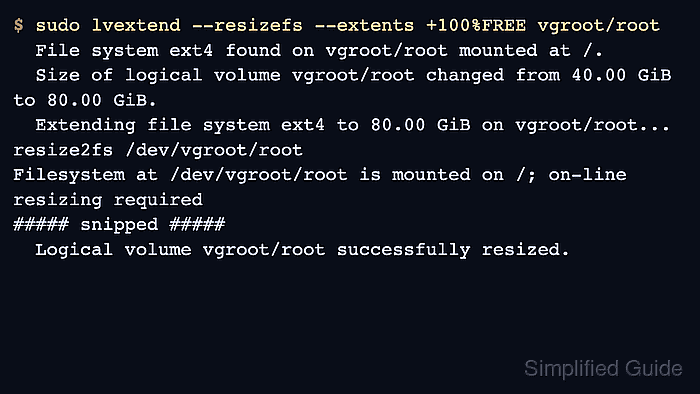
LVM exposes the mounted root filesystem through a logical-volume device such as /dev/mapper/vgroot-root or /dev/vgroot/root. lvextend allocates free extents from the volume group, and --resizefs asks fsadm to grow the filesystem after the logical volume changes.
Use this online flow only to increase /. Shrinking a root filesystem requires a verified backup, rescue media, and a filesystem that supports offline shrink; XFS root filesystems cannot be reduced in place and should be rebuilt or restored to a smaller volume instead.
Steps to grow an LVM root filesystem:
- Identify the mounted root filesystem and its backing device.
$ findmnt / --output TARGET,SOURCE,FSTYPE,SIZE,AVAIL
TARGET SOURCE                  FSTYPE SIZE  AVAIL
/      /dev/mapper/vgroot-root ext4    40G   1.8G
The SOURCE value should point to an LVM logical volume, usually under /dev/mapper or /dev/<vg>/<lv>. Use the generic filesystem grow page for non-root application mounts.
- Check free space in the root volume group.
$ sudo vgs vgroot
  VG     #PV #LV #SN Attr   VSize  VFree
  vgroot   1   2   0 wz--n- 80.00g 40.00g
Replace vgroot with the volume group from the root logical-volume path. If VFree is too small, add storage to the volume group before resizing /.
Related: How to add a disk to an LVM volume group - Confirm the current root logical-volume size.
$ sudo lvs --options lv_path,lv_size vgroot/root
  Path             LSize
  /dev/vgroot/root 40.00g
The VG/LV form, such as vgroot/root, is accepted by LVM commands and avoids relying on a specific /dev/mapper name.
- Confirm that a bootable recovery path and a current backup cover the server.
Expanding root storage is normally online for ext4 and XFS, but targeting the wrong LV or discovering filesystem damage during the grow can leave the system unbootable. Do not run lvreduce on a mounted root filesystem.
- Grow the root logical volume and filesystem together.
$ sudo lvextend --resizefs --extents +100%FREE vgroot/root
  File system ext4 found on vgroot/root mounted at /.
  Size of logical volume vgroot/root changed from 40.00 GiB (10240 extents) to 80.00 GiB (20480 extents).
  Extending file system ext4 to 80.00 GiB (85899345920 bytes) on vgroot/root...
resize2fs /dev/vgroot/root
resize2fs 1.47.2 (1-Jan-2025)
Filesystem at /dev/vgroot/root is mounted on /; on-line resizing required
old_desc_blocks = 5, new_desc_blocks = 10
The filesystem on /dev/vgroot/root is now 20971520 (4k) blocks long.

resize2fs done
  Extended file system ext4 on vgroot/root.
  Logical volume vgroot/root successfully resized.
Use --size +20G instead of --extents +100%FREE when only part of the free volume-group space should be assigned to /.
- Verify the larger logical volume size.
$ sudo lvs --options lv_path,lv_size vgroot/root
  Path             LSize
  /dev/vgroot/root 80.00g
- Verify the mounted root filesystem size.
$ df -h /
Filesystem               Size  Used Avail Use% Mounted on
/dev/mapper/vgroot-root   79G   36G   40G  48% /
If lvs shows the larger LV but df still reports the old size, rerun the filesystem-specific grow step for the root filesystem type. ext4 uses resize2fs on the LV path, while XFS uses xfs_growfs against /.

Mohd Shakir Zakaria is a cloud architect with deep roots in software development and open-source advocacy. Certified in AWS, Red Hat, VMware, ITIL, and Linux, he specializes in designing and managing robust cloud and on-premises infrastructures.


