When an application mount runs low on space, adding capacity to the volume group is only part of the storage change. The logical volume and the filesystem mounted from it both need to grow, or df can keep reporting the old size while writes still fail.
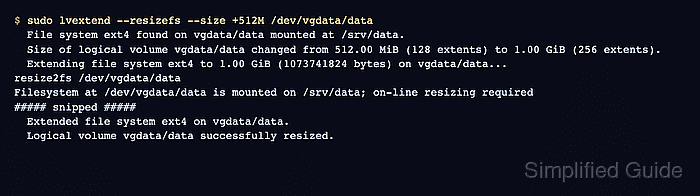
LVM extends a logical volume by allocating free extents from its volume group. Running lvextend with --resizefs also asks fsadm to grow the filesystem after the block device changes, which keeps the mounted path and the logical volume in step for supported filesystems.
The volume group must show enough VFree before the grow starts, and a tested backup or recent storage snapshot should cover the mounted data. Use the dedicated root-filesystem procedure for / because boot, rescue, and rollback expectations are different from an ordinary application mount.
Related: How to add a disk to an LVM volume group
Related: How to grow a filesystem on LVM
Related: How to grow the root filesystem on LVM
Steps to increase an LVM logical volume size:
- Identify the mounted filesystem and its backing logical volume.
$ findmnt /srv/data --output TARGET,SOURCE,FSTYPE,SIZE,AVAIL
TARGET    SOURCE                  FSTYPE   SIZE  AVAIL
/srv/data /dev/mapper/vgdata-data ext4   487.2M 451.2M
Replace /srv/data with the mount point that needs more capacity. The SOURCE column should point to the LVM device that will be extended.
- Check free space in the volume group.
$ sudo vgs vgdata
  VG     #PV #LV #SN Attr   VSize  VFree
  vgdata   1   1   0 wz--n- <2.00g <1.50g
Replace vgdata with the volume group that contains the logical volume. Add storage to the volume group first when VFree is smaller than the amount being added.
- Check the current logical volume size.
$ sudo lvs --options lv_path,lv_size vgdata/data
  Path             LSize
  /dev/vgdata/data 512.00m
The path can be written as vgdata/data, /dev/vgdata/data, or /dev/mapper/vgdata-data. Use the same logical volume shown by findmnt.
- Confirm that a tested backup or recent storage snapshot covers the mounted data.
ext4 and XFS can grow while mounted in normal conditions, but targeting the wrong logical volume or discovering filesystem damage during the grow can still interrupt the workload.
- Extend the logical volume and grow the filesystem.
$ sudo lvextend --resizefs --size +512M /dev/vgdata/data
  File system ext4 found on vgdata/data mounted at /srv/data.
  Size of logical volume vgdata/data changed from 512.00 MiB (128 extents) to 1.00 GiB (256 extents).
  Extending file system ext4 to 1.00 GiB (1073741824 bytes) on vgdata/data...
resize2fs /dev/vgdata/data
Filesystem at /dev/vgdata/data is mounted on /srv/data; on-line resizing required
##### snipped #####
  Extended file system ext4 on vgdata/data.
  Logical volume vgdata/data successfully resized.
Replace +512M with the amount to add. Omit --resizefs only when the filesystem will be grown separately after the logical volume change.
- Verify the larger logical volume size.
$ sudo lvs --options lv_path,lv_size vgdata/data
  Path             LSize
  /dev/vgdata/data 1.00g
- Verify the larger mounted filesystem size.
$ df -h /srv/data
Filesystem               Size  Used Avail Use% Mounted on
/dev/mapper/vgdata-data  991M  156K  935M   1% /srv/data
If df still reports the old size, recheck the filesystem type and grow it manually after confirming that lvs shows the larger logical volume.
- Check a known file from the mounted path.
$ cat /srv/data/keep.txt
archive record
Use a real application file, database check, or service smoke test for the mounted path in production.

Mohd Shakir Zakaria is a cloud architect with deep roots in software development and open-source advocacy. Certified in AWS, Red Hat, VMware, ITIL, and Linux, he specializes in designing and managing robust cloud and on-premises infrastructures.


