Prompt templates control the instructions and retrieved context that LlamaIndex sends to a language model during response synthesis. A custom text QA template can constrain an answer to supplied context, require a response format, or add domain-specific wording without replacing the surrounding query engine.
Query engines expose their active prompt dictionary through get_prompts(). Nested components prefix keys with their module name, so the text QA prompt commonly appears as response_synthesizer:text_qa_template and must be passed back to update_prompts() under that exact key.
The local check uses MockLLM and MockEmbedding to exercise prompt selection without an API key. Because MockLLM returns the formatted prompt, the saved marker and retrieved context provide separate proof that the replacement template reached the response path; a production model still needs its own answer-quality evaluation.
Steps to configure a LlamaIndex prompt template:
- Create prompt_template_check.py with the imports and local mock model settings.
- prompt_template_check.py
from llama_index.core import Document, PromptTemplate, Settings, VectorStoreIndex
from llama_index.core.embeddings import MockEmbedding
from llama_index.core.llms import MockLLM


Settings.llm = MockLLM()
Settings.embed_model = MockEmbedding(embed_dim=8)
- Append the source document and compact query engine below the model settings.
document = Document(text="Support hours are 09:00 to 17:00 UTC.")
index = VectorStoreIndex.from_documents([document])
query_engine = index.as_query_engine(response_mode="compact", similarity_top_k=1)
- Append the prompt-key selection and discovery check below the query engine.
prompt_key = "response_synthesizer:text_qa_template"
print("prompt_key_found=", prompt_key in query_engine.get_prompts())
The target component's get_prompts() result is authoritative because other query engines and response modes can expose different prompt keys.
- Append the custom template with the selected prompt's required context_str and query_str variables below the discovery check.
text_qa_template = PromptTemplate(
    """Context information is below.
---------------------
{context_str}
---------------------
Start the answer with CUSTOM_PROMPT_OK, then answer using only the context.
Question: {query_str}
Answer: """
)
query_engine.update_prompts({prompt_key: text_qa_template})
The text QA template receives retrieved text through context_str and the reader's question through query_str.
- Append the saved-template and query-response checks below the replacement call.
configured_template = query_engine.get_prompts()[prompt_key].get_template()
response = str(query_engine.query("When is support open?"))

print("template_marker_saved=", "CUSTOM_PROMPT_OK" in configured_template)
print("response_marker_used=", "CUSTOM_PROMPT_OK" in response)
print("context_used=", "Support hours are 09:00 to 17:00 UTC." in response)
- Compare the completed script with this consolidated file.
- prompt_template_check.py
from llama_index.core import Document, PromptTemplate, Settings, VectorStoreIndex
from llama_index.core.embeddings import MockEmbedding
from llama_index.core.llms import MockLLM


Settings.llm = MockLLM()
Settings.embed_model = MockEmbedding(embed_dim=8)

document = Document(text="Support hours are 09:00 to 17:00 UTC.")
index = VectorStoreIndex.from_documents([document])
query_engine = index.as_query_engine(response_mode="compact", similarity_top_k=1)

prompt_key = "response_synthesizer:text_qa_template"
print("prompt_key_found=", prompt_key in query_engine.get_prompts())

text_qa_template = PromptTemplate(
    """Context information is below.
---------------------
{context_str}
---------------------
Start the answer with CUSTOM_PROMPT_OK, then answer using only the context.
Question: {query_str}
Answer: """
)
query_engine.update_prompts({prompt_key: text_qa_template})

configured_template = query_engine.get_prompts()[prompt_key].get_template()
response = str(query_engine.query("When is support open?"))

print("template_marker_saved=", "CUSTOM_PROMPT_OK" in configured_template)
print("response_marker_used=", "CUSTOM_PROMPT_OK" in response)
print("context_used=", "Support hours are 09:00 to 17:00 UTC." in response)
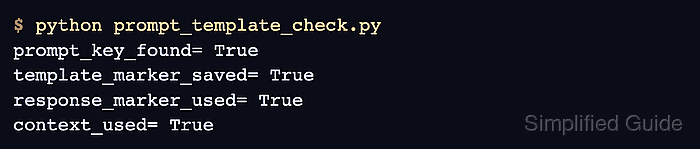
- Run the completed script to confirm the custom template is saved and used with retrieved context.
$ python prompt_template_check.py
prompt_key_found= True
template_marker_saved= True
response_marker_used= True
context_used= True
A false prompt_key_found value means the selected component exposes a different key. A false response check means the template or retrieved context did not reach the query response path.

Mohd Shakir Zakaria is a cloud architect with deep roots in software development and open-source advocacy. Certified in AWS, Red Hat, VMware, ITIL, and Linux, he specializes in designing and managing robust cloud and on-premises infrastructures.


