A LlamaIndex request can cross document parsing, embedding, retrieval, prompt construction, and model calls before returning one answer. OpenTelemetry exposes those internal stages as spans, making it possible to see where a query spent time and which component failed.
The llama-index-observability-otel package connects LlamaIndex instrumentation events to an OpenTelemetry tracer provider. A ConsoleSpanExporter keeps the first test local, while a simple span processor prints each completed span immediately instead of waiting for a batch.
Span events can contain queries, retrieved text, prompts, model responses, and embeddings. Use non-sensitive sample content for the console test, then apply suitable retention and access controls before sending production traces to a collector or hosted backend.
Steps to enable LlamaIndex OpenTelemetry tracing:
- Install the LlamaIndex core and OpenTelemetry observability packages in the active Python environment.
$ python -m pip install --upgrade llama-index-core llama-index-observability-otel
The project's existing virtual environment keeps these dependencies isolated from the system Python installation.
Related: How to install LlamaIndex with pip - Create trace_llamaindex.py with the imports and deterministic test models.
- trace_llamaindex.py
from llama_index.core import Document, Settings, VectorStoreIndex
from llama_index.core.embeddings import MockEmbedding
from llama_index.core.llms.mock import MockLLM
from llama_index.observability.otel import LlamaIndexOpenTelemetry
from opentelemetry.sdk.trace.export import ConsoleSpanExporter

Settings.embed_model = MockEmbedding(embed_dim=8)
Settings.llm = MockLLM(max_tokens=16)
- Add the OpenTelemetry registration below the Settings assignments.
instrumentor = LlamaIndexOpenTelemetry(
    service_name_or_resource="llamaindex-demo",
    span_exporter=ConsoleSpanExporter(),
    span_processor="simple",
)
instrumentor.start_registering()
Instrumentation sees events emitted after registration, so this block belongs before index, query engine, agent, or workflow construction. The simple processor suits this terminal smoke test; long-running applications normally use batching and an OTLP exporter.
- Add the index-backed retrieval workflow after start_registering().
index = VectorStoreIndex.from_documents(
    [Document(text="OpenTelemetry exports LlamaIndex retrieval and query spans.")]
)
query_engine = index.as_query_engine(similarity_top_k=1)
response = query_engine.query("What does OpenTelemetry export?")

print("Answer:", response)
- Review the completed trace_llamaindex.py file before execution.
- trace_llamaindex.py
from llama_index.core import Document, Settings, VectorStoreIndex
from llama_index.core.embeddings import MockEmbedding
from llama_index.core.llms.mock import MockLLM
from llama_index.observability.otel import LlamaIndexOpenTelemetry
from opentelemetry.sdk.trace.export import ConsoleSpanExporter

Settings.embed_model = MockEmbedding(embed_dim=8)
Settings.llm = MockLLM(max_tokens=16)

instrumentor = LlamaIndexOpenTelemetry(
    service_name_or_resource="llamaindex-demo",
    span_exporter=ConsoleSpanExporter(),
    span_processor="simple",
)
instrumentor.start_registering()

index = VectorStoreIndex.from_documents(
    [Document(text="OpenTelemetry exports LlamaIndex retrieval and query spans.")]
)
query_engine = index.as_query_engine(similarity_top_k=1)
response = query_engine.query("What does OpenTelemetry export?")

print("Answer:", response)
- Run the instrumented query from the directory containing trace_llamaindex.py.
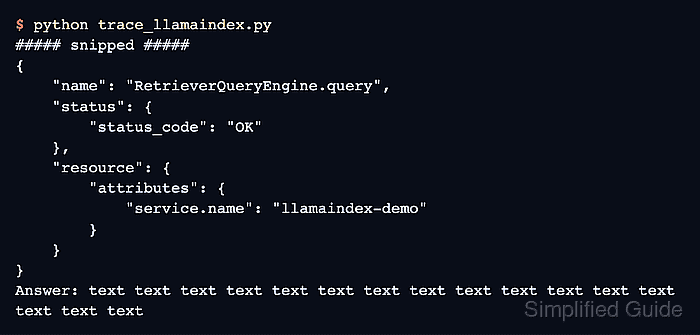
$ python trace_llamaindex.py ##### snipped ##### { "name": "RetrieverQueryEngine.query", "context": { ##### snipped ##### }, "status": { "status_code": "OK" }, ##### snipped ##### "resource": { "attributes": { "service.name": "llamaindex-demo" }, "schema_url": "" } } Answer: text text text text text text text text text text text text text text text text - Confirm the output includes a RetrieverQueryEngine.query span with status_code set to OK and service.name set to llamaindex-demo.
Console spans can expose query text, document chunks, prompts, model output, and embeddings. Real application data does not belong in terminal captures, issue trackers, or shared logs.

Mohd Shakir Zakaria is a cloud architect with deep roots in software development and open-source advocacy. Certified in AWS, Red Hat, VMware, ITIL, and Linux, he specializes in designing and managing robust cloud and on-premises infrastructures.


