Rich documents usually carry structure that a plain text loader cannot see: page headings, tables, slide text, scanned regions, and layout cues all affect how retrieval behaves later. LlamaParse sends those files to LlamaCloud Parse and returns markdown or text that can become LlamaIndex documents before indexing.
The current Python path uses the llama-cloud SDK for upload, parsing, polling, and result retrieval. Requesting markdown_full gives one markdown string for the document, while LlamaIndex turns that string into a Document object that can be indexed or passed into a larger ingestion pipeline.
Parsing requires a LlamaCloud API key and sends the source file to the managed service. Start with one non-sensitive document, keep the key in LLAMA_CLOUD_API_KEY for the current shell session, and inspect the returned markdown before using it in a production retrieval index.
Steps to parse a document with LlamaParse and LlamaIndex:
- Install the LlamaCloud SDK and LlamaIndex core package in the project environment.
$ python3 -m pip install 'llama-cloud>=2.1' llama-index-core
llama-cloud provides the LlamaCloud client. llama-index-core provides Document, VectorStoreIndex, and MockEmbedding for the local indexing smoke test.
- Set the LlamaCloud API key for the current shell.
$ export LLAMA_CLOUD_API_KEY="llx-..."
Use a real key from LlamaCloud, but do not commit it into source files, notebooks, shell history exports, screenshots, or shared transcripts.
- Place one supported source document in the project directory.
Input file: policy-handbook.pdf
Output file: parsed-policy-handbook.md
LlamaParse supports common document, presentation, spreadsheet, image, and audio formats. For Parse uploads, the current platform-wide file-size limit is 512 MB; split larger files before uploading.
- Create the parser script.
- parse_with_llamaparse.py
import os
import sys
from pathlib import Path

from llama_cloud import LlamaCloud
from llama_index.core import Document, VectorStoreIndex
from llama_index.core.embeddings import MockEmbedding


def main() -> None:
    if len(sys.argv) != 2:
        raise SystemExit("Usage: python3 parse_with_llamaparse.py <document-path>")

    if not os.environ.get("LLAMA_CLOUD_API_KEY"):
        raise SystemExit("Set LLAMA_CLOUD_API_KEY before running the parser.")

    source = Path(sys.argv[1])
    if not source.is_file():
        raise SystemExit(f"Input file not found: {source}")

    client = LlamaCloud()
    uploaded = client.files.create(file=source, purpose="parse")
    result = client.parsing.parse(
        file_id=uploaded.id,
        tier="agentic",
        version="latest",
        expand=["markdown_full"],
    )

    markdown = (result.markdown_full or "").strip()
    if not markdown:
        raise SystemExit("Parse completed without markdown output.")

    documents = [
        Document(
            text=markdown,
            metadata={
                "source": source.name,
                "parse_job_id": result.job.id,
                "parse_tier": "agentic",
            },
        )
    ]

    parsed_markdown = Path("parsed-policy-handbook.md")
    parsed_markdown.write_text(markdown + "\n", encoding="utf-8")

    index = VectorStoreIndex.from_documents(
        documents,
        embed_model=MockEmbedding(embed_dim=8),
    )
    retrieved = index.as_retriever(similarity_top_k=1).retrieve("expense approvals")
    preview = markdown.splitlines()[0][:80]

    print(f"parse job: {result.job.status}")
    print(f"llamaindex documents: {len(documents)}")
    print(f"characters: {len(documents[0].text)}")
    print(f"preview: {preview}")
    print(f"indexed nodes: {len(index.index_struct.nodes_dict)}")
    print(f"retrieved nodes: {len(retrieved)}")
    print(f"saved markdown: {parsed_markdown}")


if __name__ == "__main__":
    main()
The agentic tier can return markdown. The fast tier is lower latency, but current Parse docs limit it to text and spatial text outputs, so do not use fast when the pipeline needs markdown or structured items.
- Run the parser against the source document.
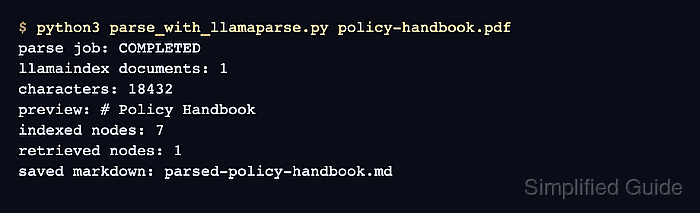
$ python3 parse_with_llamaparse.py policy-handbook.pdf
parse job: COMPLETED
llamaindex documents: 1
characters: 18432
preview: # Policy Handbook
indexed nodes: 7
retrieved nodes: 1
saved markdown: parsed-policy-handbook.md
The document count, character count, indexed-node count, and retrieved-node count should be non-zero. The preview should begin with recognizable content from the uploaded file.

Mohd Shakir Zakaria is a cloud architect with deep roots in software development and open-source advocacy. Certified in AWS, Red Hat, VMware, ITIL, and Linux, he specializes in designing and managing robust cloud and on-premises infrastructures.


