A local vector database becomes durable when a later application process can recover the indexed records without receiving the original documents again. A Chroma collection gives LlamaIndex that on-disk handoff for retrieval applications that must outlive their indexing process.
The ChromaVectorStore integration connects a chromadb collection to the StorageContext used by VectorStoreIndex.from_documents(). Chroma stores the resulting nodes and embeddings under the path supplied to PersistentClient.
Eight keyword dimensions keep the result deterministic without an API key or downloaded embedding model. The builder exits after writing two support runbooks, and a separate reader process opens the same directory before retrieving the billing record.
Steps to build a LlamaIndex Chroma vector store:
- Install LlamaIndex core, its Chroma integration, and chromadb in the project environment.
$ python3 -m pip install llama-index-core llama-index-vector-stores-chroma chromadb
- Create keyword_embedding.py with the deterministic keyword-vector method.
- keyword_embedding.py
from llama_index.core.embeddings import BaseEmbedding


class KeywordEmbedding(BaseEmbedding):
    def _vector(self, text: str) -> list[float]:
        terms = [
            "billing",
            "escalation",
            "inventory",
            "restart",
            "refund",
            "dashboard",
            "ticket",
            "runbook",
        ]
        lowered = text.lower()
        return [1.0 if term in lowered else 0.0 for term in terms]
- Complete KeywordEmbedding below _vector() with the required LlamaIndex embedding methods.
    def _get_text_embedding(self, text: str) -> list[float]:
        return self._vector(text)

    def _get_query_embedding(self, query: str) -> list[float]:
        return self._vector(query)

    async def _aget_query_embedding(self, query: str) -> list[float]:
        return self._vector(query)
- Create chroma_vector_store_build.py with the persistent collection and LlamaIndex storage context.
- chroma_vector_store_build.py
from pathlib import Path

import chromadb
from llama_index.core import Document, StorageContext, VectorStoreIndex
from llama_index.vector_stores.chroma import ChromaVectorStore

from keyword_embedding import KeywordEmbedding


persist_dir = Path("chroma_support_store")
if persist_dir.exists():
    raise SystemExit(f"Refusing to replace existing store: {persist_dir}")

client = chromadb.PersistentClient(path=str(persist_dir))
collection = client.create_collection("support_runbooks")
vector_store = ChromaVectorStore(chroma_collection=collection)
storage_context = StorageContext.from_defaults(vector_store=vector_store)
An existing chroma_support_store directory causes an immediate stop, preventing accidental replacement of stored vectors.
- Append the support documents below the storage-context setup.
documents = [
    Document(
        text=(
            "Billing chatbot runbook: ticket 7421 belongs to Maya. "
            "Escalate refund answers to the docs-review queue."
        ),
        metadata={"area": "billing", "ticket": "7421"},
    ),
    Document(
        text=(
            "Inventory chatbot runbook: ticket 8804 belongs to Arun. "
            "Restart warehouse sync before opening an incident."
        ),
        metadata={"area": "inventory", "ticket": "8804"},
    ),
]
- Append the index build and stored-record output below the document list.
VectorStoreIndex.from_documents(
    documents,
    storage_context=storage_context,
    embed_model=KeywordEmbedding(),
)

print("collection:", collection.name)
print("stored records:", collection.count())
- Create chroma_vector_store_query.py with a fresh client that opens the persisted collection.
- chroma_vector_store_query.py
from pathlib import Path

import chromadb
from llama_index.core import VectorStoreIndex
from llama_index.vector_stores.chroma import ChromaVectorStore

from keyword_embedding import KeywordEmbedding


persist_dir = Path("chroma_support_store")
client = chromadb.PersistentClient(path=str(persist_dir))
collection = client.get_collection("support_runbooks")
vector_store = ChromaVectorStore(chroma_collection=collection)
index = VectorStoreIndex.from_vector_store(
    vector_store,
    embed_model=KeywordEmbedding(),
)
retriever = index.as_retriever(similarity_top_k=1)
- Append the billing query and result output below the retriever setup.
question = "Which runbook covers billing escalation for ticket 7421?"
nodes = retriever.retrieve(question)

print("persisted records:", collection.count())
print("query:", question)
print("top match:", nodes[0].node.get_content(metadata_mode="none"))
- Run chroma_vector_store_build.py to create the persistent collection.
$ python3 chroma_vector_store_build.py
collection: support_runbooks
stored records: 2
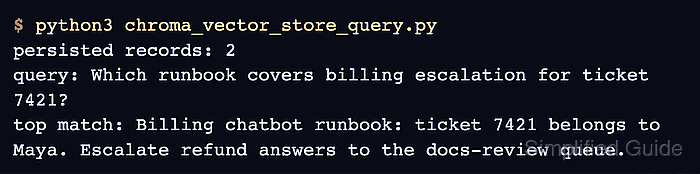
- Run chroma_vector_store_query.py in a separate Python process after the builder returns to confirm persisted retrieval.
$ python3 chroma_vector_store_query.py
persisted records: 2
query: Which runbook covers billing escalation for ticket 7421?
top match: Billing chatbot runbook: ticket 7421 belongs to Maya. Escalate refund answers to the docs-review queue.

Mohd Shakir Zakaria is a cloud architect with deep roots in software development and open-source advocacy. Certified in AWS, Red Hat, VMware, ITIL, and Linux, he specializes in designing and managing robust cloud and on-premises infrastructures.


