Images carry information that a text-only language model cannot recover from a prompt alone. The llama.cpp vision API accepts an image and a question through its OpenAI-compatible chat endpoint, returning an answer from a local vision-language model.
A vision model needs both its language-model weights and a matching multimodal projector, often named mmproj. The small SmolVLM-500M-Instruct model can run on a CPU, and llama-server can download its weights and projector together from a public Hugging Face repository without an account.
An image can travel inside the JSON request as a base64 data URI, so the server does not need access to the client's image path. The unauthenticated API stays on the same computer through a loopback listener; a recognizable image makes an unrelated or mistaken description easier to spot.
Steps to call the llama.cpp vision API:
- Build llama-server in ~/llama.cpp using the CMake source-build instructions.
The package commands below use Ubuntu or Debian. The build guide supplies the compiler and OpenSSL libraries; the API client also needs the packages installed next.
Related: How to build llama.cpp from source with CMake - Refresh the APT package index.
$ sudo apt-get update
- Install curl, Python 3, and Pillow for the image request.
$ sudo apt-get install --assume-yes curl python3 python3-pil
APT installs system packages with sudo; the server and client run as your regular user. Pillow creates the PNG image, while Python's standard base64 and json modules prepare the request. No Python API SDK or pip environment is needed.
- Start the vision model on the local loopback address.
A public listener would expose this API without authentication. The explicit 127.0.0.1 bind limits connections to this computer; loopback binding does not authenticate local clients.
$ ~/llama.cpp/build/bin/llama-server \
  -hf ggml-org/SmolVLM-500M-Instruct-GGUF:Q8_0 \
  --alias local-vision --host 127.0.0.1 --port 8080 \
  --ctx-size 2048 --parallel 1 --threads 2 \
  --gpu-layers 0 --no-mmproj-offload
The model repository provides the Q8_0 model and matching projector. The first launch downloads them and needs internet access. --gpu-layers 0 and --no-mmproj-offload keep both components on the CPU. A CPU-only build may warn that no usable GPU was found; CPU inference still works. One request slot, two CPU threads, and a 2,048-token context limit resource use. The alias supplies the request's model value, and the explicit port matches the client's URL. The foreground terminal keeps the server running while the client uses a second terminal.
- Confirm that the server has finished loading from a second terminal.
$ curl --fail --silent --show-error http://127.0.0.1:8080/health
{"status":"ok"}
The server's startup log should show the multimodal projector loading before it accepts requests. An HTTP 503 response means it is still loading; a connection failure means there is no reachable listener at this address.
Related: How to check llama.cpp server health - Create image.png containing a red square on a white background.
$ python3 - <<'PYTHON'
from PIL import Image, ImageDraw

image = Image.new("RGB", (256, 256), "white")
ImageDraw.Draw(image).rectangle((64, 64, 191, 191), fill="red")
image.save("image.png")
PYTHON
The known image makes the answer easy to compare with its input. For your own picture, image.png can instead be your PNG image saved in the same working directory.
- Create vision-request.py in your text editor with the PNG encoding code.
- vision-request.py
import base64
import json
from pathlib import Path

image_bytes = Path("image.png").read_bytes()
image_data = base64.b64encode(image_bytes).decode("ascii")
image_url = f"data:image/png;base64,{image_data}"
The data:image/png;base64, prefix identifies the bytes as a PNG. A JPEG input needs both its own filename and the image/jpeg MIME type.
Tool: Image Base64 Converter - Append the chat payload to the end of vision-request.py.
request = {
    "model": "local-vision",
    "messages": [
        {
            "role": "user",
            "content": [
                {
                    "type": "image_url",
                    "image_url": {"url": image_url},
                },
                {
                    "type": "text",
                    "text": "Describe this image in one sentence.",
                },
            ],
        }
    ],
    "max_tokens": 80,
    "temperature": 0,
}
Path("vision-request.json").write_text(
    json.dumps(request), encoding="utf-8"
)
The content array carries separate image and text objects. A client-side file path alone does not send image bytes; the data URI embeds them in the request. max_tokens bounds the answer length, and zero temperature selects greedy sampling.
- Save vision-request.py in your text editor.
- Generate vision-request.json from the image and question.
$ python3 vision-request.py
- Send the image-bearing request to the chat completions endpoint. Example output:
$ curl --fail --silent --show-error \
  http://127.0.0.1:8080/v1/chat/completions \
  --header 'Content-Type: application/json' \
  --data-binary @vision-request.json \
  --output vision-response.json \
  --write-out 'HTTP %{http_code}\n'
HTTP 200
The response is saved in vision-response.json. --fail returns an error for an HTTP failure instead of treating the error body as a completed request. No Authorization header is needed for this loopback server without API-key checking.
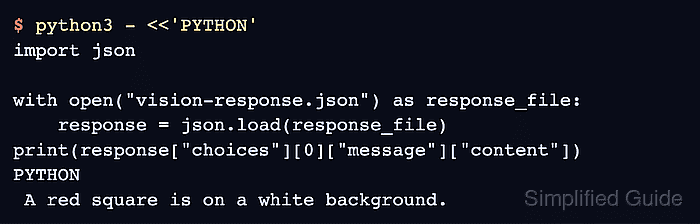
- Check that the assistant's description matches the red square on a white background. Example output:
$ python3 - <<'PYTHON'
import json

with open("vision-response.json") as response_file:
    response = json.load(response_file)
print(response["choices"][0]["message"]["content"])
PYTHON
 A red square is on a white background.
The wording can vary. A returned description matching the supplied image shows that the request reached the vision model; HTTP 200 alone does not establish that. With your own PNG, the description should match its visible subject.