Hugging Face model directories store weights, tokenizer files, and configuration in a layout used by training and Python inference libraries. llama.cpp runs local models from GGUF files, so converting a supported directory creates the portable model artifact that llama-cli, llama-server, and later quantization tools can read.
The upstream convert_hf_to_gguf.py script lives in the llama.cpp source tree and uses the conversion library from that checkout. A current checkout matters because model architecture mappings, tokenizer handling, and output types change as new model families are added.
An F16 GGUF provides a high-precision input for later quantization without changing the source model directory. Conversion still needs room for both copies, and larger models require substantially more disk space and memory than the small public SmolLM2-135M model.
Steps to convert a Hugging Face model to GGUF for llama.cpp:
- Clone the current llama.cpp source tree.
$ git clone --depth 1 https://github.com/ggml-org/llama.cpp
Cloning into 'llama.cpp'...
The converter is source-tree Python code, separate from the installed llama-cli and llama-server binaries. The starting requirements are Git, Python 3.12 with virtual-environment support, and an installed llama-cli for the final load test.
Related: How to build llama.cpp from source with CMake - Enter the source directory.
$ cd llama.cpp
- Create a Python virtual environment for the converter.
$ python3 -m venv .venv
Here, python3 selects Python 3.12. The virtual environment keeps converter dependencies separate from system Python packages.
- Activate the virtual environment.
$ . .venv/bin/activate
- Install the converter requirements and Hugging Face downloader.
$ pip install -r requirements/requirements-convert_hf_to_gguf.txt huggingface_hub
The checkout's requirements select the converter's dependency versions. huggingface_hub supplies the hf download command; no Hugging Face login is needed for this public model.
- Download a supported Hugging Face model directory.
$ hf download HuggingFaceTB/SmolLM2-135M --local-dir models/smollm2-135m
##### snipped #####
Download complete. Moving file to models/smollm2-135m/model.safetensors
/work/llama.cpp/models/smollm2-135m
HuggingFaceTB/SmolLM2-135M is a small base language model, so its output is a text continuation rather than an instruction-tuned chat reply. Other model architectures need explicit support in the converter.
- Check that the downloaded directory contains the model configuration, tokenizer, and weights.
$ ls models/smollm2-135m
README.md
config.json
generation_config.json
merges.txt
model.safetensors
special_tokens_map.json
tokenizer.json
tokenizer_config.json
vocab.json
A missing config.json, tokenizer, or weight file prevents a complete conversion. The source weights here use safetensors.
- Convert the model directory to an F16 GGUF file.
An existing file at models/smollm2-135m-f16.gguf can be overwritten. A new output name preserves an earlier conversion; the source model directory remains unchanged.
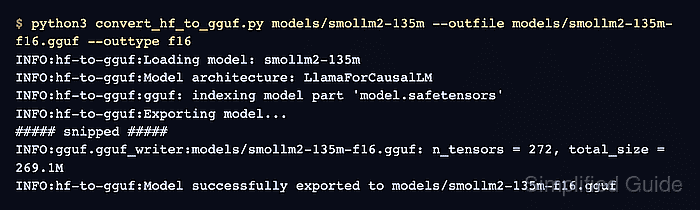
$ python3 convert_hf_to_gguf.py models/smollm2-135m --outfile models/smollm2-135m-f16.gguf --outtype f16
INFO:hf-to-gguf:Loading model: smollm2-135m
INFO:hf-to-gguf:Model architecture: LlamaForCausalLM
INFO:hf-to-gguf:gguf: indexing model part 'model.safetensors'
INFO:gguf.gguf_writer:gguf: This GGUF file is for Little Endian only
INFO:hf-to-gguf:Exporting model...
##### snipped #####
INFO:gguf.gguf_writer:models/smollm2-135m-f16.gguf: n_tensors = 272, total_size = 269.1M
##### snipped #####
INFO:hf-to-gguf:Model successfully exported to models/smollm2-135m-f16.gguf
--outtype f16 creates a high-precision GGUF, with some tensors retained as F32. Lower-bit quantization is a separate operation.
Related: How to quantize a GGUF model with llama.cpp - Inspect the generated GGUF metadata.
$ python3 gguf-py/gguf/scripts/gguf_dump.py models/smollm2-135m-f16.gguf
INFO:gguf-dump:* Loading: models/smollm2-135m-f16.gguf
* File is LITTLE endian, script is running on a LITTLE endian host.
* Dumping 35 key/value pair(s)
      1: UINT32     |        1 | GGUF.version = 3
      2: UINT64     |        1 | GGUF.tensor_count = 272
      3: UINT64     |        1 | GGUF.kv_count = 32
      4: STRING     |        1 | general.architecture = 'llama'
      5: STRING     |        1 | general.type = 'model'
      6: STRING     |        1 | general.name = 'Smollm2 135m'
##### snipped #####
     21: UINT32     |        1 | general.file_type = 1
##### snipped #####
* Dumping 272 tensor(s)
gguf_dump.py prints the metadata and tensor table from the generated file, which confirms the converter wrote a readable GGUF artifact.
- Load the converted GGUF with a short single-turn prompt.
$ llama-cli -m models/smollm2-135m-f16.gguf -p "Once upon a time" -n 32 --single-turn
##### snipped #####
build      : b11913-7aca0d2ea
model      : models/smollm2-135m-f16.gguf
ftype      : F16
modalities : text
##### snipped #####
> Once upon a time
Once upon a time
Once upon a time
Once upon a time
Once upon a time
Once upon a time
Once upon a time
Once upon

[ Prompt: 351.4 t/s | Generation: 23.6 t/s ]
##### snipped #####
Exiting...
The model path and F16 type identify the converted file, and the text after the prompt shows that it generated tokens. --single-turn returns to the shell after one response. A base model can repeat its prompt, as shown here; wording and timings vary, and a load error or no generated text means the test did not succeed.
Related: How to run a local GGUF model with llama-cli