Unexpected process exits, service restarts, and container exits with status 137 can come from the Linux kernel OOM killer rather than an application crash. Reading the kernel log separates a memory kill from a normal service failure and gives the timestamp, selected process, and memory context needed for the incident note.
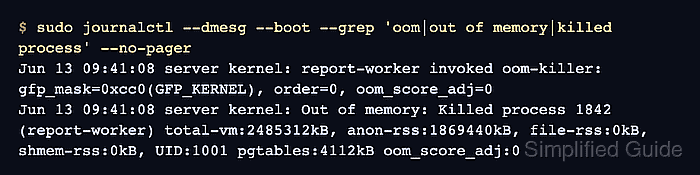
On systemd hosts, journalctl stores kernel messages with the kernel transport, and journalctl --dmesg limits the search to those entries for a boot. The --grep pattern searches for the common phrases that appear around the selected victim, including oom-killer and Killed process.
Do not force a production host into memory exhaustion just to test the query. A missing match means the accessible logs do not show an OOM kill for the selected boot or time window; it does not prove memory pressure never happened if the journal was rotated, the kernel ring buffer was overwritten, or a container runtime reported only its own cgroup event.
Steps to check OOM killer events in Linux:
- Search current-boot kernel messages for OOM killer entries.
$ sudo journalctl --dmesg --boot --grep 'oom|out of memory|killed process' --no-pager
Jun 13 09:41:08 server kernel: report-worker invoked oom-killer: gfp_mask=0xcc0(GFP_KERNEL), order=0, oom_score_adj=0
Jun 13 09:41:08 server kernel: Out of memory: Killed process 1842 (report-worker) total-vm:2485312kB, anon-rss:1869440kB, file-rss:0kB, shmem-rss:0kB, UID:1001 pgtables:4112kB oom_score_adj:0
The Killed process line names the selected victim. The surrounding lines show the allocation path, memory counters, and oom_score_adj value that influenced selection.
Related: How to view system logs with journalctl - Check the previous boot when the process disappeared before the last restart.
$ sudo journalctl --dmesg --boot -1 --grep 'oom|out of memory|killed process' --no-pager
Jun 12 22:18:44 server kernel: backup-job invoked oom-killer: gfp_mask=0xcc0(GFP_KERNEL), order=0, oom_score_adj=0
Jun 12 22:18:44 server kernel: Out of memory: Killed process 3097 (backup-job) total-vm:3917824kB, anon-rss:2713600kB, file-rss:128kB, shmem-rss:0kB, UID:1002 pgtables:6592kB oom_score_adj:0
Use journalctl --list-boots first if the host has many retained boots and the incident happened further back.
- Narrow the search to the incident window when the journal is large.
$ sudo journalctl --dmesg --since "2026-06-13 09:30" --until "2026-06-13 09:50" --grep 'oom|out of memory|killed process' --no-pager
Jun 13 09:41:08 server kernel: oom-kill:constraint=CONSTRAINT_NONE,nodemask=(null),cpuset=/,mems_allowed=0,global_oom,task=report-worker,pid=1842,uid=1001
Jun 13 09:41:08 server kernel: Out of memory: Killed process 1842 (report-worker) total-vm:2485312kB, anon-rss:1869440kB, file-rss:0kB, shmem-rss:0kB, UID:1001 pgtables:4112kB oom_score_adj:0
Replace the sample time window with the service restart, alert, or container exit time being investigated.
- Check the current kernel ring buffer when the system has no accessible journal.
$ sudo dmesg --kernel --level=err,warn --time-format=iso
2026-06-13T09:41:08,126804+00:00 report-worker invoked oom-killer: gfp_mask=0xcc0(GFP_KERNEL), order=0, oom_score_adj=0
2026-06-13T09:41:08,127116+00:00 Out of memory: Killed process 1842 (report-worker) total-vm:2485312kB, anon-rss:1869440kB, file-rss:0kB, shmem-rss:0kB, UID:1001 pgtables:4112kB oom_score_adj:0
dmesg reads the current kernel ring buffer only, and some systems restrict it with kernel.dmesg_restrict. Prefer journalctl when retained journal data is available.
- Compare the OOM timestamp with the affected systemd service when the victim was service-managed.
$ systemctl status --no-pager report-worker.service
× report-worker.service - Report Worker
     Loaded: loaded (/etc/systemd/system/report-worker.service; enabled; preset: enabled)
     Active: failed (Result: signal) since Sat 2026-06-13 09:41:08 UTC; 2min 12s ago
   Main PID: 1842 (code=killed, signal=KILL)
signal=KILL or container exit status 137 alone does not prove an OOM kill. Treat the matching kernel Out of memory or oom-kill line as the proof.
Related: How to check Linux service status

Mohd Shakir Zakaria is a cloud architect with deep roots in software development and open-source advocacy. Certified in AWS, Red Hat, VMware, ITIL, and Linux, he specializes in designing and managing robust cloud and on-premises infrastructures.


