Unexpected SUID and SGID files can turn a normal account into a privileged execution path. Finding those mode bits during a security review, incident triage, or package audit helps separate expected system helpers from local files that should not run with elevated owner or group privileges.
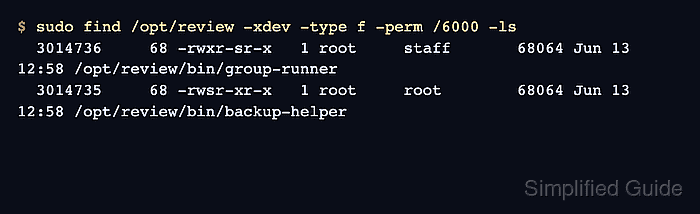
The find command can match permission bits directly. SUID is the octal 4000 bit, SGID is the octal 2000 bit, and -perm /6000 matches entries that have either bit set. Use -perm -4000 or -perm -2000 when the scan needs only one of the two bits.
Run broad scans with sudo so permission-denied directories do not hide privileged files. Keep the starting path and -xdev boundary deliberate, because a root-filesystem scan should not automatically cross into backup disks, container layers, removable media, or network mounts unless those filesystems are part of the review.
Steps to find SUID and SGID files in Linux:
- Search the target filesystem for regular files with either SUID or SGID set.
$ sudo find /opt/review -xdev -type f -perm /6000 -ls
  3014736     68 -rwxr-sr-x   1 root     staff       68064 Jun 13 12:58 /opt/review/bin/group-runner
  3014735     68 -rwsr-xr-x   1 root     root        68064 Jun 13 12:58 /opt/review/bin/backup-helper
Replace /opt/review with the path being audited. Use / for the root filesystem, or a mount point such as /srv when the review is intentionally limited. -xdev keeps find on the starting filesystem.
- List only files with the SUID bit set.
$ sudo find /opt/review -xdev -type f -perm -4000 -ls
  3014735     68 -rwsr-xr-x   1 root     root        68064 Jun 13 12:58 /opt/review/bin/backup-helper
The owner execute position shows s in -rwsr-xr-x when SUID is present and the owner execute bit is also set.
- List only files with the SGID bit set.
$ sudo find /opt/review -xdev -type f -perm -2000 -ls
  3014736     68 -rwxr-sr-x   1 root     staff       68064 Jun 13 12:58 /opt/review/bin/group-runner
The group execute position shows s in -rwxr-sr-x when SGID is present and the group execute bit is also set.
- Check directories with the SGID bit when shared-write locations are in scope.
$ sudo find /opt/review -xdev -type d -perm -2000 -ls
  3014734      4 drwxrwsr-x   2 root     root         4096 Jun 13 12:58 /opt/review/shared
SGID on a directory makes new entries inherit the directory group on many Linux filesystems. That can be expected for shared project directories, but it should still match the intended owner and group.
- Confirm the mode, owner, and group for each file that needs review.
$ stat --format '%A %a %U %G %n' /opt/review/bin/backup-helper /opt/review/bin/group-runner /opt/review/shared
-rwsr-xr-x 4755 root root /opt/review/bin/backup-helper
-rwxr-sr-x 2755 root staff /opt/review/bin/group-runner
drwxrwsr-x 2775 root root /opt/review/shared
The numeric mode makes the special bit explicit: 4 at the front means SUID, 2 means SGID, and 6 means both bits are set.
- Check whether a known system file belongs to a package.
$ dpkg-query -S /usr/bin/passwd
passwd: /usr/bin/passwd
Use rpm -qf /path/to/file on RHEL, Fedora, Rocky Linux, AlmaLinux, and related systems. Package ownership does not prove a file is safe, but it helps separate distribution-managed privileged helpers from local additions.
- Check whether an unexpected file is outside package ownership.
$ dpkg-query -S /opt/review/bin/backup-helper
dpkg-query: no path found matching pattern /opt/review/bin/backup-helper
An unpackaged SUID or SGID executable under a writable, temporary, application, or user-controlled path deserves immediate review. Record the path, mode, owner, group, hash, and package result before changing or deleting the file.

Mohd Shakir Zakaria is a cloud architect with deep roots in software development and open-source advocacy. Certified in AWS, Red Hat, VMware, ITIL, and Linux, he specializes in designing and managing robust cloud and on-premises infrastructures.


