PDF content needs both readable text and a traceable location before it can support document retrieval. In LangChain, a local PDF can become a list of Document objects containing each page's extracted text and source information.
pypdf reads the file, while langchain-core provides the Document type. Keeping one document per page makes it possible to identify where a passage came from before splitting the text into smaller chunks. The metadata can store the file path and a page index starting at zero.
A text-based, unencrypted PDF suits this method. Scanned pages need OCR before they contain extractable text, and complex layouts can produce text in a different reading order. Reading the PDF locally requires no model, API key, or upload.
Steps to load a PDF document in LangChain:
- Open an activated Python project environment in the project folder.
langchain-core requires Python 3.10 or newer, and activation makes python resolve to the environment's interpreter.
Related: How to create a virtual environment for LangChain - Copy a small PDF with selectable text and a known page count into the project folder as guide.pdf.
A PDF viewer shows the page count and whether text can be selected. Blank pages legitimately have no text; a text-bearing PDF makes missing extraction easier to spot.
Related: pypdf text extraction and limitations - Install the PDF reader and LangChain document package in the active environment.
$ python -m pip install pypdf langchain-core
Tested on Linux with Python 3.10, 3.12, and 3.14, pypdf 7.0.0, and langchain-core 1.7.6.
Related: LangChain PDF document workflow - Create load_pdf.py in your project folder using your text editor.
- load_pdf.py
from pypdf import PdfReader
from langchain_core.documents import Document

file_path = "guide.pdf"
reader = PdfReader(file_path)
file_path identifies the PDF copied into the project folder. Relative paths are resolved from the directory where Python runs; an absolute path also works.
- Append the page-to-document conversion after the reader assignment.
documents = [
    Document(
        page_content=page.extract_text() or "",
        metadata={"source": file_path, "page": page_index},
    )
    for page_index, page in enumerate(reader.pages)
]
Each PDF page produces one Document, including pages with no extracted text. The source and page keys are assigned here; page=0 means the first physical page, regardless of printed page labels.
- Append the document counts and per-page text preview after the documents list.
print(f"PDF pages: {len(reader.pages)}")
print(f"Documents: {len(documents)}")
for document in documents:
    print(
        f"source={document.metadata['source']} "
        f"page={document.metadata['page']} "
        f"characters={len(document.page_content)}"
    )
    print(document.page_content[:120].strip())
- Save load_pdf.py in your text editor.
- Run load_pdf.py from the project folder to compare its page count with your PDF viewer.
$ python load_pdf.py
PDF pages: 2
Documents: 2
source=guide.pdf page=0 characters=33
LangChain reads this PDF locally.
source=guide.pdf page=1 characters=42
Each page keeps its source and page index.
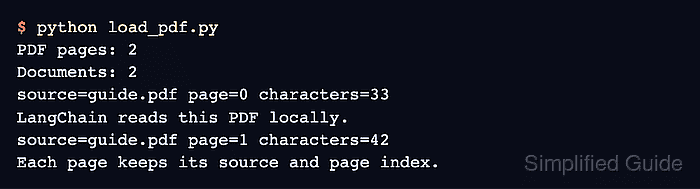
The output shown is from a two-page PDF; counts and text vary with the input. Both printed counts come from pypdf, so the count shown in the PDF viewer is the independent check. Every text-bearing page should show a nonzero character count and recognizable text. The source should match file_path, with page indexes from zero through the page count minus one. An empty preview on a visibly text-bearing page means extraction needs attention before retrieval. DependencyError: cryptography>=3.1 is required for AES algorithm means the PDF is AES-encrypted, even if it opens without a password.