A chat model accepts a fixed number of tokens in each request, and a multi-turn LangChain agent moves closer to that limit with every message it saves. Once a thread outgrows the model's context window, each new call fails with a context length exceeded error until SummarizationMiddleware or a similar history reduction brings the request back under the limit.
The limit applies to the whole request, not to the newest message, so a one-line question can fail on a long thread. An agent with a checkpointer reloads the saved thread on each run, so a retry sends that oversized history again and fails the same way. SummarizationMiddleware runs before the model call, replaces the older messages with one generated summary, keeps the most recent messages unchanged, and writes the shorter thread back to the checkpoint.
A summary costs an extra model call and can lose detail, so facts the agent must never lose belong somewhere other than the message history. Message trimming avoids that extra call by dropping old messages outright. A local model with a small context window reproduces the error without an API key, while a hosted model needs its own client and thresholds sized to its much larger limit.
Steps to fix context length exceeded errors in LangChain:
- Install LangChain, the OpenAI integration, and the llama-cpp-python server in the active project environment.
$ python -m pip install --upgrade \
    langchain langchain-openai \
    "llama-cpp-python[server]" huggingface-hub
llama-cpp-python compiles llama.cpp during installation, so the environment needs a C++ compiler. LangChain requires Python 3.10 or newer. Tested with LangChain 1.4.9, langchain-openai 1.7.4, and llama-cpp-python 0.3.36 on Python 3.12 on Linux.
Related: How to create a virtual environment for LangChain - Open a second terminal with the project environment activated.
- Start a local model with a 2,048-token context window in the second terminal.
$ python -m llama_cpp.server \
    --hf_model_repo_id Qwen/Qwen2.5-0.5B-Instruct-GGUF \
    --model qwen2.5-0.5b-instruct-q4_k_m.gguf \
    --n_ctx 2048 \
    --model_alias local-chat \
    --host 127.0.0.1 \
    --port 8000
--n_ctx sets the context window the server enforces. The first start downloads a model file of about 470 MB. The server is ready when it prints Uvicorn running on with its address, and it stays in the foreground of that terminal.
- Create a file named long_thread.py in your project folder with the imports and the model client.
- long_thread.py
from langchain.agents import create_agent
from langchain.messages import AIMessage, HumanMessage
from langchain_core.messages.utils import (
    count_tokens_approximately,
)
from langchain_openai import ChatOpenAI
from langgraph.checkpoint.memory import InMemorySaver

model = ChatOpenAI(
    model="local-chat",
    base_url="http://127.0.0.1:8000/v1",
    api_key="sk-no-key-required",
    temperature=0,
)
The local server checks no key, but the client still needs a value.
- Add the agent below the model client with a checkpointer that saves the thread.
agent = create_agent(
    model=model,
    tools=[],
    checkpointer=InMemorySaver(),
)
- Add a synthetic 80-message thread below the agent.
history = []
for turn in range(1, 41):
    node = f"node-{turn:02d}"
    history.append(HumanMessage(
        f"Ticket update {turn}: the nightly backup on {node} "
        "failed with a timeout while copying the database "
        "archive to object storage."
    ))
    history.append(AIMessage(
        f"Noted for {node}. Check the storage endpoint, "
        "confirm the transfer window, and retry the copy "
        "after the current maintenance period ends."
    ))

config = {"configurable": {"thread_id": "support-1042"}}
agent.update_state(config, {"messages": history})
A real thread grows one turn at a time. update_state writes all 80 messages to the checkpoint at once, so the failure appears without 40 model calls.
- Add a printout of the thread size below the synthetic thread.
saved = agent.get_state(config).values["messages"]
print("Messages in thread:", len(saved))
print("Estimated tokens:", count_tokens_approximately(saved))
In your own agent, get_state with the failing thread_id returns that thread for the same two measurements. count_tokens_approximately estimates from message length rather than the model's tokenizer, so its figure can differ from the model's count.
Tool: LLM Token Counter - Add two user turns at the end of the file.
questions = [
    "Which node did the latest ticket update mention?",
    "Name the first thing I should check, in a few words.",
]
for question in questions:
    turn = {"messages": [HumanMessage(question)]}
    reply = agent.invoke(turn, config)["messages"][-1]
    print("Input tokens:", reply.usage_metadata["input_tokens"])
    print("Reply:", reply.text)
input_tokens is the count reported with the model's response, so it measures the request that reached the model.
- Add a printout of the saved thread at the end of the file.
saved = agent.get_state(config).values["messages"]
print("Messages after run:", len(saved))
print("Thread starts:", saved[0].text.splitlines()[0])
- Save long_thread.py.
- Run long_thread.py from your project folder in the first terminal to reproduce the context length error.
$ python long_thread.py
Messages in thread: 80
Estimated tokens: 3000
Traceback (most recent call last):
##### snipped #####
langchain_openai.chat_models.base.OpenAIInvalidRequestError:
Error code: 400 - This model's maximum context length is 2048
tokens. However, you requested 2669 tokens (2669 in the
messages, None in the completion). Please reduce the length of
the messages or completion.
During task with name 'model' and id
'd536c1d9-9520-6edf-a471-c6a92dd98fdd'
The two long lines are wrapped here to fit the page. The first number in the error is the limit and the second is the size of this request. The new question adds only a few tokens to a thread of 80 messages, so the history is what needs to shrink. The response's code field is context_length_exceeded, while other providers word the same failure differently, such as prompt is too long. A hosted model's limit is in its provider documentation, and model.profile reports it as max_input_tokens when LangChain has profile data for that model.
- Open long_thread.py in your text editor.
- Insert the following line immediately after from langchain.agents import create_agent.
from langchain.agents.middleware import SummarizationMiddleware
- Insert the following argument immediately after tools=[], in the create_agent call.
    middleware=[
        SummarizationMiddleware(
            model=model,
            trigger=("tokens", 1500),
            keep=("messages", 6),
            trim_tokens_to_summarize=1000,
        ),
    ],
trigger starts summarizing at about three quarters of this model's limit, which leaves room for the reply. keep is the number of recent messages left unchanged, and trim_tokens_to_summarize caps the history placed in the summary request, whose default of 4,000 tokens does not fit a 2,048-token window. In your own agent, add this argument to its create_agent call with values sized to that model's limit.
- Save long_thread.py.
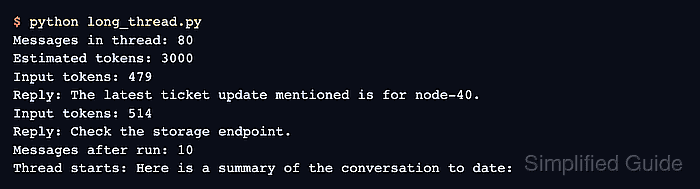
- Run long_thread.py again to confirm that the same thread now completes.
$ python long_thread.py
Messages in thread: 80
Estimated tokens: 3000
Input tokens: 479
Reply: The latest ticket update mentioned is for node-40.
Input tokens: 514
Reply: Check the storage endpoint.
Messages after run: 10
Thread starts: Here is a summary of the conversation to date:
The same 80-message thread now reaches the model at well under the 2,048-token limit, and the second turn stays there because the shorter thread was saved. The reply wording depends on the model. If the error returns and names a SummarizationMiddleware task, the summary request is too large, so lower trim_tokens_to_summarize. If it names the task model, the request that reached the model is still too large, so lower keep or trigger.