Streaming chat interfaces feel responsive because the first tokens appear while the model is still producing the rest of the answer. With LangChain, a Streamlit UI can consume a runnable's stream() iterator and render chunks inside the assistant message as they arrive.
This local app uses RunnableLambda to create deterministic chunks without an external model key, then passes chain.stream(prompt) into st.write_stream() inside a st.chat_message() container. After the UI path works, replace the demo runnable with a provider-backed chat model or chain that exposes the same streaming iterator.
The smoke test uses Streamlit app testing to submit a prompt and inspect the rendered chat messages without storing provider credentials. Keep real API keys in environment variables or a secrets manager, and keep the streamed iterator boundary unchanged when switching from the local demo stream to a hosted model.
Related: How to enable streaming in LangChain
Related: How to deploy a LangChain chatbot with FastAPI
Related: How to install LangChain with pip
Steps to build a streaming LangChain chatbot UI app:
- Open an activated Python project environment.
- Create the dependency file for LangChain and Streamlit.
langchain
streamlit
- Install the dependencies.
$ python -m pip install -r requirements.txt
Install the matching provider package, such as langchain-openai or langchain-anthropic, only when replacing the local demo stream with a real model.
Related: How to install LangChain with pip - Create the Streamlit app with a streaming LangChain runnable.
- app.py
import os
import time

import streamlit as st
from langchain_core.runnables import RunnableLambda


def stream_reply(question: str):
    delay = float(os.getenv("STREAM_DELAY_SECONDS", "0.03"))
    for word in f"LangChain streamed this response for: {question}".split():
        if delay:
            time.sleep(delay)
        yield word + " "


chain = RunnableLambda(stream_reply)

st.set_page_config(page_title="LangChain Streaming Chatbot")
st.title("LangChain Streaming Chatbot")

if "messages" not in st.session_state:
    st.session_state.messages = [
        {
            "role": "assistant",
            "content": "Ask a question to see a streamed LangChain response.",
        }
    ]

for message in st.session_state.messages:
    with st.chat_message(message["role"]):
        st.markdown(message["content"])

if prompt := st.chat_input("Ask about LangChain streaming"):
    st.session_state.messages.append({"role": "user", "content": prompt})
    with st.chat_message("user"):
        st.markdown(prompt)

    with st.chat_message("assistant"):
        response = st.write_stream(chain.stream(prompt))

    st.session_state.messages.append({"role": "assistant", "content": response})
st.write_stream() accepts a generator or stream-like object and renders string chunks with a typewriter effect. Keep chain.stream(prompt) as the handoff point when replacing stream_reply() with a real LangChain model or chain.
- Start the local Streamlit app.
$ python -m streamlit run app.py

You can now view your Streamlit app in your browser.

Local URL: http://localhost:8501
Network URL: http://192.0.2.10:8501
- Open the local URL and submit a test prompt in the chat input.
The assistant message should appear in the chat area word by word instead of waiting for the whole reply to finish.
- Create an automated smoke test for the stream and chat UI state.
- verify_app.py
import os

from langchain_core.runnables import RunnableLambda
from streamlit.testing.v1 import AppTest


os.environ["STREAM_DELAY_SECONDS"] = "0"


def stream_reply(question: str):
    for word in f"LangChain streamed this response for: {question}".split():
        yield word + " "


chain = RunnableLambda(stream_reply)
chunks = list(chain.stream("show token flow"))
assert len(chunks) > 4, chunks
assert "".join(chunks).strip() == "LangChain streamed this response for: show token flow"
print(f"chunk_count={len(chunks)}")
print("stream_text=" + "".join(chunks).strip())

app = AppTest.from_file("app.py")
app.run(timeout=10)
assert not app.exception, app.exception
app.chat_input[0].set_value("show token flow").run(timeout=10)
assert not app.exception, app.exception

messages = [
    block.markdown[0].value
    for block in app.chat_message
    if getattr(block, "markdown", None)
]
assert "show token flow" in messages, messages
assistant_reply = next(
    message
    for message in messages
    if "LangChain streamed this response for: show token flow" in message
)
print(f"chat_messages={len(messages)}")
print("assistant_reply=" + assistant_reply)
The test removes the artificial delay and checks both the LangChain stream chunks and the Streamlit chat message state.
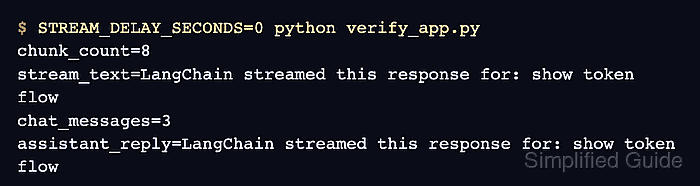
- Run the smoke test.
$ STREAM_DELAY_SECONDS=0 python verify_app.py
chunk_count=8
stream_text=LangChain streamed this response for: show token flow
chat_messages=3
assistant_reply=LangChain streamed this response for: show token flow

Mohd Shakir Zakaria is a cloud architect with deep roots in software development and open-source advocacy. Certified in AWS, Red Hat, VMware, ITIL, and Linux, he specializes in designing and managing robust cloud and on-premises infrastructures.


