Ingress failures in Kubernetes usually appear as an HTTP 404, HTTP 503, a TLS error, or a request that reaches the wrong backend even while the application Pods are running. Diagnosing the route means following the same path as the request, from the host and path rule to the IngressClass, controller, Service, EndpointSlice, and backend Pod labels.
The networking.k8s.io/v1 Ingress object stores routing intent, but an Ingress controller such as ingress-nginx must watch the matching class and translate the rule into proxy configuration. A rule can therefore look valid in YAML while traffic still fails because the controller is missing, the class name points to a different controller, or the backend Service selects no Pods.
A request with the target Host header is the main proof surface because it exercises the same hostname and path match that the controller sees. When public DNS is not ready, send the Host header to the controller address directly; for HTTPS failures, confirm that the TLS Secret named by the Ingress exists in the same namespace before chasing certificate errors.
Related: How to create a Kubernetes Ingress
Related: How to troubleshoot a Kubernetes Service
Steps to troubleshoot Kubernetes Ingress routing:
- Reproduce the failing request through the Ingress controller address.
$ curl --include --silent --show-error --header 'Host: app.example.test' http://127.0.0.1:8080/
HTTP/1.1 503 Service Temporarily Unavailable
Content-Type: text/html
##### snipped #####
<center><h1>503 Service Temporarily Unavailable</h1></center>
Replace 127.0.0.1:8080 with the controller load balancer, node address, or local port-forward target. Keep the Host header equal to the host in the Ingress rule.
- Inspect the Ingress rule, class, backend, and controller events.
$ kubectl describe ingress web --namespace demo
Name:             web
Namespace:        demo
Address:          10.96.94.211
Ingress Class:    nginx
Rules:
  Host              Path  Backends
  ----              ----  --------
  app.example.test
                    /   web:80 ()
Events:
  Type    Reason  Age                   From                      Message
  ----    ------  ----                  ----                      -------
  Normal  Sync    2m39s (x2 over 3m5s)  nginx-ingress-controller  Scheduled for sync
An empty backend detail such as web:80 () often means the controller accepted the rule but has no ready endpoint behind the referenced Service.
- Read the event rows for the Ingress object.
$ kubectl events --namespace demo --for ingress/web
LAST SEEN              TYPE     REASON   OBJECT        MESSAGE
2m39s (x2 over 3m5s)   Normal   Sync     Ingress/web   Scheduled for sync
- Confirm that the named IngressClass exists and points to the expected controller.
$ kubectl get ingressclass
NAME    CONTROLLER             PARAMETERS   AGE
nginx   k8s.io/ingress-nginx   <none>       3m56s
If the Ingress uses a different class name, either correct spec.ingressClassName or check the controller that owns that class.
- Check that the Ingress controller Pod is ready.
$ kubectl get pods --namespace ingress-nginx --selector app.kubernetes.io/component=controller
NAME                                        READY   STATUS    RESTARTS   AGE
ingress-nginx-controller-5d9bb85749-nl9j8   1/1     Running   0          3m56s
Use the controller namespace and labels from your installation when they differ from ingress-nginx.
- Inspect the backend Service selected by the Ingress rule.
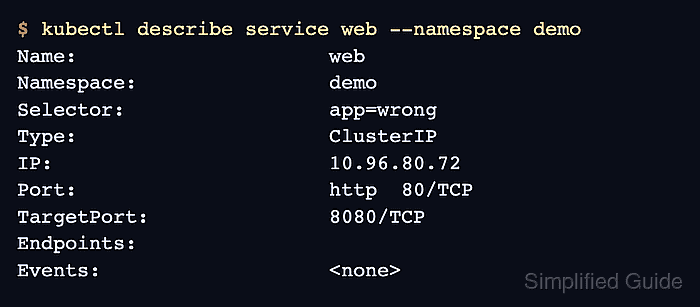
$ kubectl describe service web --namespace demo
Name:                     web
Namespace:                demo
Selector:                 app=wrong
Type:                     ClusterIP
IP:                       10.96.80.72
Port:                     http  80/TCP
TargetPort:               8080/TCP
Endpoints:
Events:                   <none>
A blank Endpoints value on the referenced Service makes the controller return a backend error even when the Ingress rule and controller are both present.
- Compare the backend Pod labels with the Service selector.
$ kubectl get pods --namespace demo --show-labels
NAME                   READY   STATUS    RESTARTS   AGE    LABELS
web-79665db5d6-7nwfl   1/1     Running   0          3m6s   app=web,pod-template-hash=79665db5d6
- Confirm that the EndpointSlice for the Service has no endpoint address.
$ kubectl get endpointslice --namespace demo --selector kubernetes.io/service-name=web
NAME        ADDRESSTYPE   PORTS     ENDPOINTS   AGE
web-jxcwv   IPv4          <unset>   <unset>     3m6s
EndpointSlice objects are what recent Kubernetes clusters use to publish selected backend addresses for a Service.
- Patch the Service selector to match the backend Pod label.
$ kubectl patch service web --namespace demo --type=merge --patch '{"spec":{"selector":{"app":"web"}}}'
service/web patched
Patch the live Service only when that selector is the intended fix. For Helm, Kustomize, or GitOps-managed clusters, make the same selector change in the source manifest so the next reconciliation does not revert it.
- Confirm that the EndpointSlice now contains a backend address and port.
$ kubectl get endpointslice --namespace demo --selector kubernetes.io/service-name=web
NAME        ADDRESSTYPE   PORTS   ENDPOINTS    AGE
web-jxcwv   IPv4          8080    10.244.0.8   3m8s
- Retest the same Ingress request.
$ curl --include --silent --show-error --header 'Host: app.example.test' http://127.0.0.1:8080/
HTTP/1.1 200 OK
Content-Type: text/plain; charset=utf-8
##### snipped #####
NOW: 2026-06-26 12:14:42.779631631 +0000 UTC m=+179.513327958
If the request still returns 404 or 503 after endpoints appear, compare the path, pathType, backend port, TLS Secret name, and controller logs before changing unrelated application Pods.

Mohd Shakir Zakaria is a cloud architect with deep roots in software development and open-source advocacy. Certified in AWS, Red Hat, VMware, ITIL, and Linux, he specializes in designing and managing robust cloud and on-premises infrastructures.


