Pretrained language models pair learned weights with a tokenizer that translates text into model inputs. KerasHub can load a supported Hugging Face Transformers checkpoint and its matching preprocessing assets for local inference.
The public DistilGPT2 repository uses the GPT-2 architecture and includes SafeTensors weights, vocabulary, and merge rules. KerasHub's GPT-2 loader converts those weights into a Keras model, while its attached preprocessor handles text input and generated text output.
An initial download needs internet access, but inference runs on the local machine. DistilGPT2 needs no Hugging Face account or token; other repositories can require license approval, and a checkpoint needs SafeTensors weights and a compatible KerasHub converter rather than merely being hosted on the Hub.
Steps to load a Hugging Face checkpoint with KerasHub:
- Install KerasHub and its Hugging Face loading dependencies in your Python 3.12 project environment on Linux.
$ python3 -m pip install --upgrade \
    keras-hub tensorflow huggingface-hub safetensors
Tested with KerasHub 0.33.0, Keras 3.15.1, TensorFlow 2.21.0, huggingface-hub 2.4.0, and safetensors 0.8.0 on Linux ARM64. Python 3.13 gives the same result. tensorflow-text has no Python 3.14 wheels, so on 3.14 pip falls back to an older KerasHub and loading the checkpoint fails with an ImportError.
Related: How to install Keras with pip - Start an interactive Python session in that environment.
$ python3
- Select the TensorFlow backend before importing KerasHub.
import os
os.environ["KERAS_BACKEND"] = "tensorflow"
import keras_hub
The backend is selected when Keras is imported. An existing session that already imported Keras needs a restart before changing this setting.
Related: How to set the Keras backend - Load the DistilGPT2 checkpoint through its Hugging Face handle.
model = keras_hub.models.GPT2CausalLM.from_preset(
    "hf://distilbert/distilgpt2"
)
A handle is hf:// plus the Hub repository ID, in the form hf://<owner>/<repository>. The first call downloads the model configuration, weights, and tokenizer assets into the Hugging Face cache. A warning about unauthenticated requests is harmless here because this public checkpoint needs no token. For another text-generation checkpoint, change the handle and use the generic CausalLM class, which selects the matching class. The repository must also list .safetensors weights among its files, or loading raises a FileNotFoundError. A ValueError saying KerasHub has no converter marks an unsupported architecture. KerasHub documents the checkpoint conversion mechanism.
- Confirm that the model includes the GPT-2 preprocessor and tokenizer.
print(type(model.preprocessor).__name__)
print(type(model.preprocessor.tokenizer).__name__)
- Output
GPT2CausalLMPreprocessor
GPT2Tokenizer
These components let the model accept text directly. Loading only a backbone does not supply this complete text-generation interface.
- Select greedy sampling for the generation call.
model.compile(sampler="greedy")
Greedy sampling selects the highest-scoring next token, so repeating the call returns the same text. Compiling here configures generation without training the model.
- Generate a continuation from the loaded checkpoint.
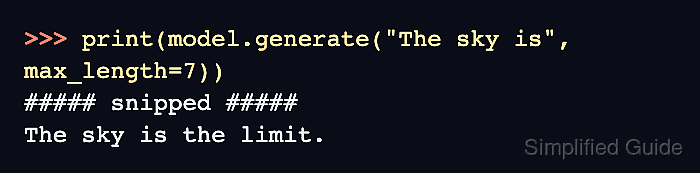
print(model.generate("The sky is", max_length=7))
- Output
##### snipped #####
The sky is the limit.
TensorFlow log lines about XLA can appear before the text on the first call and do not affect the result. The returned text starts with the prompt. The length limit counts the prompt and generated tokens together; the first call can take longer while TensorFlow builds the generation function.