A causal language model extends a prompt one token at a time, and KerasHub packages that generation path behind pretrained model presets. A small GPT-2 run can prove that the selected Keras 3 backend, preset assets, tokenizer, and generate() call work together before the code moves into a notebook, service, or batch job.
The gpt2_base_en preset supplies the model weights and matching preprocessing assets. Setting the preprocessor's sequence_length to 64 bounds the tokenized input, while max_length=40 limits the combined prompt-and-completion length for this CPU-oriented smoke test.
The TensorFlow backend must be selected before importing Keras, and the model uses greedy sampling for generation. Greedy sampling always chooses the highest-probability next token, so repeated runs follow one deterministic decoding path instead of producing a different sampled continuation.
Related: How to install Keras with pip
Related: How to set the Keras backend
Steps to generate text with KerasHub:
- Install KerasHub and TensorFlow in the active Python environment.
$ python -m pip install --upgrade --quiet keras-hub tensorflow
An isolated virtual environment, notebook kernel, or container keeps model dependencies separate. The first preset load also downloads model assets into the Keras/Kaggle cache for that environment.
- Create generate_kerashub_text.py with the initial TensorFlow configuration shown below.
- generate_kerashub_text.py
import os

os.environ["KERAS_BACKEND"] = "tensorflow"

import keras
import keras_hub


PRESET = "gpt2_base_en"
PROMPT = "KerasHub lets developers"
The KERAS_BACKEND value must be set before importing keras, keras_hub, or a project module that imports Keras. A later backend change does not convert existing Keras objects.
- Append the preset-loading block to generate_kerashub_text.py.
preprocessor = keras_hub.models.GPT2CausalLMPreprocessor.from_preset(
    PRESET,
    sequence_length=64,
)
model = keras_hub.models.GPT2CausalLM.from_preset(
    PRESET,
    preprocessor=preprocessor,
)
model.compile(sampler="greedy")
The attached preprocessor accepts a raw prompt string and applies the preset's tokenizer during generate().
- Append the generation call and result reporting to generate_kerashub_text.py.
completion = model.generate(PROMPT, max_length=40, strip_prompt=True)

print(f"backend: {keras.config.backend()}")
print(f"preset: {PRESET}")
print(f"prompt: {PROMPT}")
print(f"completion: {completion.strip()}")
The strip_prompt=True argument returns only newly generated text. Without it, downstream code receives the original prompt and continuation in one string.
- Review the completed generate_kerashub_text.py file before execution.
- generate_kerashub_text.py
import os

os.environ["KERAS_BACKEND"] = "tensorflow"

import keras
import keras_hub


PRESET = "gpt2_base_en"
PROMPT = "KerasHub lets developers"


preprocessor = keras_hub.models.GPT2CausalLMPreprocessor.from_preset(
    PRESET,
    sequence_length=64,
)
model = keras_hub.models.GPT2CausalLM.from_preset(
    PRESET,
    preprocessor=preprocessor,
)
model.compile(sampler="greedy")

completion = model.generate(PROMPT, max_length=40, strip_prompt=True)

print(f"backend: {keras.config.backend()}")
print(f"preset: {PRESET}")
print(f"prompt: {PROMPT}")
print(f"completion: {completion.strip()}")
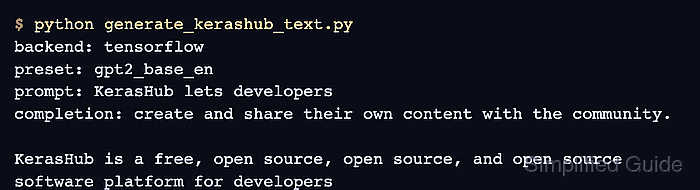
- Run generate_kerashub_text.py from its project environment. Illustrative output:
$ python generate_kerashub_text.py
backend: tensorflow
preset: gpt2_base_en
prompt: KerasHub lets developers
completion: create and share their own content with the community.

KerasHub is a free, open source, open source, and open source software platform for developers
The first run downloads about 475 MB of gpt2_base_en weights plus tokenizer and configuration files. Warnings or download progress can appear before the application output.
- Confirm the output reports tensorflow, gpt2_base_en, the exact prompt, and a nonempty completion.
The continuation reflects the pretrained model and may contain repetition or inaccurate statements; treat generation success as a runtime check, not as validation of the generated claims.

Mohd Shakir Zakaria is a cloud architect with deep roots in software development and open-source advocacy. Certified in AWS, Red Hat, VMware, ITIL, and Linux, he specializes in designing and managing robust cloud and on-premises infrastructures.


